






















Key Takeaways
- BI tools help small businesses understand profits, revenue opportunities, sales, and consumer behavior.
- Businesses must choose the right tool according to industry, existing challenges, data sources, and budget.
- The unified view of eCommerce, marketing, and sales data helps businesses use this actionable data to make informed decisions.
- Before choosing a BI tool, businesses must consider security, compliance, and scalability requirements.
The main concern for small businesses is budget and providing the right insights to clients. Often, using multiple software applications to manage requests, payments, requirements, and development is not enough. Scattered business data and manual reporting lead to unclear profitability.
Employees spend valuable time refining data to reflect changing customer behavior and comparing growth opportunities with competitor analysis. Business intelligence tools for small businesses solve these concerns by analyzing data and creating an appropriate structure.
However, selecting the right tool means businesses need to consider multiple factors such as pricing, integrations, data security, and AI features. This guide compares small business BI software to support informed decision-making.
U.S. Small Business Data and BI Adoption Statistics 2026-27
Before finalizing the BI tools for small businesses, we have conducted thorough research on the market trends and statistics. According to our findings from Market.us, 94% of U.S. businesses have adopted business intelligence tools due to their advanced data management capabilities.
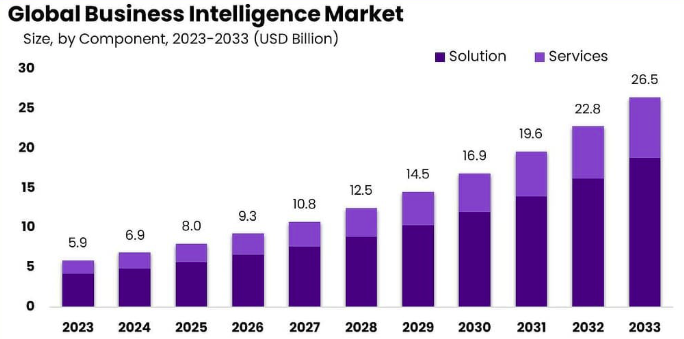
- The global business intelligence market size is expected to grow at a CAGR of 16.2% by 2033. This highlights that small businesses planning to invest in BI tools will gain greater benefits.
- Finance, retail, and ecommerce organizations are experiencing 19 times more profits by using BI tools. This data shows that businesses that do not have a BI tool must start using one.
- Over 30% of healthcare startups have adopted BI tools to manage medical data. This shows that business intelligence is used across industries to provide operational efficiency.
- Implementation of a BI solution results in a better return on investment, as its data management capabilities allow small businesses to manage sales and operational data easily.
- With the growing adoption of BI tools and advanced analytics, around 11 million jobs have been created for data scientists. Businesses require skilled professionals to manage platforms and professional data.
What Problem Will Business Intelligence Tools Solve?
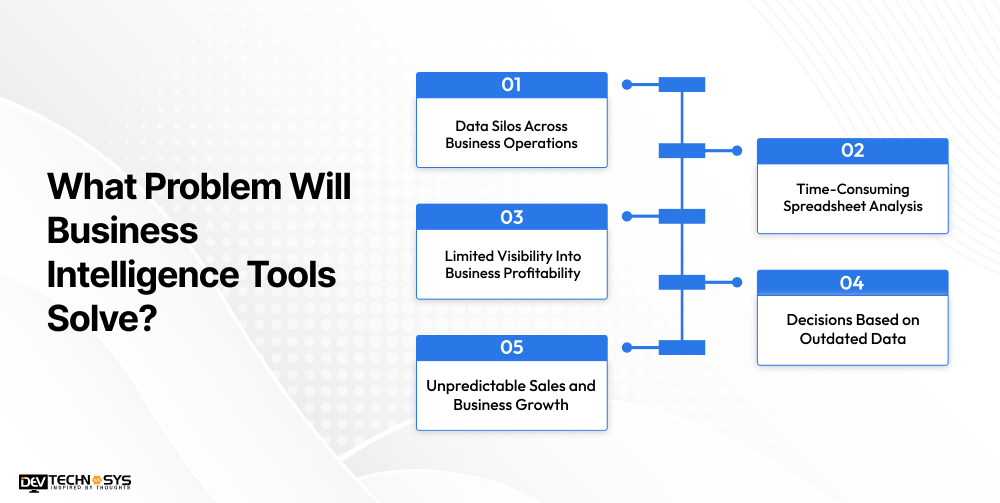
In a small business, data is spread across spreadsheets and different platforms, which is considered raw data. BI tools bring the information together and turn it into actionable insights.
1. Data Silos Across Business Operations
Small businesses often use separate software for handling business operations, which creates data silos. Teams struggle to gain proper insights due to the scattered data. For example, the sales team might not be generating leads while accounting software records the losses. BI tools centralize information in a dashboard, defining business activities, profits, losses, opportunities, and threats.
2. Time-Consuming Spreadsheet Analysis
Multiple spreadsheets create confusion between departments due to errors and inconsistent information. BI tools automate data collection for each team. Every department can check the data with a unified view to understand the insights.
3. Limited Visibility Into Business Profitability
In small businesses, accounting and operational software are not linked, which raises doubts in the minds of employees about which product or service needs to be targeted. Teams need to spend hours conducting meetings to get the correct information. BI tools combine the expenses and revenue data into understandable metrics to help businesses make informed decisions.
4. Decisions Based on Outdated Data
Data on the spreadsheet might be outdated when small businesses need to make a quick decision. This delayed information creates a challenge for business leaders to decide which campaigns to work on or how to manage inventory. BI dashboards, on the other hand, provide real-time information and alerts to teams about new updates.
5. Unpredictable Sales and Business Growth
Since small businesses do not have centralized information, most of their decisions are based on assumptions. This decreases overall business value because the information is incomplete and the analytical capabilities are limited. BI solutions support predictive analytics that help to estimate future demand and business risks.
Signs Your Business Needs a BI Tool
While it’s true that some small businesses may not need a BI tool immediately, there are still signs indicating that manual reporting is unsustainable. If any of these signs apply to your business, it might be the right moment to adopt business intelligence technology.
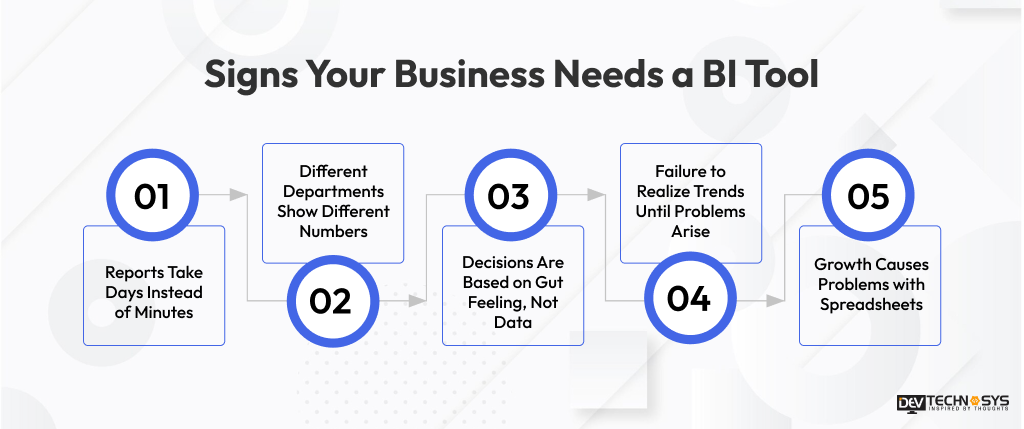
1. Reports Take Days Instead of Minutes
If it takes a couple of days of preparing spreadsheets to produce a simple sales or performance report, this precious time should have been spent on making a decision instead. BI solutions automate such processes and generate reports in real time.
2. Different Departments Show Different Numbers
If sales, marketing, and finance departments provide different numbers for the same metric, it usually means that the data exists in disparate systems. In this situation, there is never a single source of truth, which may lead to confusion at the management level.
3. Decisions Are Based on Gut Feeling, Not Data
If the team makes business decisions based on estimations instead of actual data, it’s a sign that the data is not trusted and isn’t available enough to guide daily operations. BI tools present relevant metrics and make them actionable.
4. Failure to Realize Trends until Problems Arise
When businesses do not have real-time dashboards, they only find out that they have fallen into a decline in sales, problems with their inventory, or elevated customer churn after it is too late. BI tools provide notifications and offer trends early on so that businesses can respond rather than merely reacting.
5. Growth Causes Problems with Spreadsheets
As a business grows and gains new customers, products, or locations, spreadsheets become dysfunctional. A business that used to work with spreadsheets to track data will eventually find that those spreadsheets no longer work. The formulas become complex, the files grow bigger, and errors become more common.
Top 12 Business Intelligence Tools for Small Businesses
The business intelligence tools list is curated based on analytics capabilities, pricing, usability, strengths, and limitations. This comparison helps small businesses choose a better BI tool to manage data.
BI Tool |
Best For |
Ease of Use |
AI Features |
Integrations |
Deployment |
Key Strength |
Main Limitation |
| Microsoft Power BI | Microsoft-centric SMBs | Moderate | Copilot, AI-powered insights, natural-language analytics | Microsoft 365, Azure, Excel, Dynamics 365, hundreds of connectors | Cloud, Desktop | Strong data modeling and Microsoft ecosystem integration | Advanced features can require higher-tier licensing |
| Zoho Analytics | Budget-conscious small businesses | Easy | Zia AI, natural-language queries, AI-assisted insights | Zoho apps, CRM, finance, Shopify, QuickBooks, Google, social platforms | Cloud, On-premise | Affordable self-service BI with broad business integrations | Advanced requirements may require higher plans |
| Tableau | Advanced data visualization | Moderate | Tableau AI, Tableau Agent, AI-assisted analytics | Databases, cloud platforms, Salesforce, spreadsheets, enterprise apps | Cloud, Desktop, Server | Powerful visualization and data exploration | Higher cost and learning curve for smaller teams |
| Looker Studio | Marketing and Google ecosystem reporting | Easy | Gemini-powered capabilities available in Google data ecosystem; advanced Pro capabilities | Google Analytics, Google Ads, BigQuery, Sheets, databases and partner connectors | Cloud | Free, browser-based dashboards and Google integrations | Advanced governance and enterprise BI require additional Google products |
| Qlik Cloud Analytics | Self-service and associative analytics | Moderate | Qlik AutoML, AI-assisted analytics and Insight Advisor capabilities | Databases, SaaS apps, files, cloud data sources and Qlik data integration | Cloud | Associative analytics and strong data exploration | Higher entry price than lightweight SMB tools |
| Domo | Business dashboards and governed analytics | Easy–Moderate | AI-powered analytics, natural-language interaction and AI agents | Databases, cloud apps, APIs and business systems | Cloud | Combines data integration, BI and governance in one platform | Public pricing is unavailable |
| Databox | KPI monitoring and performance dashboards | Easy | Databox AI for questions, insights and forecasting | Marketing, CRM, advertising, finance and other business data sources | Cloud | Simple KPI tracking and automated dashboards | Better suited to performance monitoring than complex enterprise BI |
| Sisense | Embedded analytics and product analytics | Moderate–Advanced | Sisense Intelligence, AI-powered analytics | Databases, APIs, cloud data sources and business applications | Cloud / Embedded | Strong embedded analytics and application integration | Pricing and enterprise capabilities require a sales engagement |
Key Features to Look for in BI Software
The priority of small businesses should be to reduce manual work and improve connectivity of multiple departments.
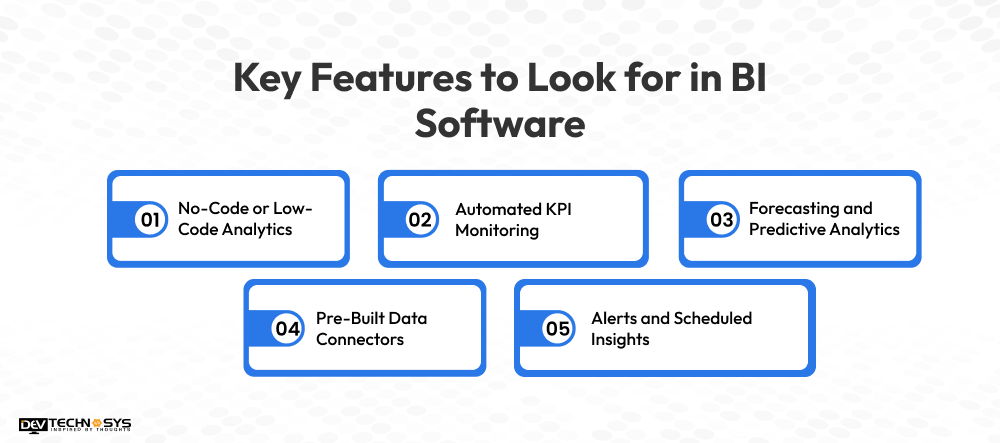
1. No-Code or Low-Code Analytics
This feature allows employees to manage data without technical knowledge. They can simply drag and drop the essential metrics for the dashboard. Multiple teams can use filters and add, delete, or review data for routine tasks.
2. Automated KPI Monitoring
Profits, conversion rate, and inventory are some of the important KPIs for small businesses that are automatically monitored by a BI Tool. The only thing is that users have to define these KPIs before starting work on such a platform.
3. Forecasting and Predictive Analytics
This BI software feature allows businesses to use historical data to understand trends and improve business operations. For example, if customer queries need to be responded to instantly or after business hours, then the business can plan to include an AI assistant in their existing software.
4. Pre-Built Data Connectors
Small businesses can avoid data duplication by using a BI tool. Pre-built connectors fetch data from CRM, spreadsheets, accounting software, or other systems and structure it in a single platform. This reduces employees’ manual effort when viewing sales, HRM, or other data.
5. Alerts and Scheduled Insights
Outdated or manual work procedures cause delays in work processes as employees miss specific tasks. The best feature of a BI tool is that employees receive alerts or notifications when a certain metric needs to be achieved. This helps employees work on priority tasks or manage recent changes in business operations.
Industry Insight
Small businesses must choose the right BI platform according to their existing operations and business systems. They must evaluate scalability, security, AI capabilities, and the total cost to maximize ROI. Starting with a focused KPI first and then expanding the business provides greater value to businesses.
How to Choose Between Free vs Paid BI Tools
Choosing between a free BI tool and a paid one depends on factors such as data complexity, team size, and long-term growth plans. Smaller companies usually start with a free tool and only upgrade when the limitations of the free version start to hinder the process of making decisions. Follow this guide to help you identify the best solution for your business:
When Is a Free BI Tool Enough?
Free tools, such as Google Looker Studio, perform well for small businesses that need easy reports and have few data sources, as well as metrics focused on marketing or sales.
If your team needs to monitor the number of visitors to your website, the impact of ads, or sales figures, a free tool can be the right solution for you. Nevertheless, it is important to keep in mind that free versions of BI tools generally have limited connectors, restrictions on the number of users, and no automation or AI functions, which may have negative consequences in the future.
When Should You Invest in a Paid BI Solution?
Paid systems like Power BI, Tableau, or Zoho Analytics may be a good investment for companies dealing with multiple data sources, needing enhanced security, or employing predictive analytics and alerts.
Companies that value real-time dashboards in various departments as well as those operating in heavily regulated industries, such as health services or finance, can largely benefit from paid options. The additional expense is typically justified when the hassle of preparing manual reports starts taking too much time.
Factor |
Free BI Tools |
Paid BI Tools |
| Cost | $0 | Typically $10–$40+ per user/month |
| Data Sources | Limited connectors (mostly Google ecosystem) | Wide range of connectors (CRM, ERP, databases, cloud apps) |
| User Seats | Restricted or single-user | Multiple users with role-based access |
| AI Features | Minimal or none | Advanced AI insights, predictive analytics, natural-language queries |
| Security & Compliance | Basic, limited compliance support | SOC 2, HIPAA, PCI DSS support available |
| Support | Community forums, limited documentation | Dedicated customer support, onboarding assistance |
| Best For | Early-stage validation, basic reporting | Growing teams, regulated industries, complex data needs |
BI Tools Comparison by Business Size, Industry Fit, and Technology Stack
Choosing a business intelligence tool depends on more than its features. U.S. small businesses should consider whether the platform fits their industry, current business size, and existing technology stack. The following comparison helps businesses identify which BI solution aligns best with their specific requirements.
1. Microsoft Power BI
Small businesses that need an analytics tool without taking an effort of building it from scratch can choose Microsoft Power BI. It can be integrated with Excel, Azure, and third-party data sources to provide information through an interactive dashboard.
Industry Fit
Healthcare, finance, manufacturing, retail, and eCommerce
Existing Technology Stack
Microsoft 365, Excel, Azure, or Dynamics 365
2. Tableau
Small businesses with complex data often find Tableau the best option for understanding data through charts and visual reports. Structured data helps businesses analyze bottlenecks and address them early.
Industry Fit
Retail, finance, marketing, and eCommerce
Existing Technology Stack
Multiple databases, cloud platforms, spreadsheets
3. Zoho Analytics
Small businesses that require AI-assisted analytics at the early stage of client management must choose Zoho. This a budget-friendly BI tool that can be accessed with less technical expertise.
Industry Fit
eCommerce, sales, marketing, professional services
Existing Technology Stack
Zoho CRM, Zoho Books, Zoho Projects
4. Google Looker Studio
Small businesses focused on sales and marketing should consider Google Looker Studio. It is helpful for managing data from Google-related data sources.
Industry Fit
Marketing, eCommerce, digital businesses, agencies, and sales teams
Existing Technology Stack
Google Analytics, Google Ads, Google Sheets, BigQuery, and other Google services
5. Databox
Smaller teams can easily access Databox for KPI monitoring. Its no-code features help businesses to work without BI specialists. It connects HRM, sales, accounting, and other departments to share the data in a unified dashboard.
Industry Fit
Marketing agencies, sales teams, eCommerce businesses
Existing Technology Stack
CRM, marketing, advertising, sales, and analytics platforms
6. Qlik Sense
Qlik Sense is a self-service analytics tool that helps businesses explore better opportunities through structured datasets. AI-powered insights and smart search features allow multiple users to access the data to streamline workflows.
Industry Fit
Retail, healthcare, finance, manufacturing, logistics
Existing Technology Stack
Databases, business applications, and multiple operational systems
7. Domo
Domo is best suited for industries such as healthcare, where the data is stored in the cloud. The tool provides quick access to the data to make effective business decisions. The centralized reporting helps business leaders gain the latest insights.
Industry Fit
Retail, healthcare, financial services, marketing
Existing Technology Stack
Cloud applications, databases, spreadsheets, and operational systems
8. Sisense
Businesses that are working on a fixed budget can choose Sisense to work with unified metrics without a dedicated data science team. The tool allows users to create charts, queries, and filters to sort the raw data.
Industry Fit
SaaS, technology, healthcare
Existing Technology Stack
APIs, databases, custom applications, and software products
9. Looker
Looker’s semantic modeling approach helps growing businesses work with structured data and advanced analytics. Small businesses may prefer Google Looker Studio over Looker because that tool provides better insights.
Industry Fit
eCommerce, SaaS, financial services, healthcare, marketing
Existing Technology Stack
Google Cloud, BigQuery, cloud databases
10. SAP Analytics Cloud
Small or growing businesses can choose SAP Analytics Cloud to manage operational and financial information. The information is synchronized into performance metrics for proper business planning.
Industry Fit
Manufacturing, retail, finance, supply chain
Existing Technology Stack
SAP ERP, SAP S/4HANA, and other SAP applications
11. Oracle Analytics Cloud
Small businesses with critical analytical requirements can choose Oracle Analytics Cloud to support effective decision-making. Predictive forecasting helps businesses follow market trends to gain a competitive edge.
Industry Fit
Finance, retail, healthcare, professional services
Existing Technology Stack
Oracle databases, Oracle Cloud, ERP systems
12. HubSpot Analytics & Reporting
Organizations that are focused on improving sales or providing professional services must choose the HubSpot Analytics & Reporting tool. This helps businesses to manage customer interactions with the advanced CRM system easily.
Industry Fit
IT services, manufacturing, Edtech, and finance
Existing Technology Stack
HubSpot CRM, Marketing Hub, Sales Hub, or Service Hub
Industry Insight
For small businesses, selection of analytical features is more important than a simple reporting tool. A centralized dashboard supports frequent business decisions as the data is available in a structured manner with better user access and features. Thus, businesses must choose a phased BI implementation considering future growth.
BI Security and Data Privacy for U.S. Small Businesses
Since business intelligence platforms contain sensitive business data, these platforms need to be built with regulatory compliance and security practices in mind. Implementing the required regulatory compliance guarantees that business leaders will make accurate decisions while protecting the data.
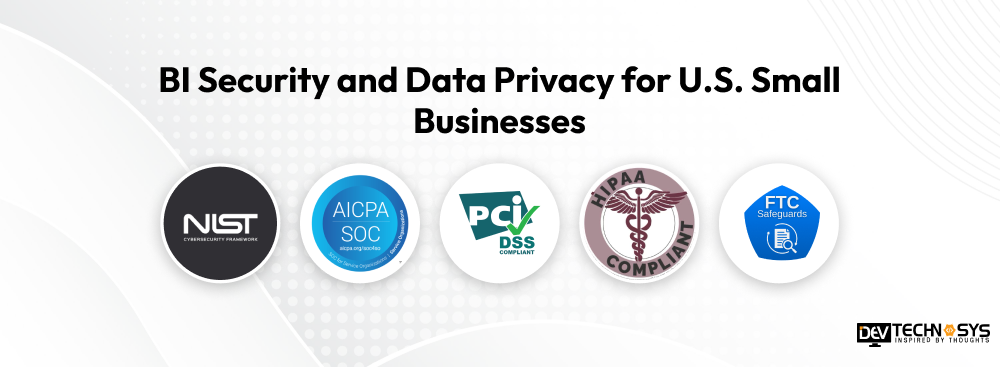
1. NIST Cybersecurity Framework 2.0
This framework helps identify vulnerability risks and protect BI data from potential fraud. Developers integrate this framework and create an incident response feature to analyze and resolve issues as early as possible. Small businesses might have to spend a considerable amount on implementing the framework with an experienced developer.
2. SOC 2
Small businesses that choose a cloud BI provider must choose SOC 2 for data confidentiality. This defines how the data is collected, stored, and processed for all users. SOC 2 evaluates and manages confidentiality, privacy, and security for cloud-based systems, ensuring that all user data is protected.
3. PCI DSS
Data engineers address the privacy of cardholders by protecting primary account numbers or sensitive authentication data. Tokenization is used alongside other practices to ensure that data is excluded from the analytical dashboards. Small business owners must consider implementing this compliance, as most customers prefer to use their credit/debit cards to make payments.
4. HIPAA
Healthcare-specific small business owners must use business intelligence tools that comply with HIPAA to provide access controls to authorized users only. BI Tools are usually linked with ePHI and other medical data systems, so data security is important. Compliance helps with risk analysis, access control, and safeguarding patient data. HIPAA might directly impact cost because experienced software engineers are needed for its implementation.
5. FTC Safeguards Rule
Small businesses that operate in the finance sector must comply with this rule to handle customers’ financial data. This compliance targets a high risk of unauthorized data exposure for all organizational activities. Data engineers deploy row-level security, MFA, and data encryption to restrict access to the data.
BI Tools Use Cases by Industry
From sales to customer interactions and providing actionable insights, BI tools help small business owners identify trends and make data-driven decisions. However, BI requirements might vary by industry. When choosing IT consulting services for small business it is important to consider the practical use cases.
1. Retail Industry
BI tools in the retail industry provide data in a single dashboard from which users can check inventory, customer queries, and manage business operations. Retailers can identify peak purchasing periods, trends, and ways to personalize services for customers. BI tools solve the limitations of optimizing inventory levels. Small businesses must partner with a CMMI Level 3 certified company to ensure the tool is implemented with compliance in mind.
2. eCommerce Industry
For small businesses, the challenge is to understand customer data to expand the business. BI platforms help small businesses understand changing customer behavior by connecting advertising platforms, CRM, e-commerce applications, and accounting systems. Future investments are easier to plan with clear insights. Businesses use these insights to identify profitable segments and also to determine which products are worth selling.
3. Healthcare Industry
Business intelligence in healthcare industry gathers data from multiple sources such as EHRs, patient reports, doctors’ notes, and business systems to provide clear insights. This helps small healthcare centers treat patients effectively. While it takes a lot of paperwork to manage patient files, medical staff can directly enter patients’ details to know their medical history. BI dashboards manage scheduling, billing, or cancellations. These can combine revenue, sales, and payment information to help understand the financial data. Lastly, integrating BI tools helps medical centers analyze patient volumes monthly or annually.
Conclusion
For small businesses, BI tools are not just a reporting platform but a way to connect data sources, understand trends, and support better decision-making. Modern platforms also support AI technologies, considering that organizations must partner with a business intelligence development company to build a scalable solution. The right choice depends on existing and future business goals along with the budget. However, businesses must start with an MVP that costs less to access the tool. Later, the platform can be upgraded to meet specific business requirements.
Planning a Mobile App?
Get a tailored development cost estimate in 3 simple steps — app basics, features, timeline, and your contact details.
- 3 quick steps
- 100% free
- Reply in 1 business day
2 Minutes Read
Frequently Asked Questions
Find answers to the most common questions related to this article.
The primary difference is that BI tools focus on improving internal business operations with centralized dashboards and reporting software. Data analytics software supports overall business growth by including statistical analysis, predictive modeling, and machine learning. For small businesses, choosing a BI tool is a better decision than switching to data analytics software.
If your business has multiple data channels and data sources, has expanded to multiple locations, has financial reporting concerns, and different departments cannot access the relevant information, using a BI tool can be helpful.
Businesses can choose a BI tool by evaluating access controls, business goals, data sources, and security concerns. Some businesses prefer to integrate a BI tool with the existing system, while others require a new one for managing operations.
Many BI platforms do not require human assistance or technical expertise to work. Most of these have drag-and-drop features followed by automated insights to analyze complex data. This saves administrative costs and reduces processing time.
If a business needs to integrate the existing system with a BI tool, it is possible by including AI capabilities, depending on the business model. For a finance-related business, predictive forecasting and natural-language queries will be the best features, while for a healthcare business, AI-assisted report creation will be suitable.
If you do not have a sufficient budget, prefer Looker Studio; for a growing business, Zoho Analytics is the best. Most businesses often use Power BI, which costs $14 per user per month. Any of these options will be the best for a small business.














