























In today’s world, businesses are increasingly moving their operations, data, and applications to the cloud. With unmatched flexibility, scalability, and cost effectiveness, we can now operate their businesses online; there are, however, security challenges/implications that cannot be ignored. Cyberattacks, data breaches, and compliance are becoming more sophisticated; sensitive business data is often exposed to risk because of this.
This is why cloud security is among the top priorities for businesses of all sizes. A cloud security program, when implemented thoughtfully and effectively, can protect your business data, providing your business, your customers, and partners with confidence and trust.
In this blog we will provide the top cloud security tips that every business should know in order to protect their cloud infrastructure, lessen risks to your business, and remain ahead of evolving cyber threats while moving into an increasingly connected world.
What is Cloud Security?
Cloud security entails a combination of established practices, technologies, and regulations that work together to support protecting data, applications, and infrastructure in the cloud.
Cloud security for business protects the confidentiality, integrity, and availability of your data from cyberthreats, breaches, and unauthorized use while ensuring you remain compliant with regulations and allow for secure business processes.
Cloud Security Tips Every Business Owner Should Know
We have created an amazing list of top cloud security tips which every business out there must know of. So are you ready to get your hands on that list right now? Let’s go!
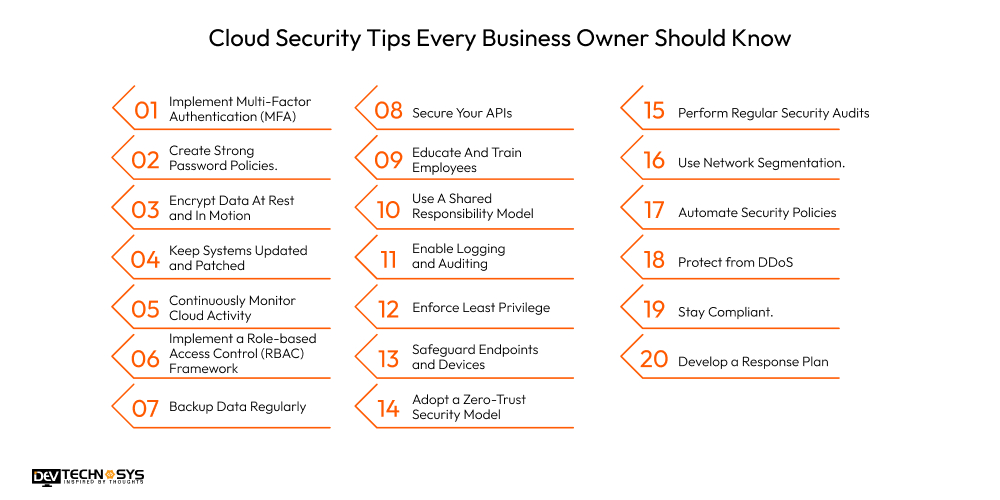
1. Implement Multi-Factor Authentication (MFA)
MFA provides another layer of protection beyond traditional passwords. If an attacker obtains your credentials, they still need another piece of information to get into the account, such as a code from the authenticator app, or a biometric factor in addition to the password. This significantly reduces the likelihood of unauthorized access and helps protect your sensitive data stored in the cloud.
2. Create Strong Password Policies.
Poor passwords are still among the most common ways accounts get breached. Enforce a password policy that requires uppercase and lowercase letters, numbers, and a symbol(s) in your password.
Don’t allow password reuse, promote the use of password managers, and send automatic reminders to your users to change their passwords periodically to keep their accounts secure on all cloud applications and services.
3. Encrypt Data At Rest and In Motion
Data encryption in the cloud is the best cloud security practices 2025 to ensure that even if an attacker is able to capture or steal your data, the information that gets stolen is not readable without the key to decrypt it.
Make use of end-to-end encryption, protect both data in transit and at rest, and consider customer-managed encryption keys to take control of data access and meet compliance requests for industry security standards and regulations.
4. Keep Systems Updated and Patched
Unpatched systems are prime targets for cyber criminals exploiting known vulnerabilities. Set up a patch management system to automatically perform updates on operating systems or applications in the cloud, as well as on databases.
In addition to operating system updates, routinely review the updates offered by vendors and apply them to help close off potential attack vectors and limit the risks of breaches and/or malware infiltrating the environment.
5. Continuously Monitor Cloud Activity
When you lack visibility, threats can go unnoticed until they have created destruction. Utilize cloud native monitoring tools and SIEM to proactively track logins and changes in files or directories or in network traffic.
Continuous monitoring is one of the excellent cloud security tips that allows for the anomalies to be disclosed early on and lowers the risks of insider threats and attacks. The faster you respond to anomalous behavior, the less impact it will have on business operations.
6. Implement a Role-based Access Control (RBAC) Framework
RBAC ensures that employees only have cloud access control to the data and applications that are necessary to perform their role.
“This controlled access limits the amount of damage done to the organization if an employee account is compromised and prevents disclosure of sensitive data by accident as employees become accustomed to working in a certain way.
Regularly review the user’s access levels and adjust as the user’s role or responsibilities change.”

7. Backup Data Regularly
Data loss arising from unintentional deletions, a security incident such as ransomware, or service disruptions can severely disrupt operations. Effectively pleading your case is made possible through the use of automated, encrypted backups that are stored in multiple locations or through multiple providers.
Be sure to test your backups regularly to ensure they can be restored quickly, thus improving upon your uptime and providing business continuity in the event of unexpected incidents occurring within your cloud environment.
8. Secure Your APIs
APIs are what provide access to your cloud service security, and these also need to be protected. To do this, you need to implement authentication, authorization, and input validation to help protect your APIs from attacks.
You also need to be regularly testing your APIs for vulnerabilities, deploying API gateways, and monitoring API traffic to aid in identifying abuse and deter data leaks or malicious breach attempts.
9. Educate And Train Employees
One of the biggest causes of cloud security incidents is human error. Have regular team training and provide proactive education on safety related to things like phishing, safe password practices, secure file sharing, and data management and handling roles.
A staff that is educated on these topics is better able to serve as the initial point of defense and the point person on your team for mitigating security risk.
10. Use A Shared Responsibility Model
Cloud security is a partnership between the provider and you. Be aware of what the provider secures (i.e., the infrastructure and the hardware), and what you must secure (i.e., the data, access, and apps).
Having a shared, clear view of respective responsibilities provides clarity that mitigates security gaps and protects all critical components of your environment from cyberattacks or unintentional misconfiguration.
11. Enable Logging and Auditing
Comprehensive logging is an important way to make sure you are aware of user activity, content changes, and system events. It is necessary to enable logging on all cloud services and to centralize access to logs.
Conducting periodic audits of logs will allow you to investigate any anomalies as they appear, to investigate incidents, or to show compliance with legal or regulatory requirements during an examination.
Want a chatbot demo or pricing? Fill the form and talk to our experts today.
Pick what you need below — you can select more than one — then tap Get detail to continue.
-
Chatbot demo dashboard
-
Cost to develop an app
-
Industry report
-
Case study
12. Enforce Least Privilege
Enforce least privilege is one of the most used cloud security tips that allow users only the access necessary to accomplish their work. Doing so will reduce the likelihood of insider threats, while minimizing the damage a compromised account can potentially facilitate. Periodically review user permissions, revoke them as necessary, and keep your cloud environment secure while also minimizing the attack surface.
13. Safeguard Endpoints and Devices
This cloud security tips does extend beyond just servers; employees’ devices are part of the cloud computing security ecosystem. Apply device compliance policies, use endpoint protection software, and enable encryption for laptops and mobile devices. Also, regularly scan for malware and vulnerabilities on devices to prevent a compromised endpoint from gaining access to your cloud environment.
14. Adopt a Zero-Trust Security Model
Traditional perimeter security alone is not enough to secure a cloud environment. A zero-trust security model assumes that no user or device is automatically trusted regardless if they are on your network or otherwise.
Continuously verify identity, enforce strict controls on user access and monitor user behavior at all times to ensure that you can provide secure access to cloud resources while simultaneously minimizing insider risk.
15. Perform Regular Security Audits
Conducting regular security audits helps identify latent weaknesses, misconfigurations, and exploitable vulnerabilities present in the security structure of your environment. Schedule internal security audits and consider using a third-party pen testing service to validate your security posture.
Making a habit of regularly auditing your security posture verifies that your security defenses are both current and ready to detect and respond to new, advancing cyber threats.

16. Use Network Segmentation.
Segmenting your network into smaller, isolated segments can help protect sensitive workloads. If an attacker compromises one of these segments, they will not be able to easily compromise your entire system.
For example, segmentation restricts lateral movement or “spreading,” restricting the ability for an attack to continue spreading through your organization before ultimately making it to your cloud infrastructure and cloud assets.
17. Automate Security Policies.
This cloud security tips management that relies solely on human intervention is vulnerable to human error. Use automation tools to enforce compliance, detect compromised workloads, and remediate misconfigurations in seconds.
Automation is one of the best cloud security tips that enhances efficiency and operational performance, increases consistency and detection rates, decreases response times, and eliminates human error in cloud cybersecurity operations.
18. Protect from DDoS.
Attacks like Distributed Denial-of-Service (DDoS) attacks are damaging to your cloud services. Use your cloud services provider’s DDoS protection services.
In addition, apply rate limits, and monitor and identify patterns of incoming requests and drop any malicious requests that could cause costly downtime and/or service interruptions.
19. Stay Compliant.
Legal non-compliance can lead to fines and legal action. For example, depending on your business, you should stay current on laws like GDPR, HIPAA, CCPA, and others.
Take advantage of compliance monitoring tools and document your procedures to show compliance with requirements for regulatory audits or customer security assessments.
20. Develop a Response Plan
Be prepared for security incidents with a response plan. Clearly define roles and responsibilities, identify communication methods, and outline procedures for detection, containment and recovery.
Tabletop cloud security tips exercises are great ways to test your preparedness and can subsequently mitigate the impact of a cyberattack in real life.
Top 7 Cloud Security Challenges and Remedies
The rate of cloud adoption is happening at an unheard of pace with varying degrees of risk to an organization’s security posture. Here are the top seven cloud security challenges with tangible remedies.
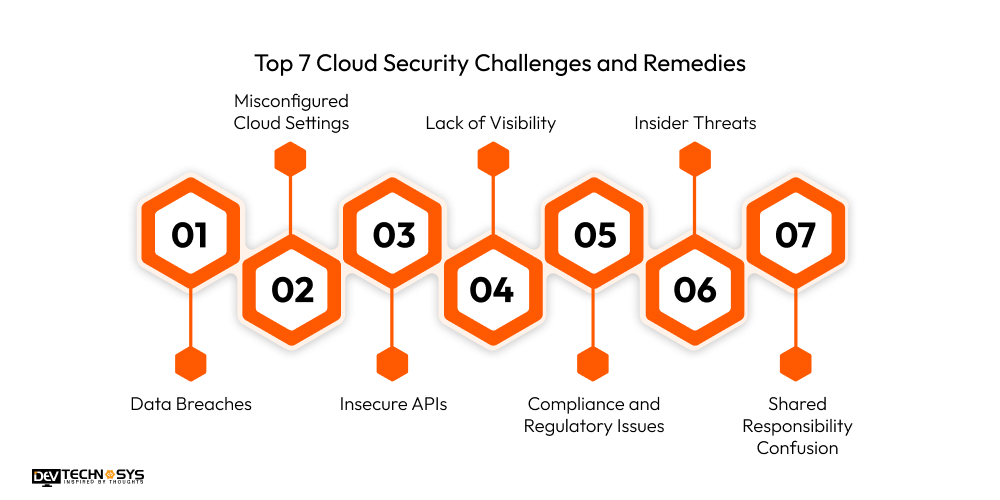
1. Data Breaches
Data breach is the number one concern in regards to cloud technology. Unauthorized use of sensitive data is a challenge for an organization.
Organizations should secure its data at all times via end-to-end encryption (decryption keys included if necessary). Organizations should hire web developers to implement multi-factored authentication (MFA), as well as, strict access control policies.
2. Misconfigured Cloud Settings
Cloud misconfiguration is a major vulnerability in cloud technology. Misconfiguration is often the result of an oversight and is very commonplace. Organizations should utilize automated configuration tools to help identify vulnerabilities.
Organizations should continue to conduct routine cloud security audits of their cloud configuration settings to ensure they comply with cloud security best practices.
3. Insecure APIs
API’s are the mechanism for cloud technology and can be exploited when they’re not secured. Secure coding practices should be in place in order to secure unidentified vulnerabilities that organizations have on its third party cloud technology. Seek API management and gateways when securing its API’s. Look to monitoring traffic to aid in refining its process of securing the API.
4. Lack of Visibility
Organizations may not detect any threat in real-time without effective supervision. To achieve comprehensive visibility into the activity, you should implement cloud monitoring tools and SIEM (Security Information and Event Management) systems.
5. Compliance and Regulatory Issues
Many industries endure strict regulations surrounding data. To avoid facing the consequences of penalties, use cloud compliance and security measures that adhere to GDPR, HIPAA, or ISO standards, and keep detailed audit logs.
6. Insider Threats
Employees who have excessive privileges may pose a risk. Use the principle of least privilege, conduct some background checks, and monitor user behavior for any unusual activity.
7. Shared Responsibility Confusion
Security responsibilities for cloud environments and your customers go hand in hand, yet many organizations misinterpret their portion of the security responsibility. Consider training your team on the shared responsibility model so they know what the organization must secure in its infrastructure.
6 Pillars of Multi-Cloud Security
As businesses begin adopting their multi-cloud strategies to leverage the best aspects of the various providers they use, securing their multi-cloud environments becomes vital. A thoughtful cloud storage security strategy can be applied using the six pillars listed below:
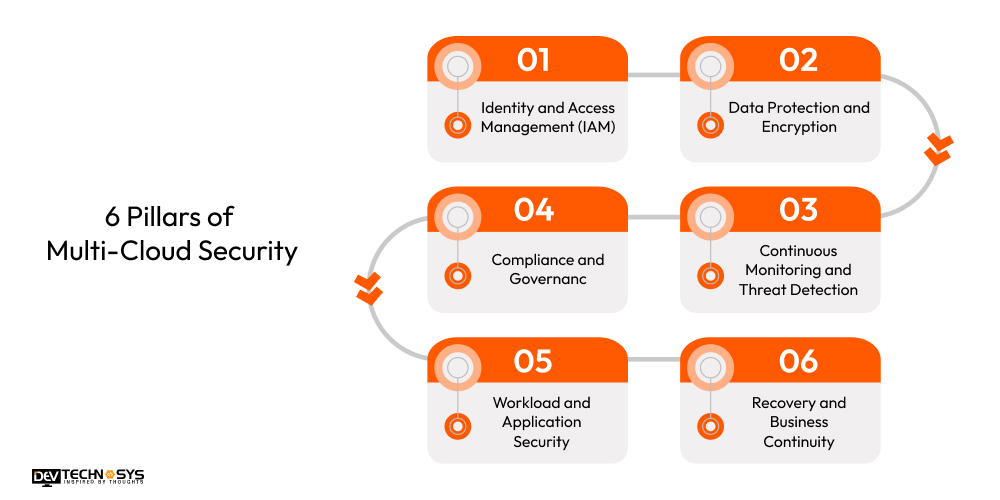
1. Identity and Access Management (IAM)
Centralized IAM enables only authorized users to access a cloud resource. You can implement multi-factor authentication (MFA), role-based access control (RBAC), and single sign-on (SSO) to simplify the authentication process for multiple clouds.
2. Data Protection and Encryption
Data must always be encrypted whether it is at rest, in transit, or in use. Always depend on provider-supported encryption keys or customer-managed keys (CMKs) for the highest level of sensitive information control across environments.
3. Continuous Monitoring and Threat Detection
Real-time visibility is essential in multi-cloud environments. It is important to deploy Security Information and Event Management (SIEM) tools with cloud-native monitoring solutions to observe when suspicious and possibly harmful activity is occurring while allowing for immediate responses.
4. Compliance and Governance
Each cloud provider may have other compliance provisions. You should institute a framework for unified governance and use compliance automation tools for adherence to compliance regulations such as GDPR, HIPAA, etc.
5. Workload and Application Security
Secure workloads through principles of zero trust, scanning for vulnerabilities, and securing applications with container security tools across the environments.
6. Recovery and Business Continuity:
An extensive disaster recovery plan is critical in any case. It is important to back up data across clouds regularly and test the failover plan periodically to reduce or eliminate downtime during an outage or attack.
Conclusion
Cloud security is no longer an option and is now only a business function. As companies have made leaps towards cloud impact or adopted more cloud applications and expanded cloud usage, the protection of confidential data or application usage and access must always be a priority.
Utilizing strong access protection, encryption, continuous monitoring, and training, company cloud environments can achieve improved risk management and compliance.
Proactive security measures not only protect against cyber threats but also build trust with customers and partners alike. Adopt these cloud security tips today to establish a safe, scalable, and future-ready digital ecosystem for your business.
FAQ
Q1. Why Is Cloud Security Important For Businesses?
Cloud security tips protects sensitive data, prevents cyberattacks, ensures regulatory compliance, and builds customer trust. In a strong security strategy, safeguarding business continuity while minimizing financial and reputational risks is important.
Q2. What Are Some Of The Biggest Cloud Security Threats Today?
Common threats include data breaches, misconfigurations, insecure APIs, insider threats, and compliance. Businesses need to address these risks with encryption, monitoring, and limits to access to safely protect data.
Q3. How Can Small Businesses Improve Cloud Security In A Cost-Effective Manner?
Small businesses can use security tools built in to their providers built-in and enable multifactor authentication, encrypt data, monitor activity, and educate employees on the cloud security best practices around security to keep their risk down without overspending.
Q4. How Much Of A Part Does Employee Training Play In Cloud Security?
Employee training is vital to prevent phishing, misconfigurations, and accidental data leaks. A trained team will always be the first line of defense against human error which results in the majority of security incidents.
Q5. How Often Should Businesses Review Cloud Security Policies?
Businesses should review cloud security policies quarterly or after major changes in infrastructure, compliance rules, or threats. Regular updates keep security controls relevant and effective against evolving risks.














