



















Are you bored of writing big code lines in HTML and CSS? If yes, then Bootstrap is the best tool to improvise the user interface. It has pre-installed libraries that allow developers to easily implement CSS code by using existing command lines in the HTML file.
To install Bootstrap, developers have options of multiple versions that are included in the documentation. This helps the developers’ community to easily find out the code links. So, let’s study this Bootstrap installation guide in detail.
What is Bootstrap?
A well-liked open-source front-end framework for creating mobile-first and responsive websites is called Bootstrap. Pre-built HTML, CSS, and JavaScript elements are included to assist developers in producing modern, consistent user interfaces more rapidly. Because of its ease of use, adaptability, and cross-browser compatibility, Bootstrap is extensively utilized.
- Speeds up development with ready-to-use components and grid systems.
- Ensures responsive design across all devices and screen sizes.
- Offers strong community support and extensive documentation.

Things Required Before Installation
To Install Bootstrap, ensure your development environment is properly set up. You’ll need basic tools like a code editor, a browser, and optionally a package manager for advanced Bootstrap setup.
- A Code Editor like VS Code can be downloaded from VisualStudio
- js and NPM used for package installation.
node -v
npm -v
- Install Bootstrap via NPM for project integration.
npm install bootstrap
Methods to Install Bootstrap
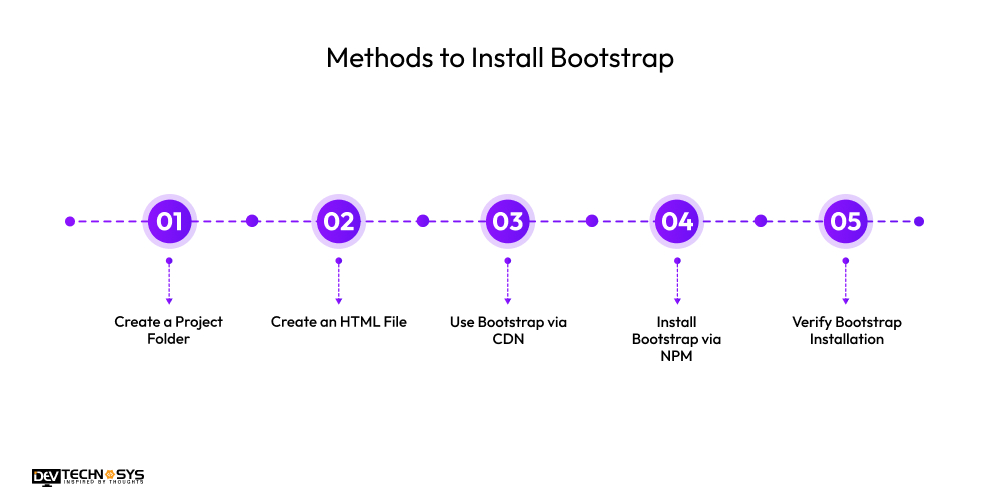
You can install Bootstrap step by step with a simple and easy process. Below are five easy steps to help you get started using Bootstrap in your web development:
1. Create a Project Folder
Start by creating a new folder to organize your project files. You can do this manually or with a Bootstrap setup using CDN.
mkdir my-bootstrap-project
cd my-bootstrap-project
2. Create an HTML File
Inside the project folder, create an HTML file to link Bootstrap. A developer must know Bootstrap CDN vs local installation process for main web page implementation.
touch index.html
3. Use Bootstrap via CDN
Add the Bootstrap CDN links to your index.html file. Paste the following inside the <head> and before </body> tags.
<!– Bootstrap CSS –>
<link href=”https://cdn.jsdelivr.net/npm/bootstrap@5.3.0/dist/css/bootstrap.min.css” rel=”stylesheet”>
<!– Bootstrap JS Bundle –>
<script src=”https://cdn.jsdelivr.net/npm/bootstrap@5.3.0/dist/js/bootstrap.bundle.min.js”></script>
4. Install Bootstrap via NPM
If you’re using a build tool or framework, install Bootstrap with npm. This is useful for React, Angular, or modular web apps.
npm init -y
npm install bootstrap
5. Verify Bootstrap Installation
You can add Bootstrap to HTML with a simple Bootstrap component like a button or textbox. Open the file in a browser to check if it’s styled properly.
<button class=”btn btn-primary”>Test Button</button>
Conclusion!!
As a Full Stack engineer, you must need Bootstrap to create various elements on a web page like navigation bar, buttons, or divisional blocks. This increases the development speed and provides quality by enhancing user engagement with experience.
Developers may go for Bootstrap 5 installation from the official website and link the code in the head section of the HTML file. This will give you the path to start with Bootstrap.
FAQs
1. Do I Need to Install Bootstrap for Web Development?
No, if you’re utilizing the CDN, you can link it in your HTML without installing anything. But installation is advised for offline use or greater control.
2. What is the Best Way to Install Bootstrap for Beginners?
With its speed and lack of setup requirements, the CDN is the ideal approach for novices. To begin using Bootstrap, simply copy the URLs to the CSS and JS into your HTML.
3. Can I Use Bootstrap with Frameworks Like React or Angular?
Yes, you may import Bootstrap into your framework project after installing it using Yarn or NPM. This makes it possible to integrate Webpack with Angular CLI more effectively.