



















Launching an astrology app on the iOS Store is an exciting step toward connecting users from around the world with astrology and cosmic insights from their iPhones. Whether your Vedic astrology app offers daily horoscopes, birth chart readings, or AI-powered astrological predictions, bringing them to Apple’s marketplace leads to a massive, loyal, and high-value audience.
But how to launch your astrology app on the iOS Store? The process of launching an astrology app takes more than just uploading it to the App Store. It requires technical setup, careful planning, and compliance with iOS app store requirements and guidelines. From preparing the Astrology app launch on iPhone to optimizing your App Store listing, every step is necessary for a smooth and successful launch.
In this Astrology app submission guide for Apple Store, we’ll walk you through the process of launching your astrology app on the iOS Store step by step, helping you turn your vision into a shining digital reality. Let’s begin!
Astrology App Market Stats
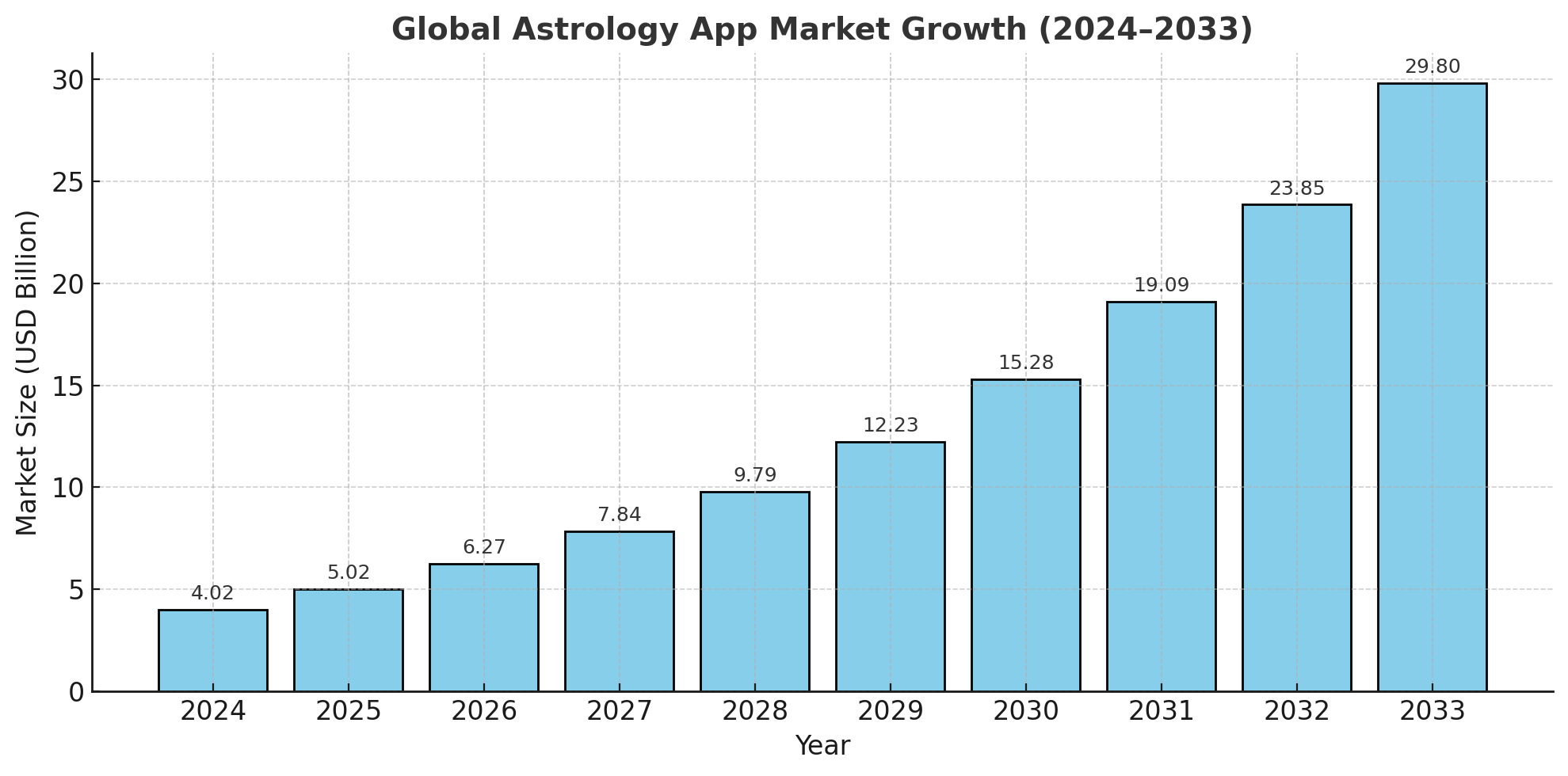
- The global astrology app market size was USD 4.02 billion in 2024, and the market is projected to touch USD 29.82 billion by 2033, at a CAGR of 24.93% during the forecast period from 2025 to 2033
- According to the U.S. National Telecommunications and Information Administration, astrology apps recorded over 15 million active monthly users in 2023, underscoring a significant rise in digital engagement.
- By type, the market is segmented into Western (tropical), Vedic and Chinese. The western (tropical) segment will dominate the market in the coming years.
Top 10 Astrology Apps to Consider in 2025
Before learning how to launch your astrology app on the iOS Store, let’s first see the top astrology apps making waves in the market. Here are the top astrology apps that you can explore in 2025.
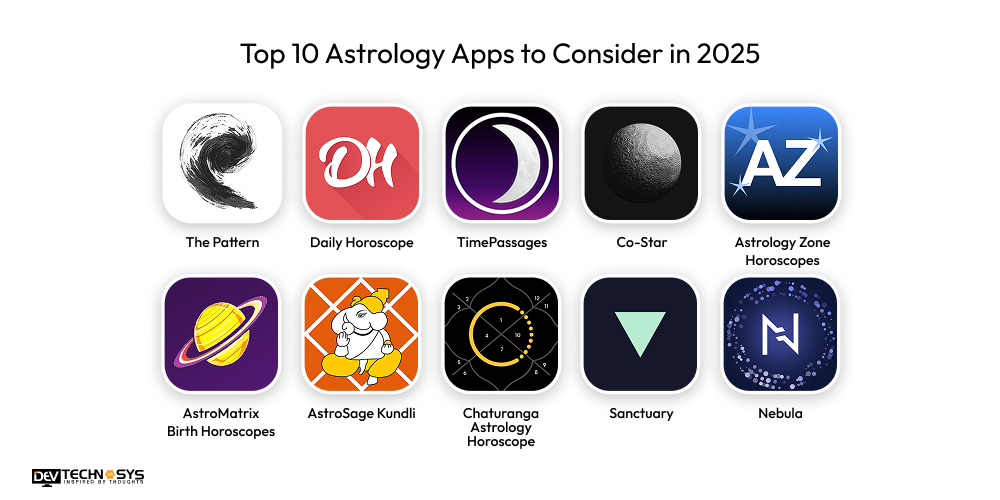
App Name |
Latest Rating |
Downloads |
Platform |
| The Pattern | 3.2/5 | 1M+ | iOS, Android |
| Daily Horoscope | 4.4/5 | 10M+ | iOS, Android |
| TimePassages | 4.8/5 | 1M+ | iOS, Android |
| Co-Star | 4.5/5 | 10M+ | iOS, Android |
| Astrology Zone Horoscopes | 4.7/5 | 850K+ | iOS, Android |
| AstroMatrix Birth Horoscopes | 4.6/5 | 1M+ | iOS, Android |
| AstroSage Kundli | 4.4/5 | 70M+ | iOS, Android |
| Chaturanga Astrology Horoscope | 4.5/5 | 500K+ | iOS, Android |
| Sanctuary | 4.5/5 | 500K+ | iOS, Android |
| Nebula | 4.6/5 | 10M+ | iOS, Android |
Tips to get Your Astrology App Approved On the iOS Store
Prior to explaining how to publish apps on the Apple Store, let’s see how to get your astrology app approved on the iOS Store. Below is the app store launch checklist or technical requirements to consider before submitting an astrology app on the iOS App Store:
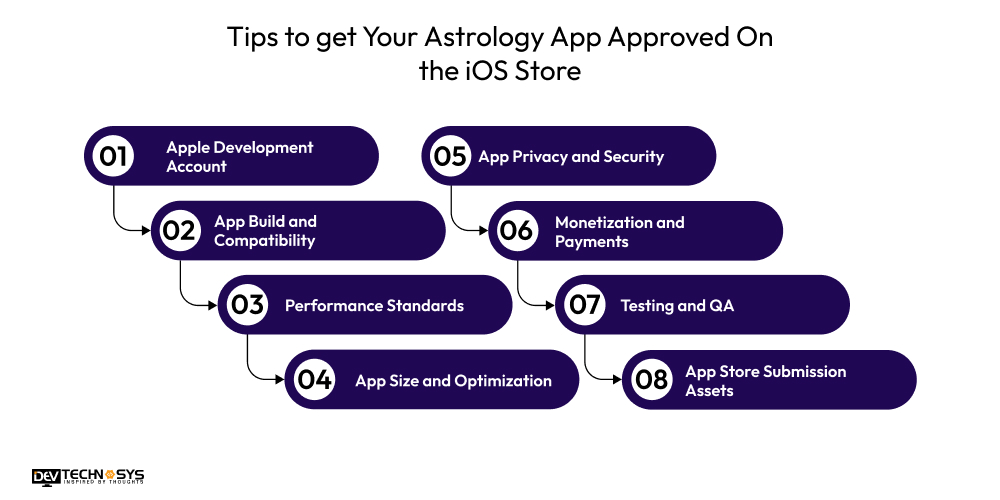
1. Apple Development Account:
The Apple developer account setup for iOS launch involves:
- Enroll in the Apple Developer Program.
- Ensure your account details match your business or individual profile.
- Use the correct bundle identifier for your app.
2. App Build and Compatibility
- Develop an app like Astrotalk using the latest Xcode version.
- Ensure compatibility with all supported iOS versions and devices (iPhone & iPad).
- Follow Apple Human Interface Guidelines for UI consistency.
3. Performance Standards
- Ensure fast load times and smooth navigation.
- Avoid crashes, freezes, or memory leaks.
- Optimize API calls for astrology calculations or data fetches.
4. App Size and Optimization
- Build a custom AI astrology app while keeping the size reasonable.
- Compress images, audio, and video assets.
- Use on-demand resources if offering large astrology charts or graphics.
5. App Privacy and Security
- Before you submit astrology app to iOS App Store, add privacy and security features to protect user data.
- Include a Privacy Policy link in your app and on the App Store listing.
- Secure user data, especially birth dates, location, and profile info.
- Use HTTPS for all data transmissions.
6. Monetization and Payments
- Use Apple’s in-app purchase (IAP) for subscriptions or premium features.
- Avoid external payment links that bypass IAP, as Apple may reject the app.
- Clearly explain free vs. premium content.
7. Testing and QA
- Choose an iPhone app development company with a skilled team of testers.
- The testing team will test your app on real devices, not just simulators.
- Check different device sizes and iOS versions.
- Verify all astrology calculations, notifications, and links work as expected.
8. App Store Submission Assets
- Provide a high-quality app icon (1024×1024 px).
- Add screenshots showing key features and UI.
- Write a compelling app description highlighting astrology features.
What Are The Steps To Launch Your Astrology App on the iOS Store?
Wondering how to launch your astrology app on the iOS Store? Well, here are the steps of launching your astrology app on the iOS App Store, with a focus on best practices and critical requirements for 2025:
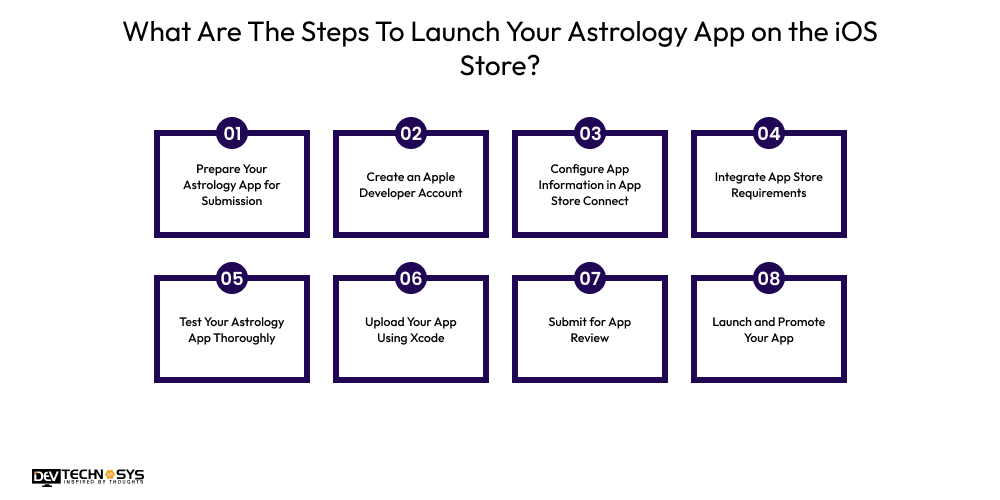
1. Prepare Your Astrology App for Submission
- The mobile app development process is different from the app submission & launch process. Ensure that your app remains stable, user-friendly, and offers original value in the crowded astrology niche.
- Before you deploy astrology app on Apple Store, validate that your app is stable, user-friendly, and offers original value in the crowded astrology niche.
- Prepare necessary assets like app icon (1024×1024 px, no transparency), at least 3–5 screenshots per device size, and an engaging app preview video (it is optional but highly recommended for conversion).
- Draft concise yet compelling metadata, including keywords for App Store search optimization.
2. Create an Apple Developer Account
- The next step to upload astrology app to iOS involves setting up two-factor authentication for extra security.
- Organizations should add relevant team members via App Store Connect and assign roles (developer, marketer, finance, etc.) for efficient collaboration.
3. Configure App Information in App Store Connect
- Fill out additional details: to submit astrology app to iOS App Store, full privacy policy text/URL (mandatory even for non-logged-in apps), copyright, and detailed contact information.
- Set localized versions for targeted countries/languages to maximize reach.
- Configure app ratings for explicit content, gambling, or interactive features.

4. Integrate App Store Requirements
- Implement user privacy options: hire mobile app developers who would add user privacy options. The app should request user consent for data tracking (App Tracking Transparency prompt) and clarify usage in your privacy policy.
- Enable Sign in with Apple if your astrology app requires account creation.
- Configure push notifications, in-app purchases, and subscriptions as needed using App Store Connect.
5. Test Your Astrology App Thoroughly
- Leverage TestFlight to distribute your app to up to 10,000 testers for real-world feedback.
- Verify all links (privacy, support, legal, terms), and test on all target devices (iPhone, iPad, etc.) and iOS versions for compatibility and UI integrity.
6. Upload Your App Using Xcode
- Use Xcode’s “Product > Archive” and “Distribute App” workflow; resolve any warnings or errors that appear.
- Before you publish astrology app on App Store, double-check that the bundle identifier and provisioning profiles match those set in App Store Connect.
7. Submit for App Review
- In App Store Connect, select the build, input release notes, and provide demo or test user credentials if the app is behind a login.
- Apple review usually takes 1–3 business days, though rejections may require fixes and resubmission.
- Respond swiftly to reviewer questions to avoid delays.
8. Launch and Promote Your App
- Choose between a manual or a scheduled app release.
- After launch, use App Store analytics to monitor retention, conversion, and user feedback.
- Capitalize on launch with social media campaigns, influencer collaborations, email marketing, and press releases relevant to the astrology, lifestyle, and app review communities.
What to Do if Your Astrology App Gets Rejected?
Now that we learned how to launch your astrology app on the iOS Store, let’s move on and learn what you need to do in case your Astrology app gets rejected:
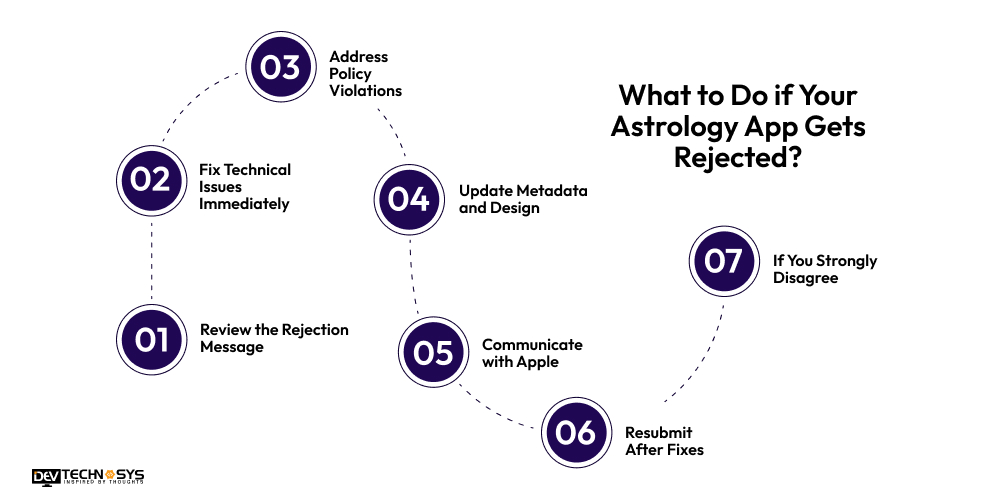
1. Review the Rejection Message
- In this Astrology app submission guide for Apple Store, we will also explain what you should do in case your best astrology apps get rejected. First, don’t panic, and carefully review the rejection message
- Check app store connect’s “Resolution Center” for Apple’s rejection notice.
- Identify whether it’s a technical, policy, design, or content-related issue. Apple typically cites the violated guideline and may provide screenshots or details to assist.
2. Fix Technical Issues Immediately
- Experts from your mobile app development company will address crashes, bugs, poor performance, or unsupported device compatibility.
- Test thoroughly with Xcode and TestFlight across all devices and iOS versions to ensure stability.
3. Address Policy Violations
- If the issue is misleading claims (fortune-telling, medical predictions), reframe astrology content as entertainment or lifestyle, not guarantees.
- Correct issues around privacy: include a Privacy Policy URL, comply with App Tracking Transparency (ATT), and secure proper user consent.
- Fix payment integration so all purchases utilize Apple’s In-App Purchases, remove external gateways, and clarify subscription terms.
4. Update Metadata and Design
- Rework app name, description, and screenshots to match actual app features—avoid keyword stuffing or unrealistic claims.
- Designers from an Android app development company should update UI to meet Apple’s Human Interface Guidelines (HIG), ensure design is clean, readable on all screen sizes, and original.
5. Communicate with Apple
- If the rejection isn’t clear, initiate a dialogue with the App Review team via App Store Connect. Provide clarifications, explanations, or request more information.
6. Resubmit After Fixes
- Submit the updated build for review, making sure all issues cited earlier have been resolved.
- Monitor review communications and quickly address any additional feedback that may arise.
7. If You Strongly Disagree
- Use the App Review Board’s formal appeal process if you believe the rejection is unwarranted. Clearly detail your case and any supporting evidence showing compliance or originality.
- Gather supporting documentation and, if appropriate, leverage developer forums to seek advice.
Best Practices to Get Faster Approval for Your Astrology App
To get faster approval for an astrology app on the iOS Store, follow the listed practices to align with Apple’s standards and streamline the review process. Below are the best practices to consider for launching your astrology app on iOS Store:
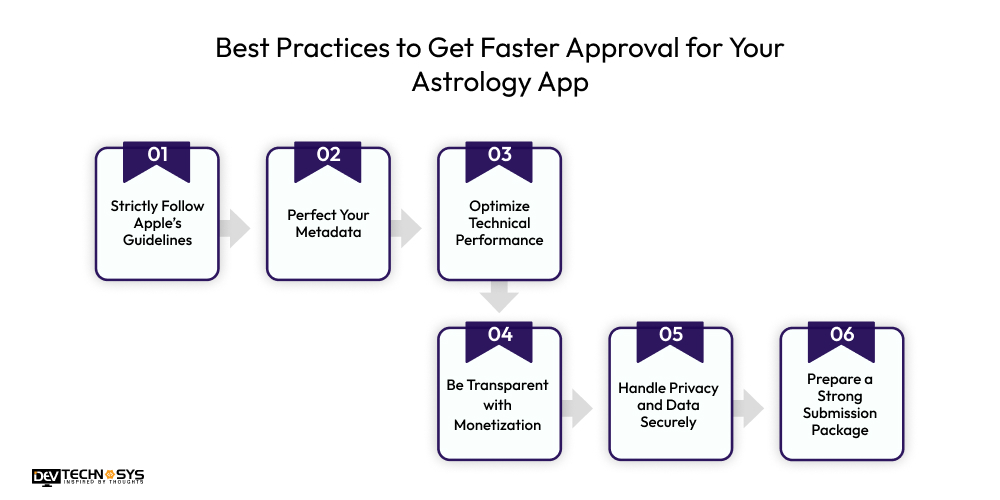
1. Strictly Follow Apple’s Guidelines
After you build and launch astrology app for iOS, prepare a strategic launch. Ensure your astrology app fully complies with Apple’s App Store Review Guidelines.
The iOS astrology app launch process involves avoiding unverifiable claims, following UI/UX best practices, and maintaining high performance and accessibility standards throughout the app.
2. Perfect Your Metadata
Write accurate titles, descriptions, and keyword sets that reflect your app’s real functionality. For the Astrology app launch on iPhone, use clear screenshots, engaging previews, and correct categories to help Apple reviewers easily understand your Co-Star App alternative.
3. Optimize Technical Performance
Focus on fast loading speeds, smooth animations, and error-free astrology calculations. Test your app across multiple iOS devices and iOS versions to guarantee consistent performance and user satisfaction.
4. Be Transparent with Monetization
App Store launch checklist includes clearly outlining all subscription plans, in-app purchases, and premium content. Use Apple’s approved payment system, and avoid third-party payment gateways that violate the App Store’s monetization policies.
5. Handle Privacy and Data Securely
All the top astrology app development companies know how crucial it is to secure users’ personal data. Protect user data like birth dates and locations using end-to-end encryption, include a transparent privacy policy, and obtain consent before collecting or sharing any personal astrological information.
6. Prepare a Strong Submission Package
Include all necessary assets, app icon, screenshots, support links, and a clear demo account. Write concise reviewer notes explaining your app’s features to speed up Apple’s review process.
Conclusion
The above blog discusses how to launch your astrology app on the iOS Store. We hope it will help clear any doubts you may have regarding how to publish apps on Apple Store. With the proper preparation and attention to detail, your astrology app can stand out in the App Store and reach a global audience of astrology enthusiasts. If you are a business looking for an astrology & horoscope app development company, contact Dev Technosys. Our experts ensure a seamless launch process, helping your astrology app reach users quickly and successfully.
FAQs
Q.1 What Post-Launch Strategies Are Used to Ensure a Seamless iOS App Launch?
Post-launch success depends on monitoring app analytics, user feedback, and crash reports. Continuous updates, timely bug fixes, and performance optimization ensure smooth functioning and improved user experience.
Q.2 What Are the Best Vedic Astrology Apps for Beginners?
Top beginner-friendly Vedic astrology apps include AstroSage Kundli, AstroMatrix, and Chaturanga Astrology Horoscope, offering easy interpretations, personalized charts, and simplified predictions for new users.
Q.3 How Long Does It Take to Get an Astrology App Approved on the iOS Store?
App review usually takes 24 to 48 hours, but can extend to a week if issues arise. Ensuring guideline compliance and providing complete metadata helps speed up approval.
Q.4 What Are the Common Reasons Astrology Apps Get Rejected?
Common rejection causes include misleading claims, technical glitches, poor UI, or privacy violations. Ensure accuracy, compliance with Apple policies, and user data protection to prevent rejections.
Q.5 How Can I Monetize My Astrology App on iOS?
You can monetize via in-app purchases, subscriptions, premium reports, or ad placements. Always use Apple’s in-app purchase system for compliance and transparent user transactions.
Q.6 What Features Should an Astrology App Include for Better Engagement?
Key features include daily horoscopes, birth charts, compatibility analysis, AI predictions, live consultations, and push notifications for user engagement and retention.