




Key takeaways:
-
-
- AI workflows can connect multiple systems, including websites, forms, CRMs, communication platforms, APIs, databases, and analytics tools.
- AI can trigger follow-up actions such as tasks, notifications, emails, appointment requests, or other approved workflows.
- A simple AI Workflow can cost $1,500, depending on business size.
- AI workflow is the best to use by US businesses to simplify workflows.
-
If you are wondering whether an AI workflow can only help you generate leads or support sales operations, then forget this myth. It helps with all kinds of workflows. For example, in the healthcare industry, the workflow will be:
Patient request → AI collects information → Updates record → Alerts staff
Medical staff can then take relevant actions.
Another example is an ecommerce business, for which the workflow will be:
Customer order → AI checks status → Updates customer → Escalates delivery issue
Why U.S. Businesses Require AI Workflow Services?
Businesses need to answer customer queries, manage orders, ensure logistics operations run smoothly, handle larger workflows, support AI lead follow-up, and maintain consistency in business operations. As technology advances, businesses are using it to simplify operations.
A workflow helps businesses work more in less time and with a limited workforce. This also increases profits. Therefore, to build an AI agent, businesses must confirm the workflow they require with the project team.
Planning to Build an AI Development Project?
Get a quick cost estimate based on your AI features, integrations, and development scope.
- 3 Quick Steps
- 100% FREE
- Hear Back Within 1 Business Day
2 Minutes Read
What You Will Further Find in This Blog:
- What Types of Queries Can a Customer Ask?
- How Does AI Understand the Customer’s Query?
- What Information Does AI Extract From the Query?
- What Decision Does AI Make Based on the Information?
- What Does AI Do in the CRM?
- How Is the Next Action Triggered?
What Types of Customer Queries Can an AI Workflow Handle?
First, customers never interact in a structured format. They will simply ask the query according to the phrases they feel right. In the US market, these interactions could be received from email, messaging, contact forms, social media, or a messaging application.
For example, a question may be: “We are a US-based healthcare company looking for an AI customer support solution. Can you tell us the estimated development cost and implementation timeline?” While another customer will be concise and direct: “What is the cost of AI Development?”
Now, an AI workflow will process these different types of queries according to intent and context. It will extract relevant information and provide actionable steps for an AI automation.
Query: We are a US-based healthcare company looking for an AI customer support solution. Can you tell us the estimated development cost and implementation timeline?
AI Workflow:
Customer Query
↓
AI Understands Intent – Identifies this as an AI development enquiry from a healthcare business
↓
AI Extracts Information – Industry: Healthcare | Location: USA | Requirement: AI customer support | Questions: Cost + Timeline
↓
AI Evaluates the Request – Determines that the customer has a specific business requirement and may need a detailed consultation
↓
CRM Record Created/Updated – Saves company requirements, industry, location, enquiry details, and contact information
↓
Action Triggered – Sends an initial response with relevant information and creates a sales follow-up or consultation task
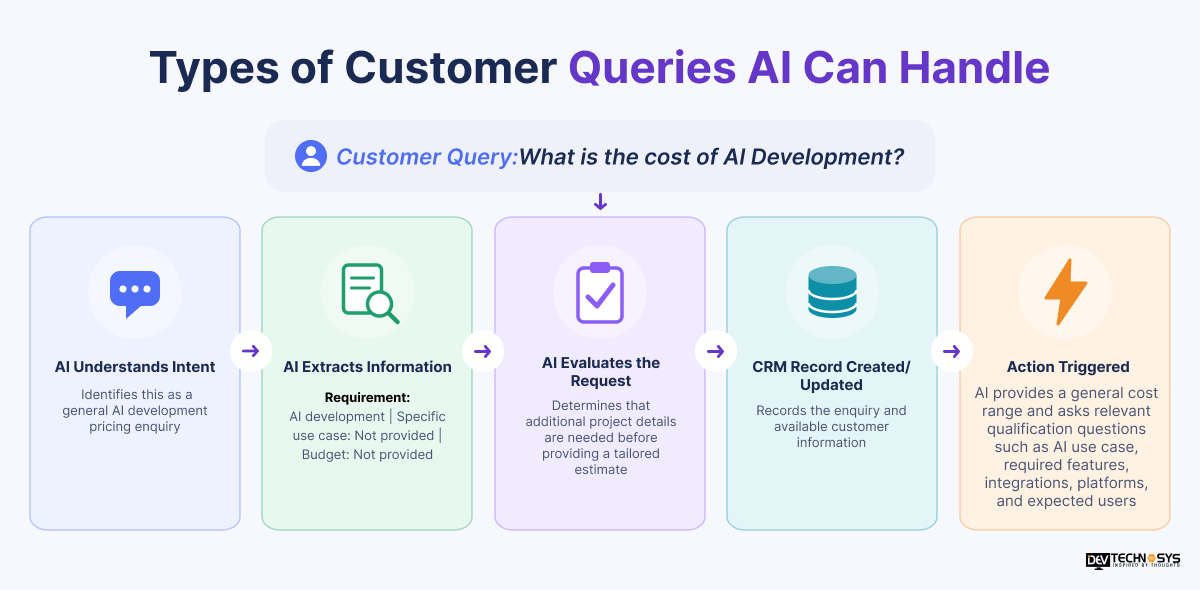
Query: What is the cost of AI Development?
AI Workflow:
Customer Query
↓
AI Understands Intent – Identifies this as a general AI development pricing enquiry
↓
AI Extracts Information – Requirement: AI development | Specific use case: Not provided | Budget: Not provided
↓
AI Evaluates the Request – Determines that additional project details are needed before providing a tailored estimate
↓
CRM Record Created/Updated – Records the enquiry and available customer information
↓
Action Triggered – AI provides a general cost range and asks relevant qualification questions such as AI use case, required features, integrations, platforms, and expected users
Example customer queries by industry:
Industry |
Example Customer Queries |
What AI Can Identify |
| Healthcare | “Can your platform integrate with our EHR?” / “What would it cost to build an AI patient support system?” | Healthcare requirement, integration needs, project type, urgency |
| Real Estate | “I want to schedule a property viewing.” / “Do you have properties under $500,000 in Texas?” | Property requirement, location, budget, viewing intent |
| E-commerce | “Where is my order?” / “Can I return this product?” / “Do you have this item in stock?” | Order intent, customer issue, product, order status |
| SaaS & Technology | “Can your software integrate with Salesforce?” / “I need a demo for 50 users.” | Product interest, integration requirement, company size, demo intent |
| Financial Services | “What documents do I need to open an account?” / “Why was my transaction declined?” | Service request, account issue, transaction-related intent |
| Insurance | “I need a quote for commercial insurance.” / “How do I file a claim?” | Quote request, policy type, claim intent, customer details |
| Automotive | “Can I schedule a service appointment?” / “I want to finance a new vehicle.” | Service requirement, vehicle interest, appointment or financing intent |
| Travel & Hospitality | “Do you have rooms available next weekend?” / “Can I change my reservation?” | Booking intent, dates, reservation details, change request |
| Education | “What are the admission requirements?” / “Can I schedule a consultation?” | Course/program interest, eligibility question, consultation intent |
| Logistics | “Where is my shipment?” / “I need a quote for shipping 500 units.” | Tracking request, shipment details, quote requirement |
| Manufacturing | “Can you provide pricing for 1,000 units?” / “Do you support custom manufacturing?” | Product requirement, order volume, customization, purchasing intent |
| Legal Services | “I need a consultation about a business contract.” / “How much does an initial consultation cost?” | Service category, consultation request, potential client information |
| Restaurants & Food Services | “Can I reserve a table for six?” / “Do you offer catering for corporate events?” | Reservation intent, party size, event requirement |

How Does AI Understand the Customer’s Query?
AI workflow converts the information into entities, intent, and requirements to provide the next step to a user. For example, the solution will interpret this query as AI customer support rather than a generic question. Let’s quickly understand in 6 steps.
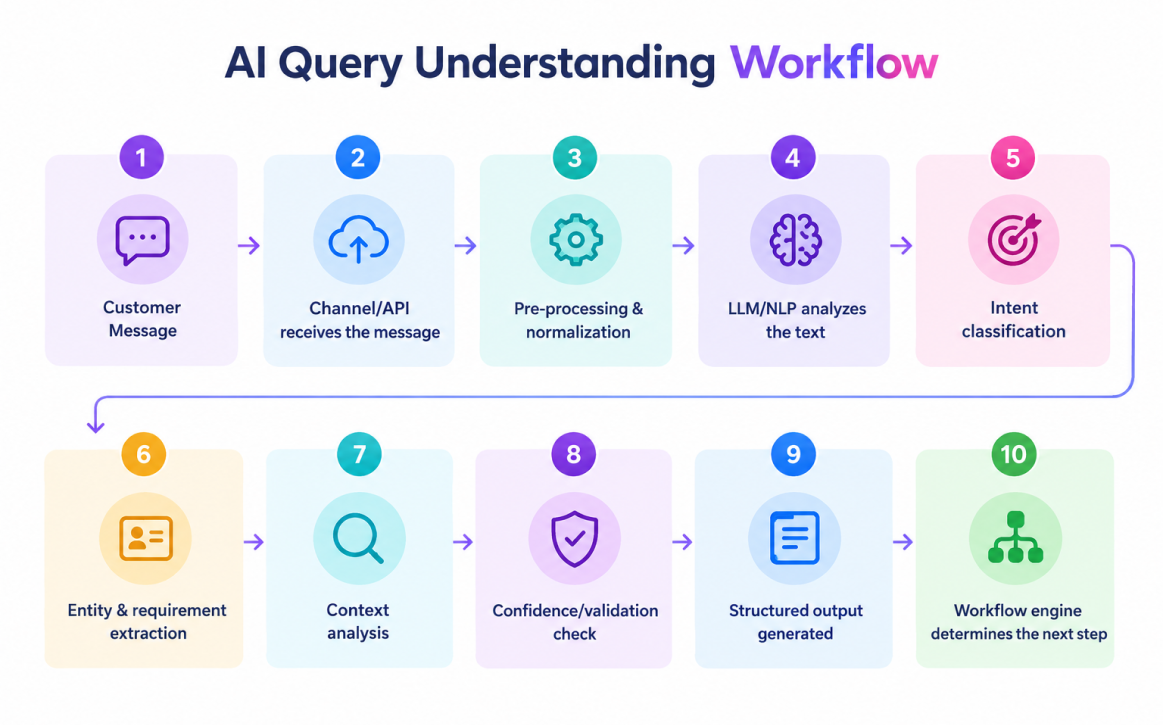
Step 1: Message Ingestion
When a user shares input, APIs, webhooks, communication platforms, or middleware pass it to the AI workflow. If the input is voice, then there will be an additional stage for ‘speech-to-text’ conversion.
Step 2: Pre-Processing
The data is normalized before it reaches an AI model. This may include language detection, conversation identification, masking sensitive information, context retrieval from CRM, and then preparing a structured input for the AI model.
Step 3: Intent Classification
Classification is performed according to the query. If it is “What is the cost of AI development?” then the intent will be AI development pricing inquiry. The classification will be performed using an LLM, a traditional NLP classifier, or a combination of AI models and business rules.
Step 4: Entity and Requirement Extraction
The intent is converted to a JSON extraction or a machine-readable format before it passes to the workflow engine.
{
“industry”: “Healthcare”,
“location”: “USA”,
“requirement”: “AI customer support”,
“pricing_requested”: true,
“timeline_requested”: true,
“intent”: “AI development enquiry”
}
Step 5: Context Analysis
AI might also infer context from the user’s previous interactions with the agent or from a keyword-based system. Both are important for providing an accurate response. AI in enterprise product development require context analysis to provide relevance in regular business operations.
Step 6: Confidence and Validation
AI workflow applies business rules, data validation, human validation, and escalation conditions. This prevents an AI system from making an inappropriate CRM update. An AI-powered workflow is different from traditional automation, as the latter relies on predefined rules, has limited contextual understanding, and works with fixed classifications.
What Information Does AI Extract From the Query?
The user’s message is converted into structured data so that the information can be processed by CRM, helpdesk, or other business systems. Let’s take this example: We are a US-based healthcare company looking for an AI customer support solution. Can you tell us the estimated development cost and implementation timeline?
The extracted information will be:
Information |
Extracted Value |
| Industry | Healthcare |
| Location | USA |
| Requirement | AI customer support solution |
| Intent | AI development/service enquiry |
| Use Case | Customer support |
| Information Requested | Development cost + implementation timeline |
| Project Timeline | Not provided |
| Budget | Not provided |
| Lead Priority | Determined using configured qualification criteria |
| Contact Information | Name, email, phone, if provided |
| Company Information | Company name, size, or other details, if provided |
If any information is missing, AI will ask follow-up questions to collect the missing data.
Free App Idea Reality Check: Let's Stress-Test Your Concept
Share your app idea with us. Within 3 business days, we'll uncover UX gaps, feature opportunities, and potential development challenges, so you can build with confidence. No strings attached.
What Decision Does AI Make Based on the Extracted Information?
In this stage, the AI workflow determines what will happen next. It will classify, qualify, route, prioritize, request additional information, trigger an action, or hand the conversation to a human. In this stage, artificial intelligence plus business rules work together. If the system encounters a request that requires human judgment, it can stop automation and transfer the interaction to an employee. U.S. businesses that choose AI consulting services get a proper assistance of the type of workflow they must select along with the AI model.
What Does AI Do in the CRM?
The system sends structured data to the CRM via an API, webhook, or native connector. Now, the CRM stores all the customer details directly.
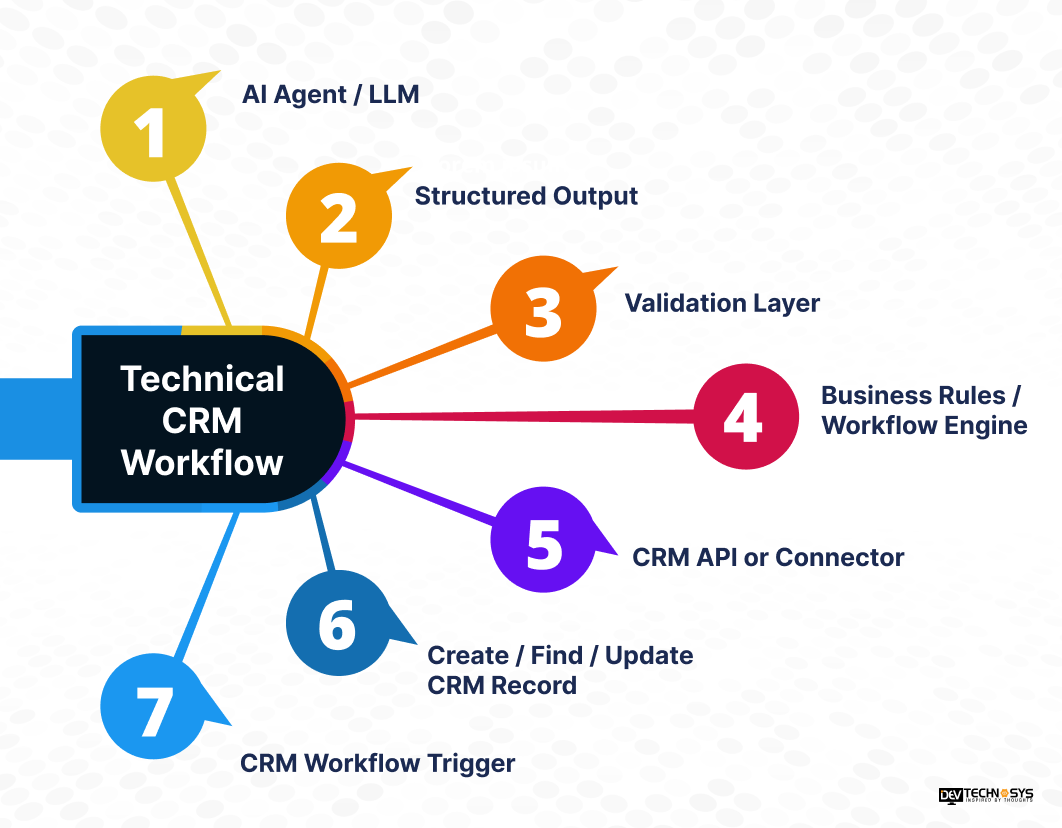
What Can the AI Workflow Do in a CRM?
Depending on the CRM and the permissions configured for the integration, the workflow can:
- Create a new lead when no matching customer record exists
- Find and update an existing contact instead of creating a duplicate
- Populate CRM fields with extracted industry, requirement, location, use case, timeline, and other information
- Add conversation summaries so sales representatives can understand the enquiry without reading the entire conversation
- Update lead status such as New, Contacted, Qualified, or Follow-Up Required
- Assign the lead to a sales representative based on territory, industry, product, or other routing rules
- Add tags or custom fields for segmentation and workflow routing
- Store qualification information collected during the AI conversation
- Create CRM tasks for sales representatives
- Record the lead source such as website chat, email, SMS, or another communication channel
- Trigger CRM workflows based on updated fields or lead status
The production workflow will also check for the same customer entry or any associated details.
Note: U.S. businesses must ensure AI does not have unlimited CRM access. Instead, it needs to work in a controlled environment. A safer architecture is:
AI → Structured Data → Validation → Permission Check → CRM API
Expert Advice: I recommend designing the flow by connecting conversation intelligence with CRM data. High-value leads are generated when the data is clean and structured.
Mohit Nag, AI Expert, Dev Technosys
How is the Next Action Triggered?
An AI chatbot development solution usually include this workflow:
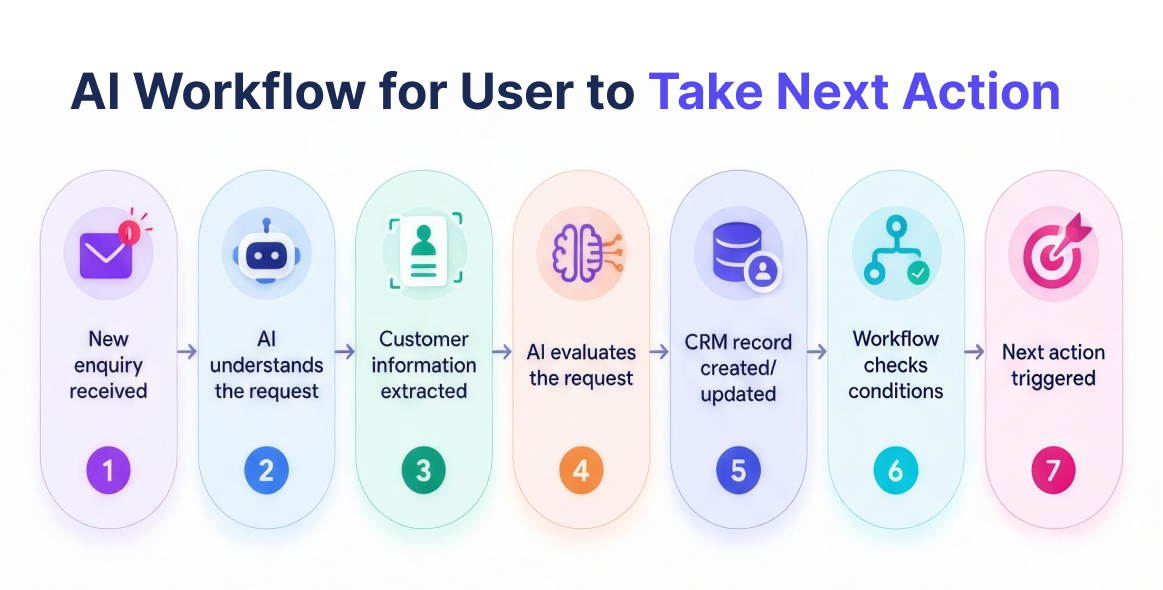
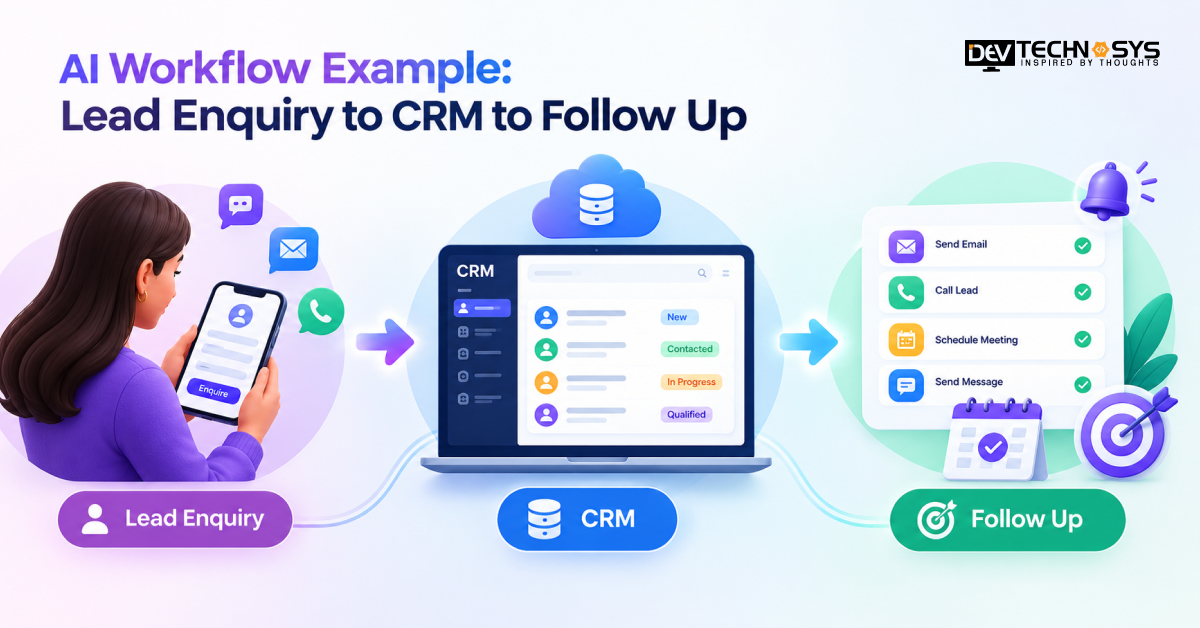
New enquiry received
↓
AI understands the request
↓
Customer information extracted
↓
AI evaluates the request
↓
CRM record created/updated
↓
Workflow checks conditions
↓
Next action triggered
The workflow can use different types of triggers, including:
Event-based trigger
A new lead is created → start the sales workflow.
Field-based trigger
Lead industry = Healthcare → assign to the healthcare sales team.
Intent-based trigger
Intent = Pricing enquiry → send relevant pricing information.
Status-based trigger
Lead status = Qualified → create a sales follow-up task.
Time-based trigger
No sales response within a defined period → send an internal reminder.
AI-confidence trigger
AI confidence below the configured threshold → request clarification or route to a human.
Human-action trigger
Sales representative approves the lead → continue to the next workflow stage.
The next action can be to generate a support ticket, send a quote to the customer, or send a message to the internal team. Before selecting an AI development services, businesses must evaluate the proper working of an agent.
Final Thoughts
An AI workflow is basically a technical path for businesses to get a qualified lead. It supports initial enquiry to a sales follow-up within a few steps. A CRM development company determine the specific requirement before integrating an agent.
The system converts customer queries into structured information and sends it to the CRM so that the sales team gets the perfect direction for a lead. For US businesses, this approach is beneficial as they can design specific business rules so that the system automatically works on the sales lead.
Frequently Asked Questions
Find answers to the most common questions related to this article.
An AI lead enquiry workflow is an automated process that uses AI to handle information received from a potential customer. It can understand the enquiry, extract important details, identify the customer's intent, create or update a CRM record, assign the lead, and initiate a suitable follow-up process.
A workflow can define escalation conditions such as complex questions, high-value opportunities, customer requests for a representative, low-confidence AI responses, sensitive information, or actions requiring approval. When a condition is met, the workflow can stop automated processing and notify the appropriate sales or support employee.
Yes. AI workflows can integrate with platforms such as Salesforce, HubSpot, Microsoft Dynamics, Zoho CRM, and other systems through APIs, webhooks, middleware, or available native integrations. The integration can transfer lead information, update records, trigger workflows, and return CRM data to the AI application when required. Choosing the best AI Development Services depends on the technical expertise and industry knowledge.
A simple AI Workflow can cost $1500, a multi-step intelligent workflow $7,000, and an agentic AI $25,000. US businesses must pay for maintenance services to keep these systems up to date. The monthly charge for an automation platform is $19, for an AI model it is $20, and for workflow maintenance, the cost will be $300. However, this is an estimate. Decision makers must discuss the price clearly with the project manager.
Yes. AI can evaluate enquiry information against predefined qualification criteria. For example, a workflow can classify leads based on business requirements, company size, location, project urgency, technology needs, or other criteria defined by the business. The result can then be stored in the CRM for sales teams to review.