



















Key Takeaways
- A good migration moves leads, listings, contacts, deals, and history into your new platform.
- Clean your data first. Duplicates and dead leads only move the problem.
- Map every field before transfer. Run a pilot migration before the full move.
- Connect portal, MLS, and website lead feeds right after go-live, then test each one.
- UAE teams should check PDPL and data residency rules before moving any client data.
- Plan for security, backups, and a rollback path from day one, not after go-live.
Businesses dealing with real estate may find themselves outgrowing their current Customer Relationship Management system (CRM) sooner than expected. As a result, it is not unusual for:
- Leads to get lost
- Property data to be muddled
- Follow-up communications to be overlooked
- Various disconnected systems to hamper day-to-day operations
At the first sign of problems with their Real Estate CRM Migration system, leaders may feel the solution is to simply move to a new CRM. However, taking care to plan transitions properly is crucial to avoid losing a wealth of valuable data. The mediator is not just the successful transfer of data, but also ensuring that operations won’t be disrupted.
What Is Real Estate CRM Migration?
Real estate CRM migration means moving your leads, contacts, property records, deals, and communication history from one CRM to another. It includes data cleanup, field mapping, transfer, testing, and integration setup.
Your team keeps every record and works in the new system from day one. It protects lead records, listing links, and deal history during the switch. Many teams ask how to migrate data between CRM platforms. The method depends on your source and target systems.
A CRM to CRM migration can use native import tools or custom scripts. Real estate adds extra layers. You also move listing data, buyer preferences, showing history, and portal leads. Each one needs careful handling.
Think of it like a house move. You do not carry every box. You sort, label, and unpack with a plan.
Signs It Is Time to Migrate Your Real Estate CRM
You should migrate when your property CRM slows sales instead of helping. Common triggers include lost leads, broken feeds, duplicate records, and rising license costs.
A legacy CRM migration becomes urgent when these signs appear:
- Agents miss follow-ups because leads sit in several tools.
- Duplicate contacts and outdated records fill your database.
- MLS, IDX, or portal feeds break often or need manual uploads.
- Reports are slow, and managers cannot see true pipeline value.
- License fees grow, but useful features do not.
- Your CRM cannot support WhatsApp, e-signature, or marketing automation.
Your existing platform does not support changing business requirements? Explore CRM software development services. It helps you identify the right upgrade or customization approach.
What Data Should You Move? A Real Estate Data Checklist
You should move leads, buyer profiles, property records, deals, documents, and communication history. Leave out stale leads and duplicates.
- Leads and Contacts: names, phone numbers, emails, source, and status.
- Buyer and Seller Profiles: budget, areas, property type, and timeline.
- Property Records: listings, photos, price history, and availability.
- Deals: stage, offers, commission, and closing dates.
- Documents: contracts, ID copies, and signed agreements.
- Activity: notes, tasks, emails, calls, and WhatsApp chats.
Property listing data migration needs extra care because photos, prices, and permit details change often. A real estate app development company can also help businesses connect property records, customer profiles, and lead management workflows.
Many agencies start with spreadsheets. To migrate customer data from spreadsheets to a CRM, use one row per contact and one column per field. Standardize phone and date formats. Import a small sample first.
Cleaning comes next. To clean CRM data before a CRM migration, remove duplicates, fix formats, fill key blanks, and tag stale leads. Do this in the old system or in a staging file.
Step-by-Step Real Estate CRM Data Migration Process
The main steps are audit, map, clean, test, migrate, validate, and go live. This is how you migrate a real estate CRM without losing data: back up first, test small, and check every count. Businesses managing both property sales and development projects may also benefit from this construction CRM integration guide.
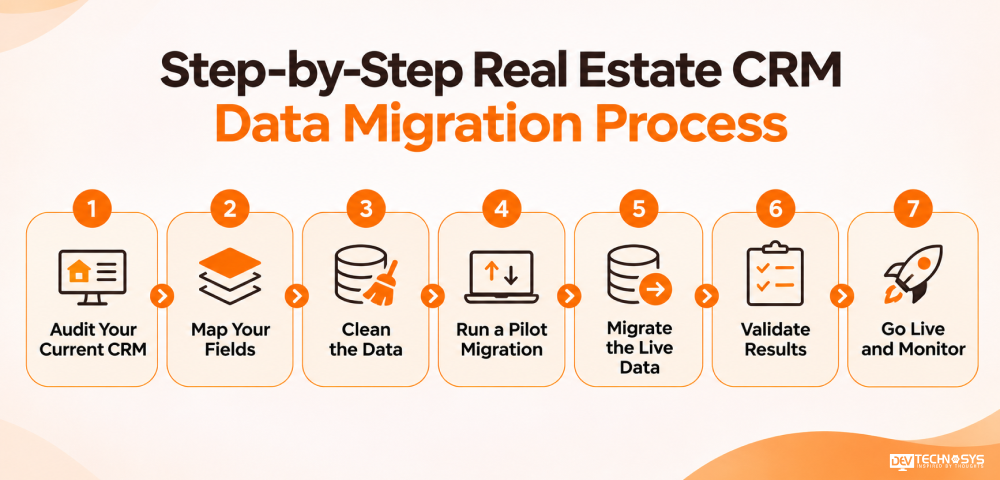
1. Audit Your Current CRM
List every object, field, user, automation, and integration. Note what works and what does not. Export a full backup before you start. Export a full backup before you start. Flag records tied to open deals for extra checks.
2. Map Your Fields
CRM data mapping matches each old field to a new one. Use custom field mapping for picklists, record owners, and property types. When planning property listing platform development, define consistent property IDs, pricing, availability, and ownership fields. So listing records can map correctly into the new CRM.
3. Clean the Data
Remove duplicates, fix formats, and archive dead leads. This saves the most time later. Merge records that share an email address or phone number, and keep the newest notes.
4. Run a Pilot Migration
Move 200 to 500 records. Check that links between contacts, properties, and deals still hold. Check that links between contacts, properties, and deals still hold.
5. Migrate the Live Data
Move the bulk first, then run a delta migration for changes made since. Freeze edits in the old CRM during the sync. A well-connected real estate management platform should keep agent activities, property updates, and customer interactions accessible.
6. Validate Results
Compare record counts and spot-check high-value leads. Ask agents to confirm their own pipelines. Use a CRM migration checklist to sign off on owners, links, and notes.
7. Go Live and Monitor
Switch users over. Keep the old system read-only for 30 days as a safety net. Check lead response times daily during the first week.
You also need to pick a method:
- Native import tools suit small data sets and CSV files.
- API-based migration suits large or complex data. To migrate CRM data via API, extract records from the source, transform them to fit the new schema, and load them in batches. Respect rate limits during CRM data transfer and log every error.
- An ETL pipeline helps when you need ongoing sync during a phased move.
CRM Integration After Migration: What to Connect First
Businesses handling rental portfolios may also need property management software development. It connects tenant records, lease information, maintenance requests, and payment workflows with CRM. Order matters, because lead sources need to work before automations start.
- Website and Landing Page Forms: New web leads must flow in from day one.
- Portal and MLS Feeds: These usually bring your highest lead volume.
- WhatsApp Business API: Agents need full conversation history in one place.
- E-signature and Document Tools: Good real estate CRM integration links signed files to the right deal.
- Accounting and Marketing Tools: Sync closed deals and rebuild campaigns after data is stable.
Dubai teams often ask how to sync Property Finder and Bayut leads to a new CRM. Start by checking how each portal delivers leads. Depending on your account, this may be an API, a webhook, or an email feed. Confirm current options with your portal account manager.
Test your Property Finder integration with live portal inquiries. Repeat the check for your Bayut integration. Real estate lead data migration also needs fast assignment rules, so each lead reaches an agent within seconds.
To automate initial property inquiries, an AI chatbot development company can help integrate conversational tools. These can capture buyer preferences and route qualified leads to the right agents.
Also verify Dubizzle lead sync before you switch off the old feed. For Dubai listings, DLD API integration can confirm property details. Trakheesi permit validation checks that each advertised listing carries a valid permit. Run one final test with real portal data before launch day. Then turn on automations one by one.
Common Real Estate CRM Migration Risks and How to Avoid Them
Here are the most common mistakes teams often make in a real estate CRM data migration, with fixes that work.
Risk |
What happens |
How to avoid it |
| Data loss | Records go missing | Back up first. Compare record counts. |
| Duplicate leads | Agents call the same buyer twice | Deduplicate before import. Match on email and phone. |
| Wrong field mapping | Budgets or owners land in the wrong fields | Sign off on a mapping sheet. |
| Broken automations | Follow-ups stop firing | Rebuild and test workflows before go-live. |
| Downtime | Agents cannot work for days | Migrate in a quiet window. Use a phased rollout. |
CRM migration data loss prevention starts with a full backup and record counts. Most failures come from rushing. A short test phase costs days. A failed move costs weeks.
Data Security and Compliance During Migration
Real estate files often hold ID copies, financial details, and contracts. Treat them as high-risk data from the first export. Here is how to migrate CRM data securely.
- Use encrypted data transfer for every file and API call.
- Apply role-based access control so only the right people can export data.
- Require multi-factor authentication for every admin account.
A secure CRM data migration also needs clear logs and tested backups. Keep audit trail logging on for every export and import. Build a backup and rollback strategy, and test it before the live move. Use test data masking in staging, so developers never see real client details.
Check UAE PDPL compliance before you move personal data. Confirm UAE data residency rules for any cloud storage. Review KYC document storage separately, since ID files carry the highest risk.
Best Practices for a Smooth Real Estate CRM Migration
Good habits cut downtime and protect lead data. These CRM data migration best practices are simple: assign one owner, move in phases, train agents, and keep a rollback plan.
- Name One Owner: One project lead keeps decisions fast and clear.
- Run a Pilot Migration: Start with one team or office. Fix issues before you move everyone.
- Train Agents on Real Tasks: Show them how to log a lead, book a viewing, and update a deal.
- Monitor the First 30 Days: Track response time, duplicate rate, and feed errors.
- Document Everything: Save your mapping sheet and rules. A HubSpot CRM data migration, for example, needs notes on custom properties and workflows.
When external expertise is required, compare top CRM development companies. This comparison should be based on their migration experience, integration capabilities, security practices, and post-launch support.
Final Words
A CRM migration has become a turning point for real estate businesses in:
- Managing relationships with clients
- Evaluating new property opportunities
- Scaling its operations on a higher level
But the real value appears after the migration. Teams can make faster decisions, identify promising buyers, understand sales patterns, and respond to changing market demands.
Before investing in a new platform, assess whether its capabilities match your long-term business model. The right migration strategy should not simply solve today’s operational challenges. It should prepare your business for its next stage of growth.
Planning a Real Estate Crm Project?
Get a tailored development cost estimate in a few simple steps.
- 3 quick steps
- 100% free
- Reply in 1 business day
2 Minutes Read
Frequently Asked Questions
Find answers to the most common questions related to this article.
Plan migration during times of low sales activity and make agents aware of the temporary shifts in workflow. Essential lead management procedures should remain in place. A migration support team gets assigned, and brief training is given before the launch of the migration. A phased implementation allows for the detection of issues early on and avoids disruption for property inquiries.
Yes, if the migration plan keeps historical activities intact by saving contact records. Call logs, e-mails, meeting notes, lead source, ownership changes, and deal history should be transferred. Also, do a test migration prior to making the full transfer. The old CRM must be accessible in read-only mode for at least thirty days. So it is possible to look through records and identify missing information.
The most pressing issues include duplicates, obsolete phones and emails, and leads. This outdated data did not go through at all and is of no use. Consider prospects with no interest, check deals that have been closed, and learn about agent assignments. On the other hand, businesses should normalize records in advance helps avoid future mistakes.
Maintain parallel connections between your existing CRM and the new platform during the transition. Compare listing IDs, property details, availability statuses, and incoming leads to identify synchronization gaps. Coordinate feed changes with your MLS or portal provider. Switch completely only after testing confirms accurate updates without duplicate listings.
Evaluate your sales model, agent workflows, integration requirements, and expected expansion before deciding. Ready-made platforms suit brokerages with conventional requirements and limited implementation time. Custom CRM development makes sense when specialized workflows, ownership rules, or integrations demand greater control. Compare licensing, customization, maintenance, and upgrade expenses.