























Key takeaways:
-
- To create inventory management software involves various steps, such as market research, project requirements, selecting the best features and functions, tech stacks, design UI/UX, development, testing, QA, deployment, and maintenance.
- Reports from Grand View Research, the inventory management software market is projected to grow at a CAGR of 8.9% from 2026 to 2033.
- There are many essential and advanced features that must be integrated, such as real-time inventory tracking, stock alerts, warehouse management, inventory reporting, demand forecasting, batch and serial tracking, and more.
- The cost to build inventory management software from Scratch ranges from $30,000 to $150,000, based on the project complexity, features, functions, backend processes, third-party integrations, tech stacks, and so on.
“The heavy lifting is done by the math.”
— Jeff Bezos, Founder of Amazon
Imagine running a store that has dozens of products coming and going every day. How do you keep track of what you have in stock, what needs to be reordered, and what has been sold? Writing everything down on paper can be cumbersome and inconvenient.
That is where an inventory management system comes in. It’s like having a smart assistant that can keep track of your products, inventory, suppliers, customers, and sales within one very reliable instrument.
As per the Grand View Research, the inventory management software market is valued at around $3.9 billion in 2026. This valuation can increase to around $7.1 billion by the end of 2033.
Creating this kind of management system from the beginning means that companies can develop their own system that meets their particular requirements rather than working with outdated and ineffective generic systems.
What is Inventory Management Software?
Inventory management software refers to an application that helps businesses manage their inventory. This means knowing what stock is on hand, sold, and when it needs to be replaced. Businesses can also use such software for tracking orders, suppliers, warehouses, and product specifications.
The software ensures that everything is kept in one place, minimizing errors, saving time, and helping businesses improve their inventory management process.
Quotes From Industry Leaders:
“It’s difficult to stay efficient when you’re going from 10 to 50 warehouses.”
– Hervé D’Halluin, RFID & Referent Interactive Sport Products Leader, Decathlon
What Does Inventory Management Software Do?
Using warehouse automation software allows an organization to monitor stock levels, purchases, sales, orders, and product movement in real-time. Inventory updates are automated, teams are alerted about products that are running low on stock, manual errors are minimized, and warehouse operations are streamlined. Some advanced systems have additional features such as inventory forecasting, barcode scanning, reporting, managing suppliers, and integrations.
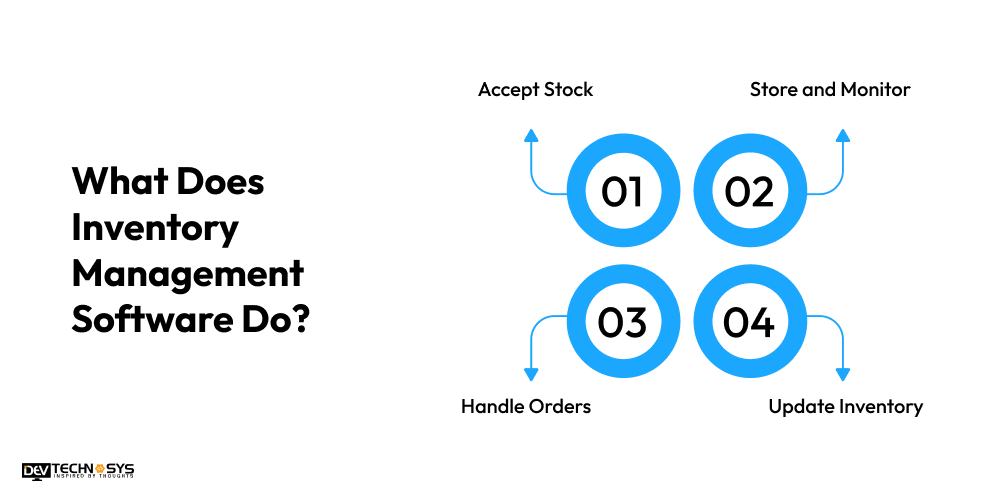
- Accept Stock: Upon arrival of products, employees document quantities, product catalog, suppliers, and storage areas, thereby automatically adding available inventory.
- Store and Monitor: The software identifies the places where stock should be stored and follows all movements with the help of barcodes, SKUs, or RFID.
Market Insights: “According to GS1 US, 47% of companies cite enhanced information exchange as a reason for investing in 2D barcodes, while 36% aim to improve inventory management and asset tracking.”
- Handle Orders: When an order is received, the software checks available stock and reserves the stock.
- Update Inventory: After shipping, the number of items in inventory decreases automatically with the help of dashboards presenting the stock level in real time.
Planning a Inventory Management Software Project?
Get a tailored development cost estimate in a few simple steps.
- 3 quick steps
- 100% free
- Reply in 1 business day
2 Minutes Read
Why Do Businesses Want to Build Inventory Management Software?
Inventory management software is developed by companies to enable speedier, simpler, and more efficient inventory management. Custom software can assist in automating everyday tasks, giving immediate updates on stock, and minimizing human mistakes, as well as connecting with other software used by the company and supporting expansion.
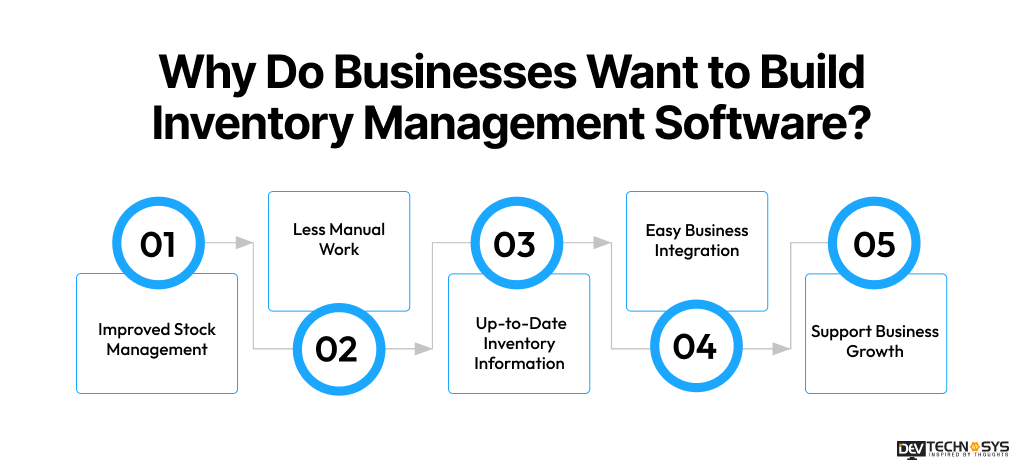
1. Improved Stock Management
Having custom inventory management software gives businesses enough information to determine how much of their products they have on hand. They can keep track of their incoming and outgoing stock and products remaining in the warehouse. This prevents overstocking or running out of key products. Businesses can manage their stock more precisely.
2. Less Manual Work
Inventory management using spreadsheets, notebooks, or a variety of tools could take a lot of time. In contrast to that, custom software can automate many repetitive tasks involved in the daily processes of a business.
For example, stock updating, order tracking, and generating inventory reports become automated, allowing employees to work on more important tasks than entering data manually.
3. Up-to-Date Inventory Information
Businesses want access to timely inventory data whenever they need it. Custom software can provide real-time information about stock levels, the movement of products, and warehouse activities.
Thanks to it, managers can know everything happening in different locations and make quick decisions without having to wait for employees to prepare reports.
4. Easy Business Integration
Some businesses could already be using accounting, eCommerce, CRM, ERP, or payment software. A customized inventory application can be created to integrate with those systems, allowing communication between systems. This eliminates double work in the business and improves quality of data.
5. Support Business Growth
When a business expands, the question of its perpetual inventory system can become very complicated. With more products, storage locations, vendors, etc., inventory control can be challenging. A custom application can grow as the business grows and include options when needed.
Custom Software |
Off-the-Shelf Software |
| Custom workflows | Predefined workflows |
| Flexible integrations | Limited integrations |
| Scalable architecture | Vendor-dependent |
| Custom reporting | Standard reports |
| Greater control | Faster initial setup |
How to Develop Inventory Management Software From Scratch?
Develop inventory management software from the ground up entails more than just establishing fundamental stock-tracking features. Companies should have a coherent workflow in place, scalable architecture, a simple user interface, a secure database, automated processes, and successful testing solutions.
This article describes the various phases of the asset tracking software development process, from gathering requirements to choosing technology.
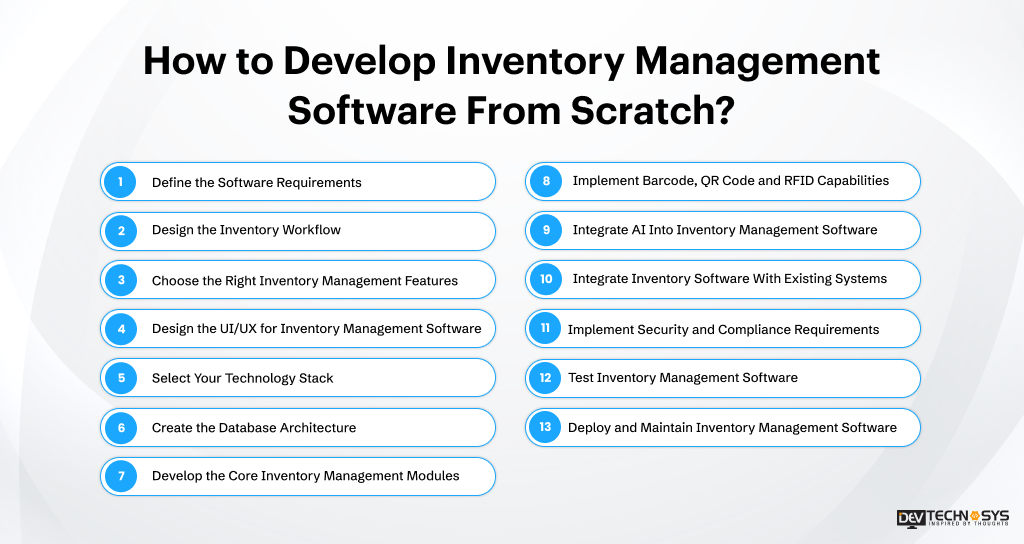
Step 1: Define the Software Requirements
Engage in defining the purpose of the inventory management and identifying its users. Determine the company objectives, inventory processes, important features, integration, level of security, and future growth.
State how products are moved through the system of buying and selling. The detailed specification sets developers on the right path to choose the correct architecture, measure the development time, eliminate irrelevant features, and ensure that the product functions correctly.
Step 2: Design the Inventory Workflow
Have a plan for each step of the system before development is initiated, as follows: Purchase – Receive – Store – Track – Pick – Pack – Ship – Do inventory – Report.
Hire a professional ERP software development company to indicate what is going on at every stage and which database is updated. For instance, receiving goods means an increase in available stock, while making sales leads to a decrease.
Step 3: Choose the Right Inventory Management Features
In this segment of our work, we will discuss the features that must be taken into account when selecting a barcode inventory system to meet all operational needs of the organization.
It may include such features as inventory control, stock notifications, purchasing control, barcoding, warehouse control, order processing control, report generation, user control and forecasting. More sophisticated systems may use such innovations as RFID, automatic restocking, management of multiple warehouses, and online dashboards.
Step 4: Design the UI/UX for Inventory Management Software
In the next section, hire a custom software development company to create an inventory management software interface. First of all, it should be noted that the UI and UX interfaces should be created depending on the users’ tasks.
Moreover, a dashboard should be created to show all the current stock in the warehouse, out-of-stock items, pending orders, buying processes, and important notifications. The product screens should provide easy access to stock information, and the warehouse screens should allow to make quick scans and updates.
Step 5: Select Your Technology Stack
Decide what technologies to use, keeping in mind your anticipated transaction volume, complexity of the business, any integrations, security issues, development capabilities, and scalability for the future. The front end can use React, Angular, or Vue, while the backend can employ Node.js, Python, .NET, or Java to perform backend functions.
For managing the database, options include PostgreSQL, MySQL, or MongoDB. Infrastructure is provided by AWS, Azure, or Google Cloud, whereas for integrating various systems, there are REST or GraphQL.
Step 6: Create the Database Architecture
Establish a database structure that enables accurate recording of all inventory events. The key elements are products, SKU management, warehouses, locations, processes related to inventory, purchase orders, sales orders, suppliers, customers, users, transfers, adjustments, batches, and serial numbers. Make use of transaction history to guarantee traceability.
For example, if 100 units arrive, tracking shows that there were 100 additions made, and if there were 20 units sold, transaction records show that 20 sold units were accounted for.
Step 7: Develop the Core Inventory Management Modules
Develop a barcode reader app using logical modules facilitating the development, testing, and support of all business functions separately. Begin with modules dedicated to product and inventory tracking, and then create the system modules related to warehouse operations, purchases, sales, order processing, and transfer of goods between suppliers. The modules must be connected through an API and common business rules.
Step 8: Implement Barcode, QR Code and RFID Capabilities
Apply the chosen techniques of identification technology as per the operational needs. Barcodes are the cheapest forms of identification in terms of receiving, picking, and shipping products. QR code scanning can have more information encoded inside as well as be scanned using the appropriate devices.
RFID makes it possible to identify several items simultaneously with the tags on them. It is important to connect the scanning processes with inventory management so that all records are kept up to date according to the performed scanning.
Fact: Research cited by GS1 US and Auburn University found that RFID can significantly reduce out-of-stock situations.
Step 9: Integrate AI Into Inventory Management Software
One of the options for using artificial intelligence is using it in order to improve inventory processes. When develop an ERP system and integrating AI, it offers demand forecasting, recommendations on times of reordering, prediction of low stock alerts, identification of surplus stock, detection of anomalies, etc.
The quality of predictions depends on the quality of the data used for prediction, including the historical data, data quality, seasonal factors, specific product characteristics, and business processes. However, it is important to let people review all pertinent transactions that involve some purchasing and inventory decisions.
Step 10: Integrate Inventory Software With Existing Systems
Make sure the RFID inventory system connects with all the existing systems the business already uses. Some common periodic inventory system integrations include ERP, CRM, accounting systems, e-commerce platforms, point-of-sale systems, WMS, TMS, payment systems, shipping systems, supplier systems, and barcode or RFID devices.
You can use APIs for synchronizing the required data between systems and limiting double data entry. A connected environment ensures enhanced inventory transparency, order repeatability, financial accuracy, and operational efficiency of the organization.
Step 11: Implement Security and Compliance Requirements
Ensure you safeguard inventory, customer, supplier, and business data throughout the software development process. Establish role-based access control, encryption, secure authentication, secure APIs, audit logs, backups, disaster recovery, and safe integration techniques to maintain safety. The above measures should be taken regardless of the business specifics or data being processed.
Step 12: Test Inventory Management Software
When assessing the software, conduct tests using real inventory scenarios rather than just testing specific features. The tests should include functional, inventory calculations, integrations, barcode/RFID tests, performance tests, user acceptance tests, security tests, and data migration tests.
In particular, ensure that concurrent transactions are paid close attention. For example, conduct tests to identify race conditions, double updates, quantity issues, or wrong inventory records when various workers transfer/perform sales of the same products at the same time.
Step 13: Deploy and Maintain Inventory Management Software
Implement your software and infrastructure in such a way as to fully accommodate the workload and security level necessary for the anticipated growth. Following the implementation of the software, the database, API, application, system, security events, and backups should be constantly monitored.
Security patches should be applied, and features should be improved based on comments and operational analysis. Regular maintenance of the system contributes to the scaling of infrastructure and improvement of performance and helps to get rid of integration difficulties.
Industry Insights: “In accordance with Deloitte, AI applications include demand forecasting, supply planning, inventory lifecycle management, automated replenishment, scenario analysis, and inventory-level optimization.”
What are the Features That Must Be Integrated in Inventory Management Software?
Precise features of inventory management software allow companies to manage inventory more efficiently, lower mistakes, streamline warehouse performance, and make quicker decisions.
Vital characteristics include real-time tracking, barcode scanning, alerting for stock, ordering and purchasing management, reporting, forecasting, multi-site support, supplier management, and safe access for multiple users for developing businesses.
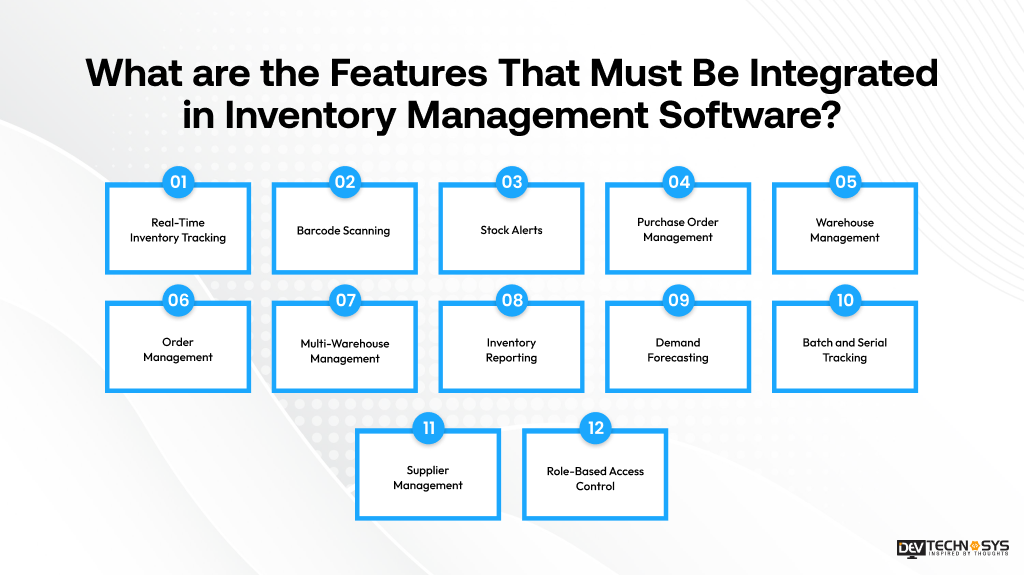
1. Real-Time Inventory Tracking
Real-time inventory management makes it possible to keep track of stock levels, movements, and locations in various warehouses, facilities, and stores, as well as their overall availability.
2. Barcode Scanning
Barcode scanning updates inventory records promptly while minimizing data entry and speeding up operations in warehouses.
3. Stock Alerts
Stock alert reminders help to notify users of any inventory items that approach minimum stock levels, thus preventing out-of-stock situations and other missed orders.
4. Purchase Order Management
Purchase order management includes all the processes from creating and approving the order through tracking delivery and quantity to making payments and recording the process.
5. Warehouse Management
Warehouse management entails controlling receiving, putaway, picking and packing operations through automation of the workflows.
6. Order Management
- Order management means that all customer orders are monitored throughout their life cycle.
- Multi-warehouse inventory allows the execution of inventory-related operations in a centralized way regardless of the location.
7. Multi-Warehouse Management
Keep track of inventory in numerous locations and warehouses, while ensuring that there is a complete overview of stock movement.
8. Inventory Reporting
Create reports that include details about stock levels, inventory turnover, sales effectiveness, purchase activities, adjustments, inventory costing, and operating trends.
9. Demand Forecasting
Review past sales, trends, seasonality, and demand data in order to calculate future inventory needs and make decisions on purchases.
10. Batch and Serial Tracking
Monitor goods using batch or serial numbers to improve traceability, monitoring of recalls, warranty control, and inventory accountability.
11. Supplier Management
Store supplier information together with purchasing history, prices, delivery periods, performance indicators, and communication history in one system.
12. Role-Based Access Control
Define access rights according to the role of the user and grant access to sensitive inventory data only to authorized users.
Look What Gartner Says: “Gartner describes store inventory management applications as being at the heart of retailers’ AI-driven inventory strategies, particularly for meeting customer demand and improving profitability.”
How Much Does it Cost to Build Inventory Management Software?
The inventory management software development cost spans from $30,000 to $150,000, and the exact amount is determined by many factors, including the complexity of the project, its features and tech stack, integrations, level of required security, and location of the development team.
The cost of a simple inventory management software with the key functionalities of inventory tracking and reporting is less than that of advanced solutions, which feature AI forecasting, multiple warehouses, and RFID inventory tracking technologies.
The final cost can be affected by UI/UX design, back-end development, database architecture, testing and launching process, as well as the ongoing maintenance.
Inventory Software Type |
Estimated Cost |
Description |
| Basic Inventory Software | $30,000 – $50,000 | Includes core features such as stock tracking, product management, stock alerts, and basic reporting. |
| Mid-Level Inventory Software | $50,000 – $90,000 | Adds barcode scanning, purchase management, warehouse operations, integrations, and advanced reports. |
| Advanced Inventory Software | $90,000 – $120,000 | Supports multi-warehouse management, automation, RFID, forecasting, dashboards, and complex integrations. |
| Enterprise Inventory Software | $120,000 – $150,000+ | Designed for large businesses with AI capabilities, extensive integrations, advanced security, scalability, and customized workflows. |
Free App Idea Reality Check: Let's Stress-Test Your Concept
Share your app idea with us. Within 3 business days, we'll uncover UX gaps, feature opportunities, and potential development challenges, so you can build with confidence. No strings attached.
What Factors Affect the Inventory Management Software Development Cost?
There are numerous factors affecting the pricing of the AI inventory management software development process. These include the complexity of the features, UI/UX requirements, technology stacks, security, scalability, and the location of the development team.
It is crucial for businesses to understand these elements in order to estimate their expenses accurately and ensure that they can afford necessary functionalities and avoid surprises.
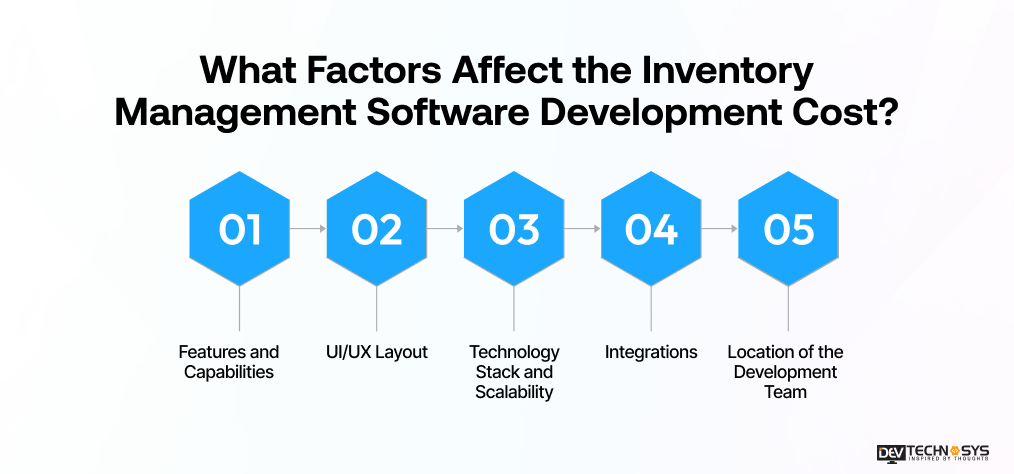
1. Features and Capabilities
Inventory management system development costs are influenced directly by the variety and intricacy of the features. Simple inventory monitoring is less costly; however, advanced features such as AI prediction, automatic restocking, RFID, multi-store management, real-time statistics, batch tracking, and tailor-made workflows require more time and expense for development.
2. UI/UX Layout
The complexity of the user interface has an impact on the total raw material inventory management software development cost. Simple dashboards with only necessary screens for inventory require low expenditures in design.
However, customized dashboards, warehousing interface design, mobile inventory optimization, different roles dashboards, and other complicated features lead to design, research, testing, and prototyping expenses.
3. Technology Stack and Scalability
The technologies selected for the project will determine its duration, the costs of structures, and the future expansion options that could be applied to the project.
More specifically, the parties in charge are to make the correct selection of technologies related to front end, back end, database, infrastructure, as well as the accompanying technologies that will fulfill the identified needs of the project and meet the organization’s requirements.
4. Integrations
The expenses involved in developing inventory software can be heightened due to third-party ERP integration services. For instance, the connection of ERP, CRM, accounting, e-commerce, POS, WMS, TMS, payment, shipping, supplier, barcode, or RFID systems is a task that requires time and effort in developing an API, synchronizing data, authenticating data, conducting testing, managing errors, and offering a support system for long-term checks of data transmissions.
5. Location of the Development Team
The position of the development team and its qualifications could impact the hourly rate and the total ERP software development cost. Programmers in various areas charge varied fees depending on the market situation and skills. Getting specialists in artificial intelligence, cloud computing, cybersecurity, or networking may be costly but effective for a good implementation.
Cost Factor |
Cost Impact |
How It Affects Development Cost |
| Features and Capabilities | 30–35% | More features increase development effort. |
| UI/UX Layout | 10–15% | Custom designs require more resources. |
| Integrations | 15–20% | Multiple integrations increase complexity. |
| Technology Stack and Scalability | 15–20% | Complex technology needs more development. |
| Development Team Location | 10–20% | Developer rates vary by location. |
Note: As per our CTO, Pramod Jangid, these percentages are estimated cost impact ranges and are mainly based on the business requirements, team expertise, project scope, and other needs.
Common Mistakes to Avoid When Building Inventory Management Software
Creating inventory management software without careful analysis can cause issues such as inaccurate stock data, integration challenges, security issues, and excessive order management system development costs.
Companies can prevent issues by eliminating unclear requirements, weak inventory transactions, poor scalability, lack of testing, and not considering integrations.
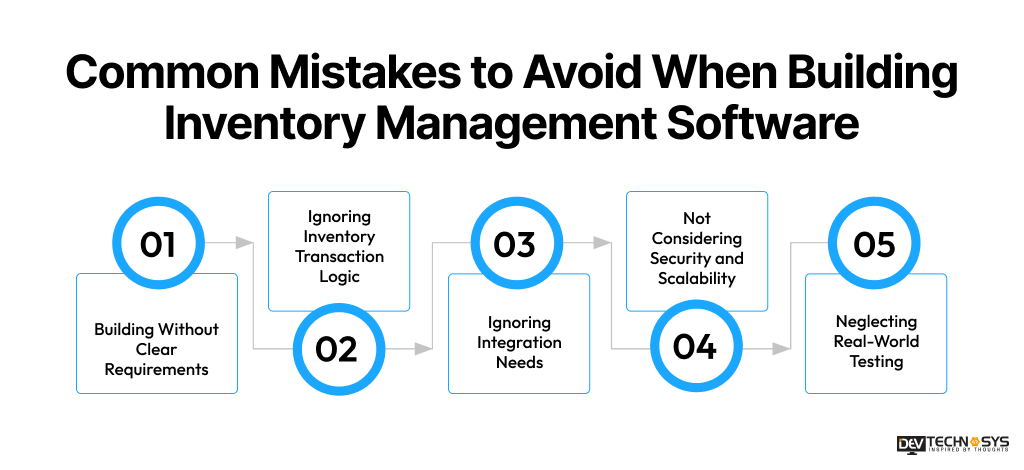
1. Building Without Clear Requirements
In the absence of a clear requirement outline for user groups, workflows, features, systems integration, and business objectives at the beginning of a project, the efforts may lead to significant and costly changes.
The development team may create unnecessary features while failing to implement essential elements. Thus, to limit rework, it’s recommended to start with the documentation of inventory processes and prioritize the business needs.
2. Ignoring Inventory Transaction Logic
Using AI inventory management software as if it were a simple CRUD application can result in multiple stock discrepancies. Each purchase, sale, return, transfer, and adjustment must trigger an appropriate inventory update.
Developers should set up rules for transactions, maintain a record of changes, and test the performance of simultaneous updates to prevent any errors in the stock changes.
3. Ignoring Integration Needs
Developing inventory management software without taking into account the already implemented business features can result in independent data storage and manual processing of the information.
Therefore, it is necessary to determine which integration of ERP, CRM, online store, accounting, warehouse, transport, POS, delivery, and scanning is needed beforehand. At this stage, the data flow, API requirements, and data synchronization and user authentication process should be defined.

4. Not Considering Security and Scalability
If the business focuses only on current inventory utilization, it may have problems because of the rapid growth of the business. The basic things to be considered include the need for role-based access, data encryption, secure APIs, data backup, monitoring, and scalable architecture from the beginning.
5. Neglecting Real-world Testing
The testing of just single features does not assure that inventory works properly. It is important to replicate warehouse conditions: simultaneous sales processes, stock transfers, returns, barcode readings, changes in the amount of stock, network disruptions, and data transfer. This is needed to ensure that the employees will be able to trust the information the software provides them for their daily operations.
Security and Compliance Requirements When Building Inventory Management Software
Security and compliance are crucial while developing inventory management software, as it may involve handling business, customer, supplier, and payment-related information.
Access controls, encryption, secure APIs, audit logs, and regular testing are helpful in protecting information. We follow PCI-DSS and ISO 27001 practices as a baseline, ensuring every system we build meets recognized API security standards.
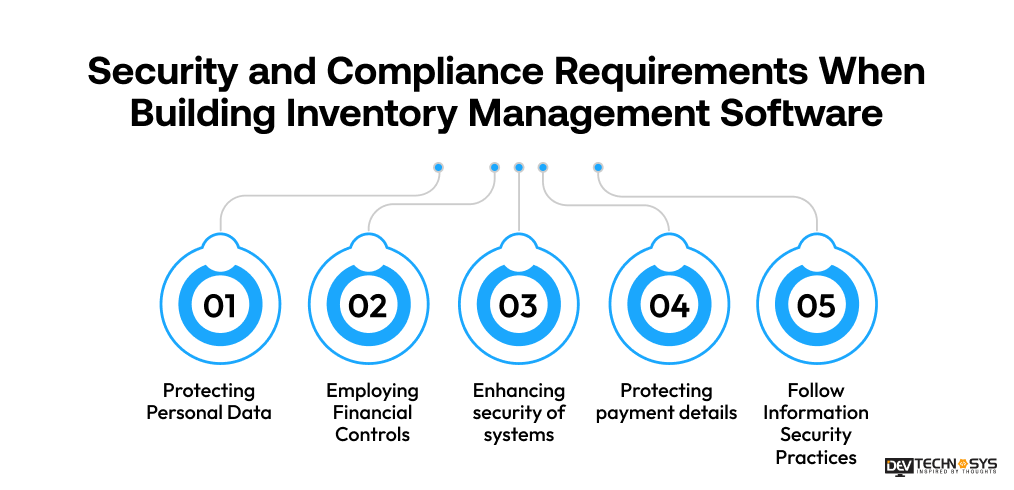
1. Protecting Personal Data
If the inventory software contains information about clients, employees, or suppliers, companies have to keep GDPR rules in mind. The software must be able to use data minimization measures, allow access rights, store information in a safe way, and give the necessary options for accessing the information, making corrections, deleting unnecessary information, and all other user rights are upheld.
2. Employing Financial Controls
If inventory software is integrated with accounting or financial systems, it must have proper authorization rights, transaction monitoring, change management, and auditing.
Being sure that the mentioned practices are followed would ensure compliance with SOC 1 requirements relating to inventory activities that influence financial reports.
3. Enhancing security of systems
Organizations, when developing their stock management software, should factor in relevant SOC 2 controls related to the security, availability, confidentiality, processing integrity, and privacy of the software.
Information technology systems must provide for such aspects as access management, monitoring, incident response, backup processes, vulnerability management, and the description of security policies so as to ensure the security of business information.
4. Protecting payment details
If the software for inventory management deals with credit card information, businesses should implement relevant PCI-DSS standards. With regard to card data security, organizations should minimize exposure of card data, use secure connections, limit access to data, monitor their systems, and implement relevant safety controls. Furthermore, it would be advisable to use third-party payment processors, which will help decrease the volume of collected cardholder data.
5. Follow Information Security Practices
ISO 27001 offers a methodology to control risk in warehouse management software development. Organizations can institute controls on their access management practices, encryption methods, risk assessment practices, incident response methods, data backup systems, supplier security, and continual improvement processes. It is not a requirement that a particular software project receive ISO 27001 certification.
Custom Inventory Software vs Ready-Made Solutions
When deciding whether to go for ready-made inventory software or a custom inventory solution, companies must consider the needs of the business, cost, ability to scale, and complexity of operations involved. Ready-made software takes less time to deploy, but a custom build offers more flexibility and freedom.
Factor |
Custom |
Ready-Made |
| Customization | High | Limited |
| Initial Cost | Higher | Lower |
| Scalability | Flexible | Vendor-dependent |
| Integrations | Custom | Available options |
| Control | High | Limited |
| Development Time | Longer | Faster |
When Should a Business Build Custom Inventory Software?
Companies should look into developing customized software for inventory if standard software does not meet their requirements regarding workflows, integrations, scalable systems, or processes.
This type of supply chain software development service is appropriate for organizations with multiple warehouses to manage, as well as those with complex processes, high transaction volumes, necessary specialized operations, or strict security requirements.
How Will Dev Technosys Help to Build Inventory Management Software?
When it comes to choosing an inventory management software development partner, it is crucial to check out the competencies and actual work done by the team. Dev Technosys has 16+ years of experience in software development and has successfully completed over 2,500 projects in various fields and business needs.
In one of their projects for a US distribution and wholesale company, Dev Technosys created a real-time inventory management solution with a team of 12 professionals in 24 weeks.
This solution replaced the client’s old way of managing inventory based on spreadsheets. Instead, his company was able to get a centralized inventory management platform that provided tracking of the current stock, automatic stock adjustments, barcode scanning, and management of several warehouses simultaneously, among other functions.
Final Words!
Building inventory management software requires a structured approach, starting with clear requirements and workflows, followed by feature planning, architecture, development, integrations, security, testing, and deployment. Each stage directly impacts system reliability, scalability, and operational efficiency.
Businesses can work with Dev Technosys, the best inventory management software development company, to build inventory management system from Scratch tailored to their specific workflows, integrations, and growth goals.
A customized solution can help streamline stock operations, improve visibility, reduce manual work, and support smarter inventory decisions across warehouses and business channels.
Frequently Asked Questions
Find answers to the most common questions related to this article.
To build inventory management software from scratch, begin by defining business requirements, users, workflows, and essential features. Then design the architecture, database, and UI/UX before developing core modules. Add integrations, barcode or RFID capabilities, security controls, and testing. Finally, deploy the software and continuously monitor, maintain, and scale it.
The inventory management program has to enable monitoring of stock levels in real time, inventory management, scanning product barcodes, sending stock notifications, buying and ordering inventory, managing warehouses, transferring inventory items between warehouses, managing suppliers, making reports, and controlling users.
The cost of inventory management software development can vary between $30,000 and $150,000 based on functionality, complexity, integration possibilities, tech stack, security, scalability, and the location of the development team. A simple software solution can cost around $30,000 to $50,000, while advanced enterprise solutions using technologies like AI, RFID, inventory automation, and multiple integrations can cost more than $150,000.
The time needed for the creation of inventory management software can differ based on the complexity of the project, the features, integrations involved, customization, testing, and the size of the team. A basic version can take four to six months for development, while the advanced versions that include high-tech capabilities such as AI, multi-warehouse functionality, RFID, complex integrations, and enterprise requirements can take nine to twelve months or even longer to launch.
Sure, inventory management solutions may be customized to function properly with the assistance of centralized inventory visibility, current available stock per warehouse, location management, bulk transfers, purchase, and sales fulfillment, which all contribute to efficient inventory management systems. The scalable architecture of such systems allows the addition of different warehouses, users, products, transactions, and integrations.














