























Key takeaways:
-
- To optimize application performance, Spotify uses batch metadata loading to limit how often it makes data requests.
- Pre-generated song sorting enables fast processing as users browse the vast music library.
- Spotify 30 day offline license explained: Spotify allows Premium users to keep downloaded music for offline playback (not permanently). To prevent offline expiry, Users must connect to Spotify at least once every 30 days.
- Spotify needs a stable internet connection from time to time, as offline access authorization is required for the downloaded content to function.
- A Spotify-like offline music streaming architecture combines local caching with optimized data processing, making offline listening possible without interruptions.
With over 100 million songs ready for offline listening and the ability to download how many songs 10,000 songs per device, Spotify’s offline feature is a significant part of the user experience. This seemingly easy process of downloading and listening is made possible through meticulous engineering. Despite the convenience that this feature offers the user, several processes are involved in retrieving the media that the user requests.
The system first needs to ascertain the user’s eligibility regarding the content they wish to play. It has to source protected media files and securely store them on the user’s devices. After that, the system has to make sure that the playback session runs uninterrupted and is able to sync all additions once the user reconnects to the Internet.
That is why offline listening is fundamentally different from regular downloads. In this article, we provide a detailed analysis of Spotify-like offline music streaming architecture, including how offline systems work, how they collaborate during offline and online playback, and the technical challenges of building offline solutions.
What Makes Spotify’s Offline Streaming Architecture Different?
Spotify’s offline music streaming app architecture differs from traditional streaming because it must maintain a secure, playable music library even when the device has no internet connection.
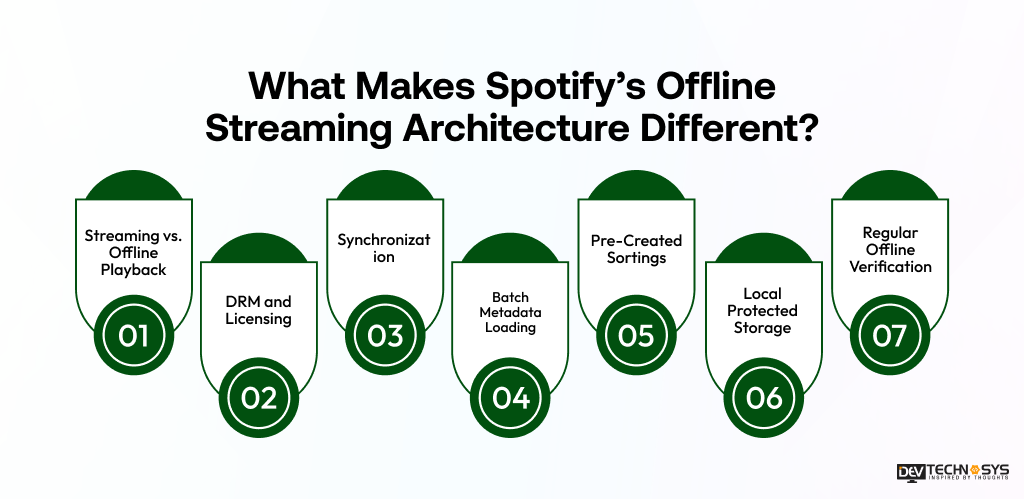
- Streaming vs. Offline Playback in Mobile Apps: Streaming retrieves audio through the network, while offline playback uses protected content stored locally on the device.
Aspect |
Streaming Playback |
Offline Playback |
| Internet | Requires an active connection | Works without an active connection |
| Audio Source | Fetches audio from remote servers/CDN | Reads protected audio stored locally |
| Latency | Depends on network quality | Generally more consistent |
| Storage | Uses temporary cache | Requires device storage |
| Access Control | Verified during online playback | Must support offline authorization |
| Network Failure | Can interrupt playback | Playback can continue |
| Synchronization | Happens continuously | Occurs when connectivity returns |
- DRM and Licensing: All songs downloaded must have protected content and licensing review, so they can be used accordingly.
Important Note: According to Vintage Legal, one of the most important legal frameworks in this regard is the Digital Millennium Copyright Act (DMCA) in the United States.
- Synchronization: Information regarding the status of the download, changes in the library, and accessibility will be synchronized with the back-end services once the device is connected again.
- Batch Metadata Loading: Spotify processes the metadata of its songs and playlists in batches, so there is no need to wait for repeated requests, and loading will be maximized.
- Pre-Created Sortings: All lists are sorted in advance and saved locally, so minimal processing is needed when browsing the downloaded songs.
- Local Protected Storage: All downloaded songs and metadata are stored as protected data and therefore cannot be easily accessed outside the application.
- Regular Offline Verification: The music can be used offline only by connecting to the Internet at least once every 30 days.
Expert Perspective: For music platforms, offline-first architecture is difficult because reliability, content protection, and licensing rules must work together without disrupting playback. A failure in any one layer can make downloaded content unavailable, even when the audio is already stored on the device.
Spotify Offline Music Streaming Architecture at a Glance
Wondering how Spotify offline mode works? Well, Spotify’s offline music streaming mode is not just about downloading music to a device. To build a music streaming app architecture, you need several components working together, including the mobile client, backend APIs, content delivery, authentication, download management and protection, local storage quota, and synchronization for a seamless playback experience.
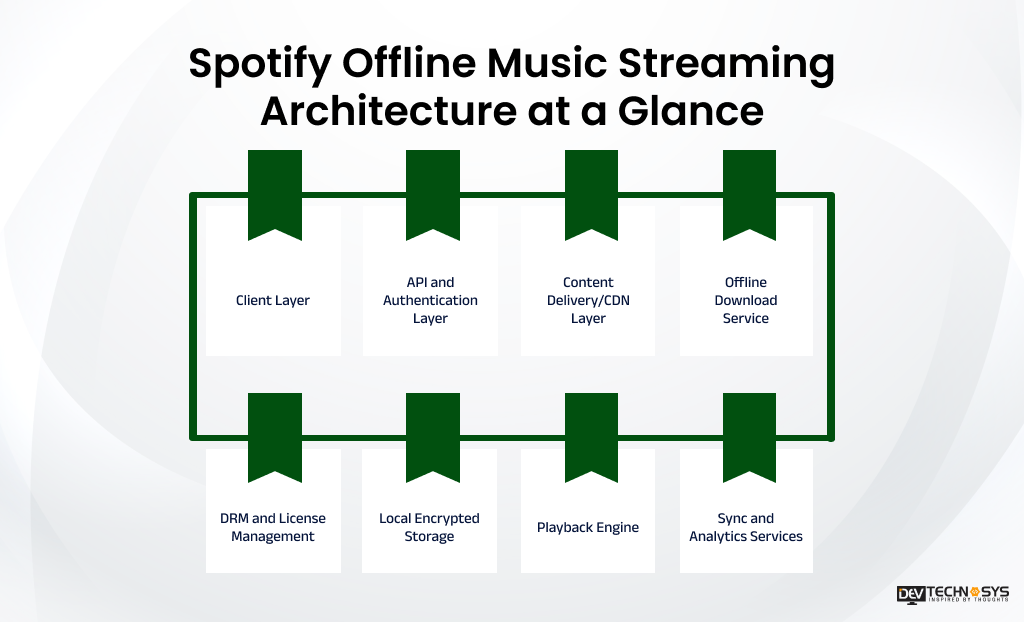
For example, whenever a playlist is downloaded by the Premium user, the application has to first identify what content has to be given to the user, check if the user has access to it, protect the downloaded file, and keep it on the device for successful playback later. Once the device has internet connectivity, it has to synchronize download and playback records with its backend services.
High-Level Offline-First Architecture for Streaming Apps
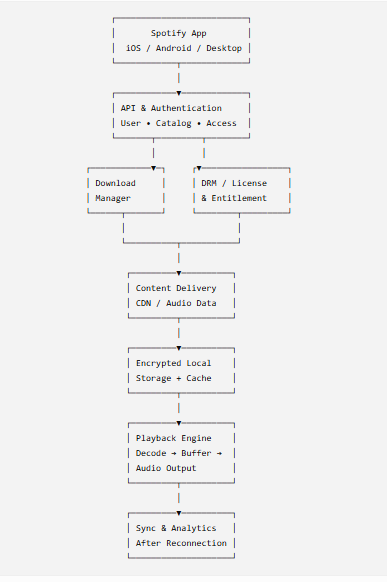
1. Client Layer
This is music app development basics. The client layer of an offline music streaming architecture similar to Spotify is where the offline experience begins. Through it, users can interact with content, select what they want to download, manage a cache eviction strategy, track storage, and listen to downloaded music.
On the device, the client can manage:
- Playlist and album downloads
- Download queues and progress
- Local track and playlist metadata
- Offline/online state detection
- Local cache and storage
- Playback controls
- Background download operations
- Synchronization after reconnecting
This layer is significant because it shifts the responsibility of some of the tasks that usually rely on online services to the user’s device.
Industry Insight:
The recent addition of Shortcuts is a good example of this shifting user experience, and Spotify has supported this approach. (Source: https://engineering.atspotify.com/)
2. API and Authentication Layer
The offline music streaming architecture involves an API layer that connects the client with the rest of the backend. It provides information about users, content, and transactions.
This layer is important in Spotify app development for offline listening before the content has been downloaded. During this time, it must be confirmed that the user is allowed to download the requested content.
This architecture therefore separates the information about management of user authorization from the actual audio content being downloaded.
3. Content Delivery/CDN Layer
Audio materials are transmitted using a decentralized content delivery system rather than depending on a central server. According to open.spotify.com, a CDN is a set of geographically distributed servers for fast content delivery. It effectively transfers large files across regions.
The basic process can be summarized as follows: Storage of Audio → CDN → Spotify App
Such an architecture presents several advantages since the API can process the requests of applications while the content delivery network is in charge of transferring large media files.
The CDN also takes part in the process of offline downloads before the device has lost connection. After the content has been stored successfully, playback happens using local-first storage instead of accessing audio files via the Internet each time.
4. Offline Download Service
The download manager coordinates the transition from online content to offline content.
A simplified workflow looks like this:
User selects Download
↓
Authenticate user
↓
Check content availability & entitlement token
↓
Create download queue
↓
Retrieve protected audio content
↓
Store locally in protected form
↓
Update local download state
A production-grade implementation also needs to handle failed downloads, interrupted connections, retries, storage limits, duplicate requests, background fetch, and download resumption.
This is one reason offline music streaming architecture is considerably more complex than simply adding a “Download” button.
5. DRM and License Management
Music streaming apps like SoundCloud and Spotify involve Digital Rights Management (DRM) to protect copyrighted music and control how downloaded content can be accessed.
An offline architecture may use DRM for offline music streaming and entitlement mechanisms to manage:
- User access rights
- Content protection
- Device authorization
- Subscription status
- Offline playback authorization
- License validity
- Access revocation
The important architectural concept is that a downloaded track is not equivalent to an unrestricted MP3 file. The application must maintain the relationship between protected content and the user’s authorization to play it.
6. Local Encrypted Storage
Spotify states that downloaded music on iPhone is stored in an encrypted cache. The local storage layer can conceptually maintain:
- Protected audio data
- AES-256 encryption
- Track metadata
- Playlist information
- Download status
- Offline-access information
- Playback/cache data
Apps like YouTube Music and Spotify also use local storage, which reduces repeated network requests. Once the content is available locally, the playback engine can retrieve the required data directly from the device.
7. Playback Engine
The playback engine is responsible for converting locally stored protected content into audible output.
A simplified offline playback path is:
Downloaded Track
↓
Local Metadata Lookup
↓
Access / Entitlement Validation
↓
Protected Content
↓
Decryption
↓
Audio Decoding
↓
Buffering
↓
Audio Output
Unlike online streaming, the playback process does not need to continuously retrieve audio data from a remote server. This reduces dependence on network quality and makes playback possible in environments such as airplanes, underground transport, or areas with poor connectivity.
8. Sync and Analytics Services
Offline mode is temporary rather than completely disconnected. When the device reconnects, locally accumulated state can be synchronized with backend systems.
Depending on the implementation, this may include:
- Listening activity
- Playlist changes
- Download status
- Account changes
- Subscription/entitlement updates
- Playback events
- Analytics data
This creates a store-and-forward pattern: the client stores necessary information locally while offline and sends relevant updates once connectivity is restored.
How the Components Work Together
The overall architecture can therefore be understood in three stages:
- Before Going Offline: The client authenticates the user, retrieves metadata, verifies access, downloads protected content, and stores it locally.
- While Offline: The application reads the downloaded content from local storage, performs the required access checks, decrypts/decodes it, and sends the resulting audio to the playback system.
- After Reconnecting: The client synchronizes relevant state, validates current account/content rights, and updates its local offline library where necessary.
Developer Insight
The Spotify-like offline architecture Dev technosys builds combines Download Manager → Protected Local Storage → Local Database → Offline Player → Entitlement Validation, supported by efficient synchronization and backend services.- Pramod Jangid, Tech Head.
How Spotify’s Offline Download Flow Works?
According to experts who provide music streaming app development services, Spotify’s offline download process is more than simply saving an audio file. A Spotify-like system must coordinate metadata, user authorization, content delivery, local storage, and synchronization before content becomes available offline.
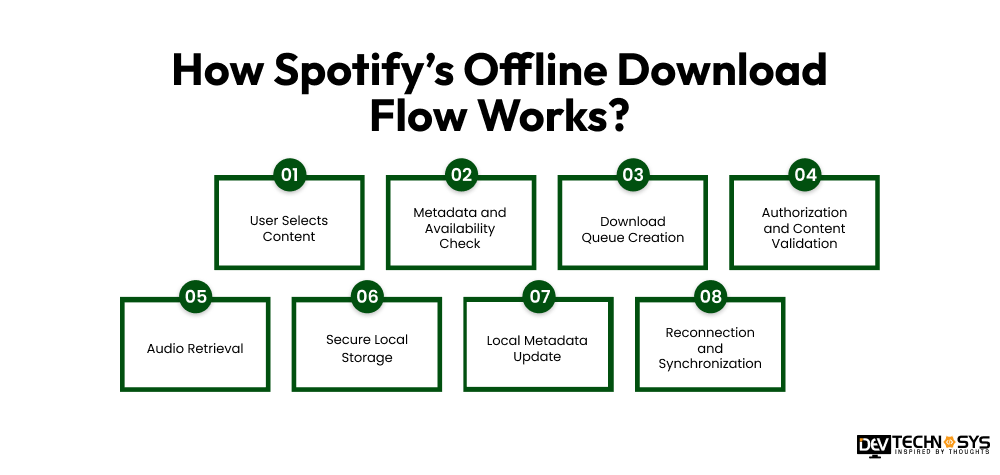
- User Selects Content: The user chooses a playlist, album, or other supported content and taps the download option.
- Metadata and Availability Check: The app retrieves track metadata and checks whether the selected content is available for the user and market.
- Download Queue Creation: The download manager organizes tracks into a queue and manages download progress, retries, and interruptions.
- Authorization and Content Validation: The system verifies the user’s access rights before allowing protected content to be downloaded.
- Audio Retrieval: Authorized audio content is retrieved through the media-delivery infrastructure, typically using CDN-based delivery.
- Secure Local Storage: The app stores downloaded content in a protected/encrypted form on the device (encrypted SQLite). Spotify confirms that downloaded music is stored in encrypted form on iOS.
- Local Metadata Update: The app records information needed to identify downloaded tracks and make them available for offline playback.
- Reconnection and Synchronization: When connectivity returns, the app synchronizes relevant download and library state with backend services and verifies continued access.
Spotify allows Premium users to go online at least once every 30 days to keep downloads active.

In simple terms:
Select → Validate → Queue → Authorize → Download → Encrypt → Store → Sync
Spotify’s offline music streaming architecture is designed to enable premium users to download music for offline listening, with limits on devices and downloaded tracks
Expert Insight:
According to the CTO of Dev Technosys, Mohit Nag, following SOC 1, SOC 2, and ISO 27001 frameworks is standard operating procedure across our music streaming app development teams, not an exception.
Background Download Architecture on iOS and Android
The background download architecture on iOS and Android enables mobile software applications to continue with file transfers while not being visible on the screen. Nevertheless, iOS and Android treat background processes differently; the music streaming app tech stack for both iOS and Android is different as well. Therefore, cross-platform solutions need to implement device-specific downloading procedures.
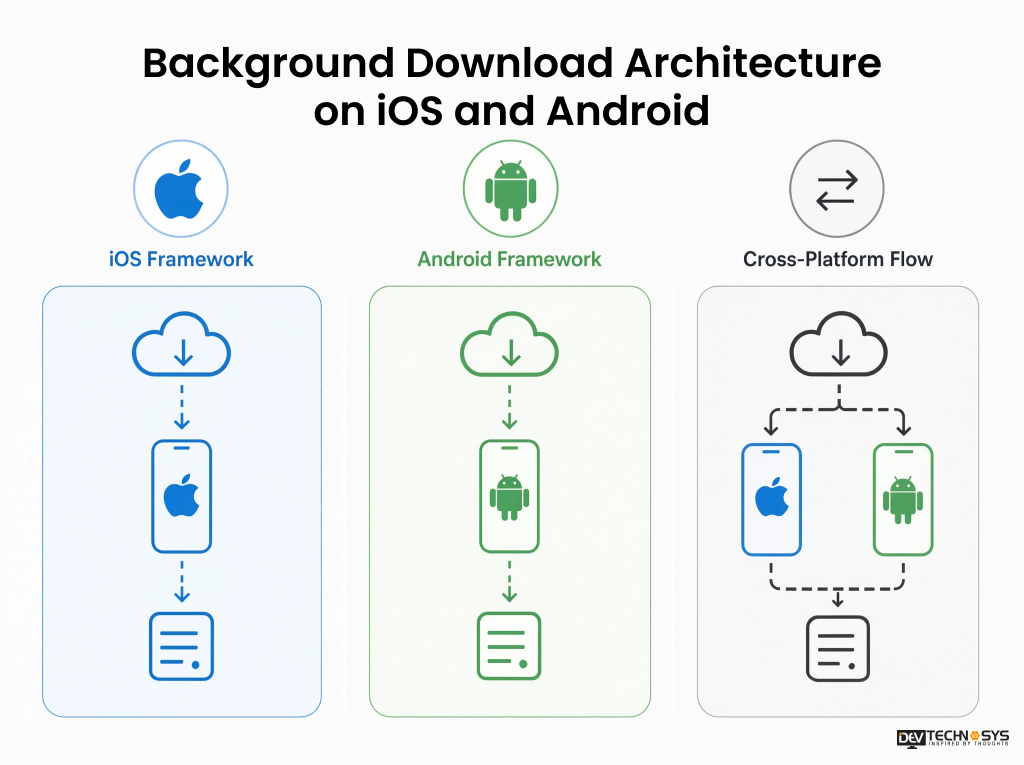
iOS Framework
- Make use of the URLSession background sessions that are used for control by the operating system.
- The operating system deals with file transfers even if the application is in the background state.
- The download tasks can be continued at a later point as they are saved and resumed.
- When completed, the app gets notifications regarding successful downloads.
- The app saves the file in the local secure memory and updates its database.
Android Framework
- Implement WorkManager for stable background activities that may be delayed.
- In case of long-running downloads, Android uses notifications to inform the user.
- The download requests are sent to the queue if necessary.
- DownloadManager could be used for some downloads controlled by the system.
- The results and download status must be stored in Android Keystore.
Cross-Platform Flow
Download Request → Download Queue → Platform Download Manager → Local Storage → Database Update → Sync/Retry
The key Spotify system design principle is to let the operating system manage background execution wherever possible, rather than keeping an app process continuously alive. This improves reliability, battery efficiency, and compliance with platform restrictions.
Inside the Offline Download Manager
Whether you use a music streaming app like Tidal or Spotify, the offline download manager acts as the control layer between the user’s download request, media delivery services, and local device storage. For a Spotify-like platform, it needs to handle large numbers of audio files reliably, even when connectivity or storage conditions change.
- Download queue management
- Priority-based downloads
- Resume and retry mechanisms
- Partial downloads
- Wi-Fi vs. mobile-data policies
- Storage availability checks
- Background downloading
- Handling interrupted downloads
EEAT angle: Explain why a production-grade download manager needs idempotency, retry policies, state persistence, and failure recovery rather than treating downloads as simple HTTP requests.
How Spotify Stores Downloaded Music Securely?
Spotify does not treat offline downloads like ordinary audio files. Downloaded content is protected locally so users can play it through the app without gaining unrestricted access to the underlying audio.
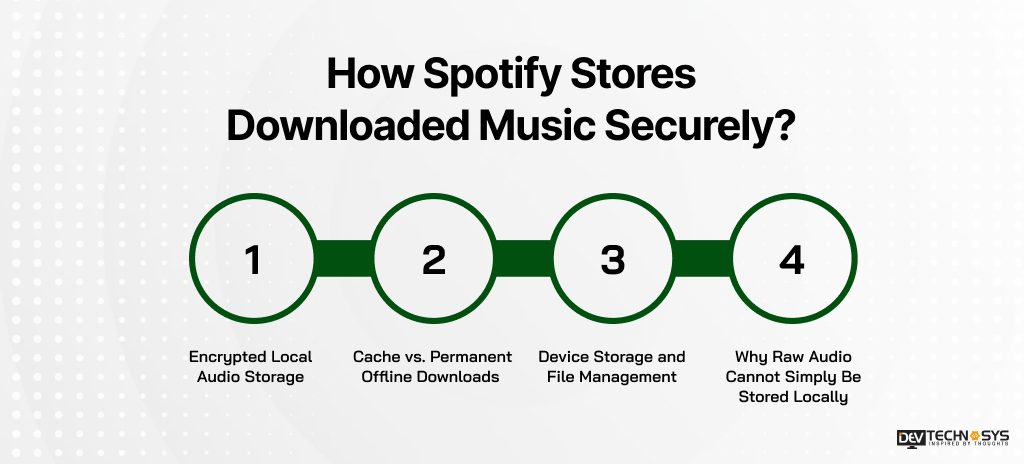
1. Encrypted Local Audio Storage
Spotify stores downloaded music in an encrypted form on iOS devices. iOS Secure Enclave helps prevent downloaded tracks from being directly accessed, copied, or played through other applications.
2. Cache vs. Permanent Offline Downloads
- Cache: Temporary data stored to improve playback and reduce repeated downloads.
- Offline Downloads: Content intentionally saved by users for offline listening.
Both consume device storage but serve different purposes.
3. Device Storage and File Management
Offline music can consume substantial device storage, especially when users download large playlists or albums. The application therefore needs a local file-management layer that can:
- Track which content has been downloaded
- Monitor available device storage
- Resume incomplete downloads
- Remove deleted or expired content
- Manage cached and offline media separately
- Maintain metadata for local playback
- Prevent unnecessary duplicate downloads
Spotify recommends having at least 1 GB of free memory available for its application and content. Premium users can also download up to 10,000 tracks per device across up to five devices, making local storage management an important part of the offline architecture.
4. Why Raw Audio Cannot Simply Be Stored Locally
If downloaded tracks were stored as ordinary playable audio files, users could potentially copy, share, or access the content outside the application. That would create significant problems for copyright protection, licensing agreements, and access control.
A secure offline architecture instead combines:
Protected Audio + Local Metadata + Access Controls + Playback Authorization
The important architectural principle is that offline availability does not mean unrestricted ownership of the audio file.
DRM and License Management in Spotify Offline Playback
DRM helps Spotify control how downloaded content can be accessed when users are offline. The exact internal DRM implementation is not publicly documented, but the architecture generally needs to handle these controls:
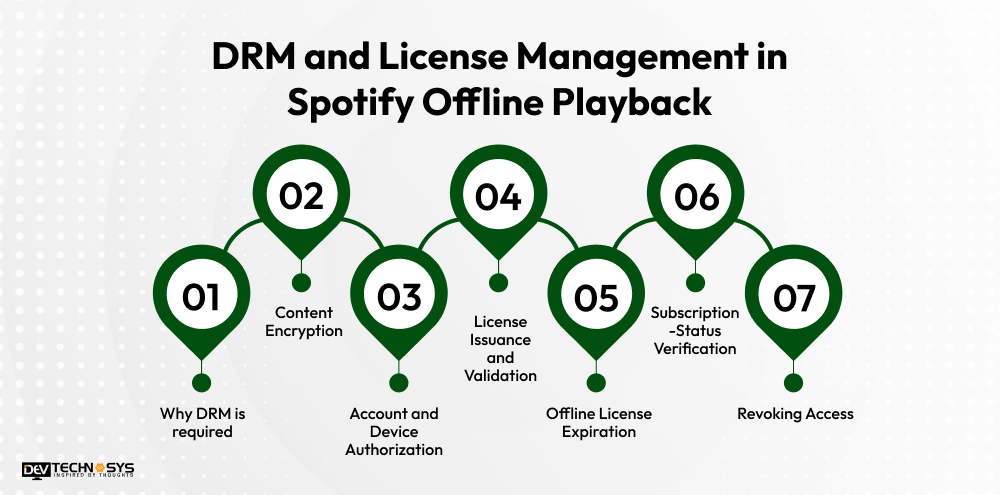
- Why DRM is required: Prevents downloaded music from being freely copied, extracted, or played outside the authorized application.
- Content Encryption: Downloaded audio is protected so the raw content cannot be directly accessed as a normal media file.
- Account and Device Authorization: The system verifies that the user and device are permitted to access the downloaded content.
- License Issuance and Validation: Playback depends on valid authorization information associated with the downloaded content.
- Offline License Expiration: Offline access can be time-limited, requiring license lease and periodic online verification.
- Subscription-Status Verification: Spotify requires Premium users to go online at least once every 30 days to keep downloads active.
- Revoking Access: If a user loses the required entitlement or access rights change, the system can prevent continued offline playback after authorization is refreshed.
What Happens When You Press Play Offline?
When a user presses Play without an internet connection, the app follows a local playback path rather than requesting audio from a remote server:
Walk through the playback path: Downloaded Track → Local Metadata → License Check → Decryption → Decoder → Audio Output
Playback Stage |
What Happens |
Example |
| Offline Entitlement | Checks whether the user can access the downloaded content offline. | Premium user plays a previously downloaded playlist. |
| Local Track Lookup | Finds the downloaded track and its local metadata. | App identifies the selected song and its stored location. |
| License Validation | Checks whether offline authorization is still valid. | Expired offline access triggers an online verification. |
| Decryption | Protected audio is processed for authorized playback. | Encrypted track data is converted into playable content. |
| Audio Decoding | Audio codecs used for offline streaming. The decoder converts the protected audio into audio data. | Encoded audio is prepared for the device’s audio system. |
| Buffer Management | Keeps enough audio ready for smooth playback. | The next few seconds are buffered to avoid interruptions. |
| Playback Restrictions | Applies applicable account or content restrictions. | Certain playback actions may remain restricted. |
| Next-Track Prefetching | Prepares upcoming content when supported. | The next song is prepared while the current song plays. |
In simple terms: offline playback replaces the network-based audio retrieval step with local protected storage, while authorization and playback controls continue to govern access.
Streaming vs. Offline Playback: Architecture Comparison
Streaming playback depends on network connectivity to retrieve audio from remote infrastructure, while offline playback piggybacks on protected content stored locally on the device.
Their architectures differ mainly in data source, authorization, storage, buffering, and synchronization. Streaming prioritizes network delivery; offline architecture prioritizes secure local access and uninterrupted playback without internet.
Component |
Online Streaming |
Offline Playback |
| Network | Required | Not required during playback |
| Audio source | Remote delivery/CDN | Local encrypted storage |
| DRM | Authorization during delivery/playback | Local entitlement + periodic validation |
| Buffering | Network + local buffer | Local buffer |
| Content availability | Server-controlled | Previously downloaded |
| Sync | Continuous | Deferred until connectivity |
How Spotify Handles Network Failures and Connectivity Changes?
Spotify’s client architecture is designed to handle changing network conditions without unnecessarily interrupting playback. Its approach can be understood through these mechanisms:
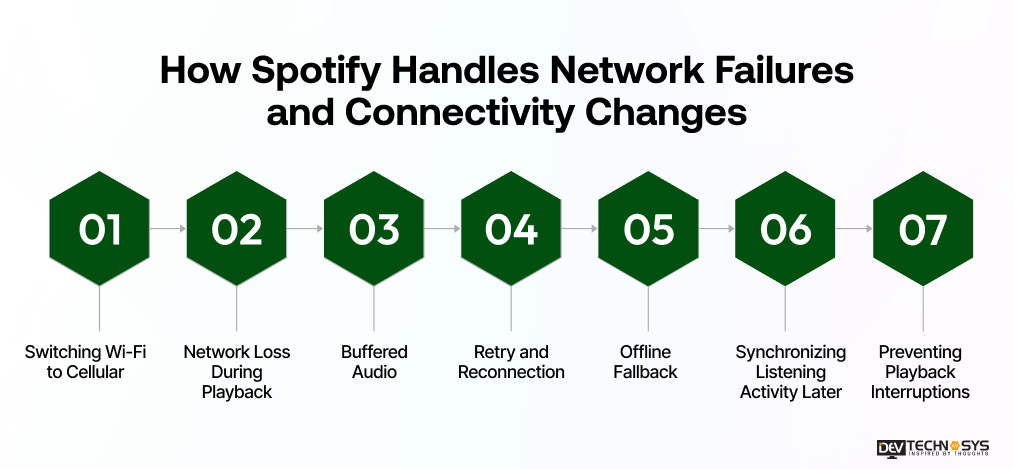
- Switching Wi-Fi to Cellular: The app can adapt when the device moves between Wi-Fi and mobile data, subject to the user’s network settings.
- Network Loss During Playback: If connectivity drops, already buffered or downloaded audio can continue playing.
- Buffered Audio: Playback keeps a portion of upcoming audio ready to reduce the impact of short network interruptions.
- Retry and Reconnection: Failed network requests can be retried when connectivity becomes available again.
- Offline Fallback: For downloaded tracks, playback can switch to locally stored content when the network is unavailable.
- Synchronizing Listening Activity Later: Actions performed offline can be synchronized with backend services after the device reconnects.
- Preventing Playback Interruptions: Local caching, buffering, retry logic, and offline downloads work together to maintain a smoother listening experience.
Spotify has also invested in client-side architecture for slower networks and older devices, including batching and local storage of metadata.
Key Technologies Behind an Offline Music Streaming Architecture
Instead of claiming Spotify uses every technology below, frame this as a reference architecture for building a Spotify-like system:
Layer |
Technologies |
Purpose |
| Mobile | Swift, Kotlin | Offline downloads and playback |
| Backend | Java, Python, Go, Node.js | Business logic and user management |
| APIs | REST, GraphQL, gRPC | Client-server communication |
| Storage | Object Storage + Database | Audio files and metadata |
| CDN | Distributed CDN | Fast media delivery |
| Caching | Redis, Client Cache | Faster data access |
| Messaging | Kafka, Pub/Sub | Event processing and synchronization |
| Security | DRM, Encryption, Authentication | Content and account protection |
| Observability | Metrics, Logs, Tracing | Monitoring and troubleshooting |
Fun Fact
Did you know Spotify has come up with yet another amazing feature besides offline play, which is Spotify Wrapped? It is an annual event that gives listeners a summary of their listening habits over the last year and has started rolling out for the streaming service’s users.- BBC News
How to Build a Spotify-Like Offline Music Streaming Architecture?
Building a Spotify-like offline streaming architecture requires combining online streaming infrastructure with secure local playback, content rights management, and scalable music streaming app backend architecture.
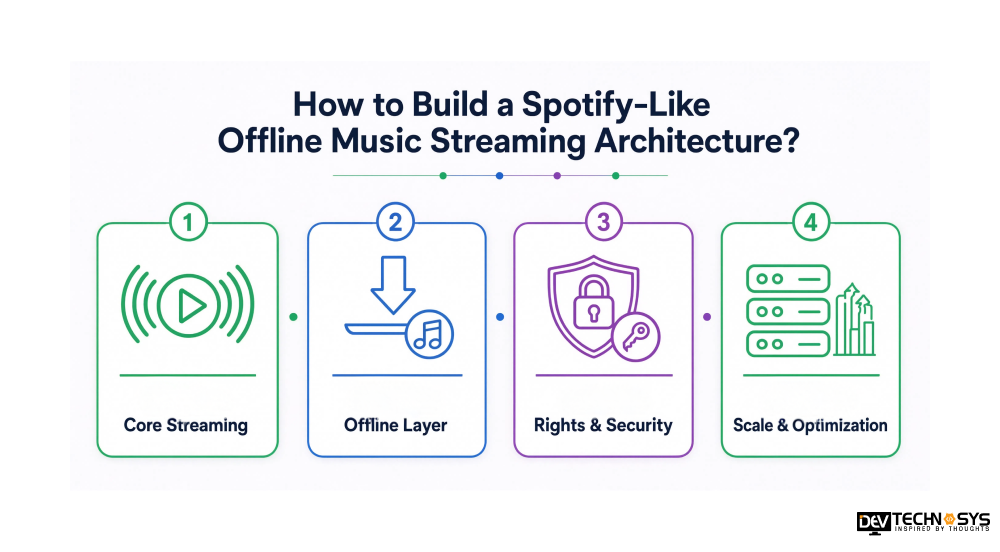
Phase 1: Core Streaming
Authentication → Catalog Service → CDN → Streaming Player
Build user authentication, music catalog APIs, content delivery through a CDN, and an adaptive streaming player for online playback.
Phase 2: Offline Layer
Download Manager → Encrypted Storage → Local Database → Offline Player
Add a download manager to fetch authorized content, protected local storage for downloaded data, and a local database for metadata, playlists, and playback state.
Phase 3: Rights & Security
DRM → License Service → Device Management → Entitlement Validation
Implement DRM and license management to protect downloaded content. Device management and entitlement checks ensure offline playback remains linked to authorized users and devices.
Phase 4: Scale & Optimization
Caching → Message Queues → Observability → Analytics → Multi-Region Infrastructure
Use caching, queues, monitoring, analytics, and multi-region infrastructure to handle growing users, downloads, streaming requests, and backend workloads efficiently.
Conclusion
Spotify’s offline streaming architecture goes beyond simply downloading music to a device. Batch metadata loading, pre-created sortings, protected local storage, and periodic online validation work together to deliver faster access while maintaining playback controls. For businesses building a Spotify-like app, this approach shows how caching, secure storage, synchronization, and entitlement management can shape a reliable offline experience.
If you’re looking for top music streaming app development companies to build a scalable platform like Spotify with secure offline playback and seamless streaming, Dev Technosys may be your best choice. With 16+ years of app development expertise, we turn your concept into a production-ready solution.
Frequently Asked Questions
Find answers to the most common questions related to this article.
Technically, Spotify uses a distributed architecture that connects mobile and desktop apps with backend services, APIs, content delivery networks (CDNs), databases, and audio storage. When a user plays a track, the app authenticates the request, retrieves the required metadata and playback information, and streams encrypted audio through a CDN.
To download the music, the user selects a playlist, album, or podcast available for offline listening. The app manages the download of the encrypted audio files to the device and takes care of storing the storage of downloaded files. When the user plays the downloaded file offline, the app verifies the files stored locally without needing to retrieve the audio stream from the Internet.
Spotify stores its offline content in app-specific storage rather than making it available as traditional music files on the user's device. The storage location and methods vary depending on the operating system and app version being used. The application itself manages any downloaded content, which is not meant for independent use.
Spotify downloads aren't stored as standard MP3 files. Instead, the downloaded audio is kept as protected data tied to the app, so users cannot locate songs to copy or play them in another media player. The technology ensures that copyright is not violated through Spotify.
Spotify does not download songs as standard audio files; it manages offline music as protected data tied to the app. Encryption and access limitations enable the use of the downloaded content only through the authorized application and account. Many of the application's encryption mechanisms are proprietary and not disclosed to the public.
The quality of offline downloads is influenced by factors such as the quality setting choices in the Spotify application and the user's device and subscription plan. Higher quality requires more storage and data. An application similar to Spotify must use a selected bitrate to download, encode, or obtain the corresponding audio representation and store the resulting protected content locally for offline playback.
Offline sync conflict resolution in mobile apps detects sync conflicts using timestamps, version numbers, or revision IDs when local and server data differ. They then apply predefined rules such as:
Last-Write-Wins: Keeps the latest change.
Server-Wins: Prioritizes server data.
Client-Wins: Keeps the local update.
Field-Level Merge: Combines non-conflicting changes.
Manual Resolution: Lets users choose which version to keep.
The selected strategy depends on the app's data consistency and collaboration requirements.














