


















Key takeaways:
-
- To build an AI photo editing app like Soda, follow several steps, such as gathering requirements, tech stacks, designing UI/UX, development, testing, security, launching, and maintenance services.
- Offering many revenue opportunities, such as a freemium model, subscription plan, in-app purchases, advertisements, collaboration & partnerships, and enterprises and API licensing.
- The cost to build an AI photo editing app lies between $30,000 to $150,000, or based on the project complexity, number of AI-based features, backend processes, and many more.
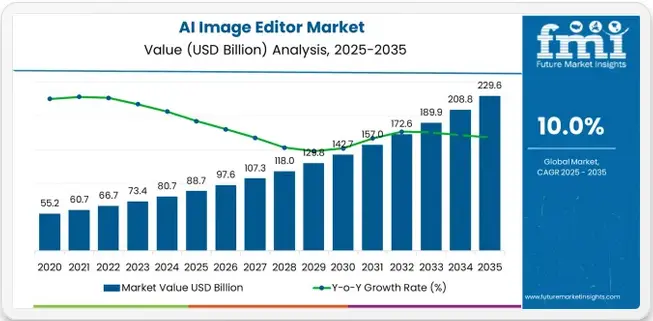
- The global AI photo editing applications market shows an explosive growth with a CAGR of 10.0% during the forecast period.
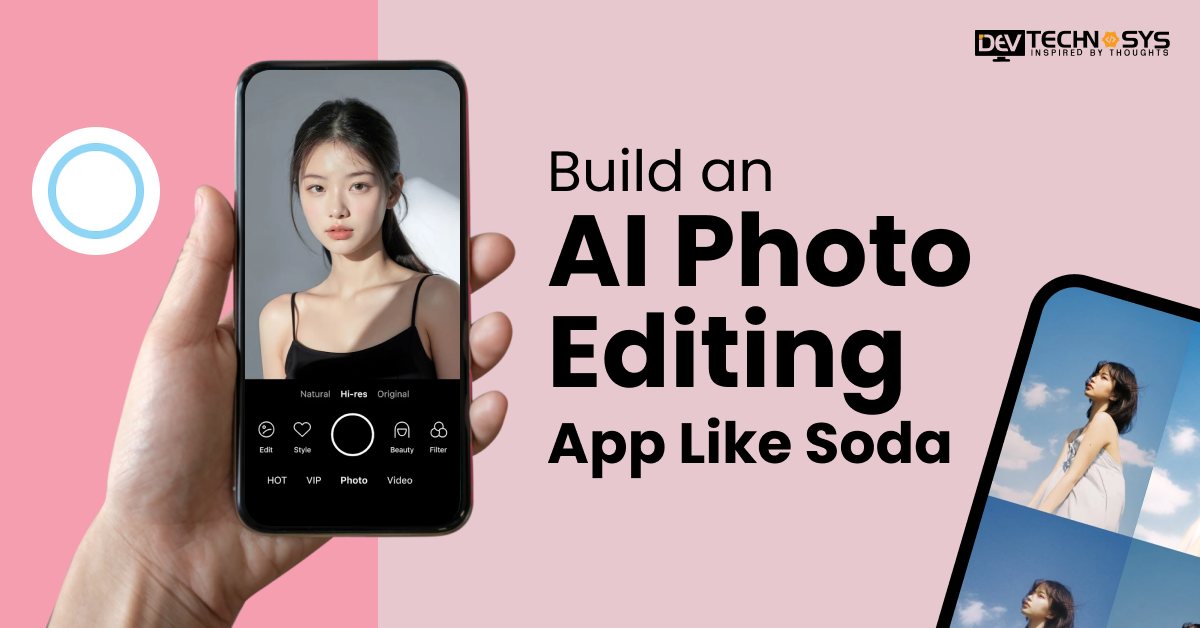
Using AI-powered photo editing apps continues to change how users manipulate, improve, and transform their photos. Apps like Soda produce massive popularity due to providing customers with smart beauty filters, enhancements to their portraits, being able to change their photo backgrounds, and with professional photographic quality output.
As long as the need for creator-based social media-ready content increases, companies will keep investing in AI-driven photo editing applications because of the potential risks that come from this growing trend.
According to Future Market Insights, the AI photo editing apps market was valued at around $97.6 billion in 2026. It is expected to grow to around $229.6 billion by the end of 2035.
This guide will describe the key factors you should keep in mind when build an AI photo editing app like Soda, as well as provide a description of the stages involved in the AI camera app development process.
What is Soda?
Soda is an AI-based image editing and beauty camera platform that enables users to capture photos seamlessly and edit with advanced filters. It is famous among social media users to modify their photos with modern and futuristic editing tools. Soda offers many features like facial enhancements, makeup effects, portrait retouching, beauty filters, and image optimization. This application provides a personalized experience to users when they make changes to their photos.
How Does Soda App Work?
Discover how SODA AI Photo Editor transforms everyday photos into professional-quality portraits using powerful AI tools. Including face retouching, background removal, filters, and smart enhancements designed for an effortless mobile creative editing experience.
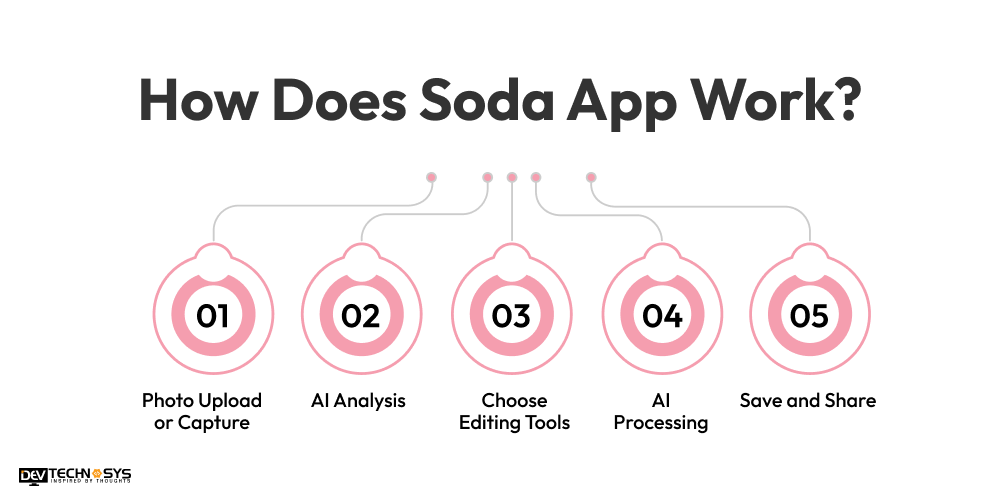
1. Photo Upload or Capture
Users open SODA AI Photo Editor and upload or capture a photo directly from the camera or gallery instantly and easily.
2. AI Analysis
AI analyzes facial features, background, lighting, and image quality automatically to detect enhancements needed for optimal editing results instantly and accurately.
3. Choose Editing Tools
Users select filters, retouch tools, beauty effects, or creative styles based on preferences to customize photo appearance quickly with ease.
4. AI Processing
AI applies edits in real time, adjusting skin, background, colors, and lighting while maintaining natural-looking results seamlessly without delay.
5. Save and Share
Users save, export, or share edited photos directly to social media platforms or device storage instantly in high-quality formats.
Market Statistics of Global AI Photo Editing Applications
- In accordance with Data Intelo, the Android platform holds the largest market revenue share, around 42.3% in 2026.
- Future Market Insights says, in terms of end user, the enterprise users segment records the highest share, around 40.8%, in the AI image editor market in 2026.
- As cited by Technavio, the North America region holds the highest revenue share, around 34%, during the forecast period.
- The worldwide AI photo editing apps are projected to grow with a Compound Annual Growth Rate (CAGR) of 10.0% from 2026 to 2035.
- As per Future Market Insights, the top key players of the AI photo editing market Abode, Canva, Corel Corporation, ACD Systems International Inc., and Fotor
Why Businesses Want to Invest in AI Photo Editing App Development Services?
Nowadays, the craze of AI photo editing is higher, and most users use these AI photo editing apps to make their photos more attractive and futuristic. That’s why the businesses are ready to adopt an AI photo editing application to gain higher profits and reach global audiences.
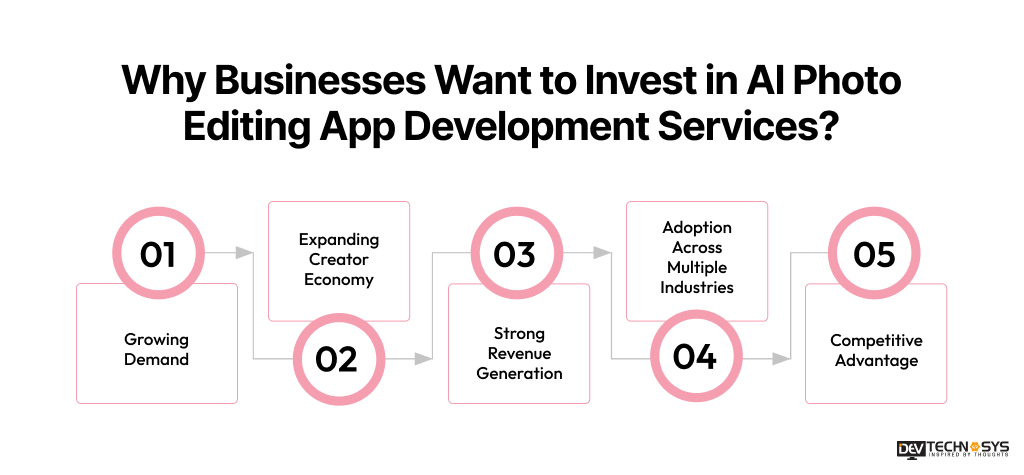
1. Growing Demand
Users prefer quick, automated, professional on-demand app development solutions that provide professional image quality without any need for technical expertise. So, users use the AI photo editing applications to generate attractive videos with just one-tap enhancements, creating broad opportunities for significant growth.
2. Expanding Creator Economy
Content creators, influencers, and social media users require high-quality video to engage more users. This is one of the reasons that entrepreneurs build an AI photo editing app. These applications offer advanced functionalities, such as enhancements, filters, automated retouching, and many more. It helps content creators to rapidly transform their videos into engaging ones.
3. Strong Revenue Generation
The Fotogenic app offers various monetization opportunities to businesses. It involves subscription plans, a freemium model, advertisements, in-app purchases, enterprise tools, and many more. These strong revenue techniques help businesses to generate higher profit, and they can also increase the overall valuation of the AI image editing app.
4. Adoption Across Multiple Industries
There are various types of industries that adopt AI photo editing apps to create highly engaging photos. It involves social media, entertainment, marketing, photography, beauty, and e-commerce sectors. These advanced editing tools help businesses to serve different customer segments, and they can also expand the overall revenue potential.
5. Competitive Advantage
Advanced AI capabilities such as facial recognition, background replacement, object removal, and personalized editing experiences help businesses differentiate their products. Investing in innovative Generative AI development services allows companies to stay competitive and meet evolving customer expectations. It can also make it different from the existing AI photo editing applications and create its own kingdom.
Look What Adobe Says About AI Photo Editing Apps-
85 percent of creators would turn to an AI agent that learns their creative style, signaling the next wave of AI adoption.
7 Key Steps to Build an AI Photo Editing App Like Soda
To create an AI photo editing app like Soda requires a strategic plan and follows strong development steps. It includes market analysis, project requirements, tech stacks, design user interface, backend development, testing, security, QA, deployment, and maintenance services. Explore the step-by-step guide of the video editing app development process:
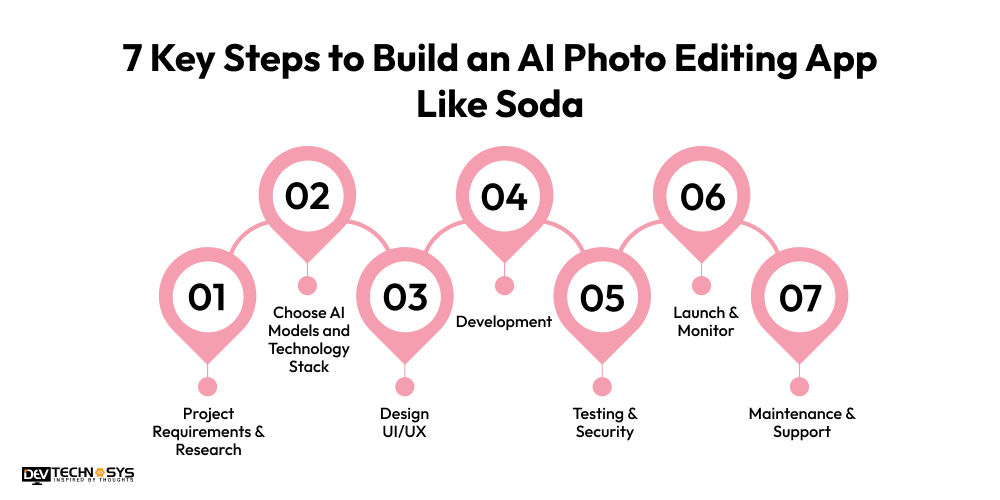
1. Project Requirements & Research
Before beginning the photo enhancement app development process, find out your project requirements like features, services, design, and more essential requirements. Prepare a structure sheet of demands that makes it simple to understand every need and what you actually want in your AI photo editing app. After that, conduct the market research on which applications are in higher demand and which functionalities are popular. Observe features like AR filters, one-tap enhancements, lighting correction, and more.
2. Choose AI Models and Technology Stack
Hire a professional AI development company to choose the best AI & ML models to integrate modern services like facial recognition, segmentation, and photo enhancement. Use various types of tech stacks:
Frameworks: TensorFlow, PyTorch, etc
Frontend: React Native, Flutter, etc
Backend: Python, Node.js, etc
Cloud Services: AWS, Google Cloud, etc
Designing: Figma, Zeplin, etc
3. Design UI/UX
Move to another stage to create an AI photo editing app like Soda, design a user-friendly interface with simple themes and layouts. It makes it easy to navigate all the features and functionalities with just one tap. This involves various design elements, such as layouts, fonts, templates, textures, wireframes, prototyping, colors, themes, and many more. You can also observe the existing AI-based photo image editing app and find some unique designs.
4. Development
In the fourth step, hire professional coders from a mobile app development company to perform the backend operations. Involves various backend processes, such as business logics, API development, authentication & security, databases, servers, infrastructure, third-party integrations, and more. Also, connect the frontend processes with the backend processes to have seamless communication.
5. Testing & Security
Conduct extensive testing for AI accuracy, app speed, and usability across different devices. Optimize models to reduce latency and battery usage. Fix bugs and improve rendering quality. Collect feedback from beta users to refine features. Continuous optimization ensures the app remains competitive and delivers consistent, high-quality photo enhancements. Implement the strong security measures, such as two-factor authentication, encryption techniques, biometrics, and firewalls.
6. Launch & Monitor
Finally, launch the AI photo editing app on the selected platforms, such as Android and iOS. Make sure that all the files and features are successfully uploaded to the live phase. Monitor every activity of the application and check its overall performance. Businesses can also use marketing techniques to reach wider audiences, such as blogs, advertising, email marketing, product marketing, and more.
7. Maintenance & Support
Now, it’s time to conduct the maintenance and support services to keep the application up-to-date and optimize performance. Hire a video editing app development company to perform various maintenance services, such as fixing bugs or glitches, regular updates, feature enhancements, adding new designs, upgrading OS version, and more. Offering 24/7 support to provide instant responses to customers and solve their issues as soon as possible.
Industry Insights: According to Canva, AI editing for non-designers positions AI as targeting 99% of users without professional design skills.
10 Features That Must Be Integrated in an AI Photo Editing App Like Soda
Offering must-have features that integrate AI photo editing apps and it can increase the users’ engagement. These features of an AI photo editing app like Soda offer flexibility and convenience to users and allow them to easily edit their photos to an attractive look.
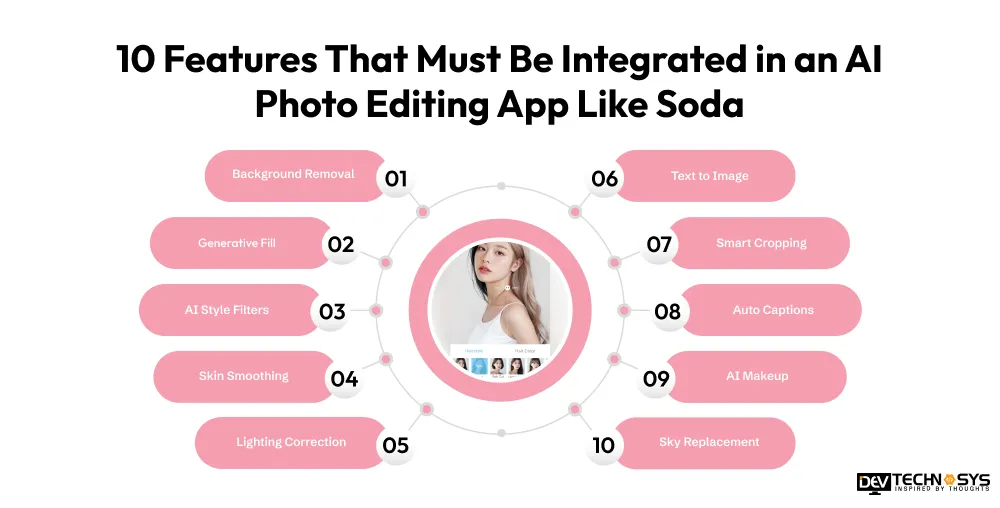
1. Background Removal
Soda clone apps use background removal to quickly detect subjects, separate them from surroundings, and replace and erase backgrounds for clean shots.
2. Generative Fill
The Soda alternatives provide generative fill that enables users to expand images by using AI fill according to the image themes, styles, lighting, and perspectives.
3. AI Style Filters
An AI photo editing application offers AI-style filters to transform the image into an artistic look, such as oil painting, cinematic tones, sketch, vintage aesthetics, watercolor, and more.
4. Skin Smoothing
Beauty filter app like Soda Skin provides a smoothing feature that reduces imperfections, evens tone, and enhances complexion using AI while preserving pores, texture, and natural facial details for a natural beauty enhancement in photos.
5. Lighting Correction
The lighting correction automatically adjusts the photo’s brightness, contrast, shadows, clarity, exposure, and quality. It improves the photo quality and also highlights.
6. Text to Image
Text-to-image generation converts written prompts into detailed visuals using AI, enabling creative content creation, concept art, and marketing materials from simple descriptive input instantly and accurately.

7. Smart Cropping
Soda alternatives uses smart cropping to automatically detect subjects and reframe images for optimal composition for various ratios, and make sure that focus remains on key elements.
8. Auto Captions
A photo editing app like Snapseed generates smart text descriptions for images and edits, improving accessibility, social sharing, and content understanding using AI-powered recognition and context analysis for better engagement.
9. AI Makeup
Soda clone apps use AI makeup to apply virtual cosmetics, like lipstick, eyeliner, blush, eyeshadow, foundation, and more. It enables users to view previous looks in real-time.
10. Sky Replacement
Sky replacement AI detects sky regions and replaces them with realistic alternatives such as sunsets, blue skies, or dramatic clouds while maintaining natural lighting consistency for enhanced visuals.
Real Case Study: AI Photo Editing Tool
We developed an AI photo editing application, GlowEdit AI, for a creative media startup. With a starting budget of the project around $18K, the client expanded requirements to include AI retouching, generative fill, AI makeup, background replacement, and batch editing features capabilities. Major challenges included GPU optimization, third-party API instability, privacy compliance, and performance issues on low-end devices globally. The final product increased engagement, reduced editing time, and boosted subscription conversions, enabling scalable business growth for the client.
Mohit Nag
– CTO
What is the Cost to Build an AI Photo Editing App Like Soda?
The cost to develop an AI photo editing app like Soda is around $30,000 to $150,000, depending on crucial reasons and project requirements. There are a higher number of factors that impact the total Soda clone app development cost, such as features, AI-based services, backend infrastructure, deployment platforms, tech stacks, third-party integrations, and Android & iOS app development team. Basically, the cost to build an AI photo editing app like Soda can be affected through AI and ML services because they are highly expensive, and AI & ML developers are also charged higher than other developers.
Complexity Level |
Key Features |
Estimated Cost (USD) |
| Low Complexity | User login, photo upload, basic filters, crop/rotate, social sharing | $30,000 – $60,000 |
| Medium Complexity | AI-powered enhancement, beauty filters, skin smoothing, makeup effects, cloud storage | $60,000 – $100,000 |
| High Complexity | Real-time face detection, AR beauty effects, background replacement, AI portrait enhancement, premium subscriptions | $100,000 – $150,000 |
1. AI Feature Complexity
In this first cost affecting factor, AI features are one of the most common factors that can fluctuate the overall AI photo editing app development cost. Basic features like user registration, filters, image enhancement, and more are affordable. But AI-powered features like virtual makeup, object removal, facial retouching, generative AI editing, and more. So, these can highly affect the cost to develop an AI video editing app.
2. Development Team
Moving to the second factor, the development team can also fluctuate the total project budget. Developers with average experience in AI models can charge less salary. But the highly experienced AI developers can charge a higher salary than others. Mainly, the developers are hired based on the project complexity and customization level.
3. Third-Party Integrations
Every user wants flexibility and accessibility within an AI photo editing application; that’s why integration of third-party tools and applications is necessary. There are various types of tools, such as communication tools, social media logins, analytics, reporting, secure payment gateways, and many more. Some of the integrations are highly paid because their licensing fees and developers’ time are consumed during integration. It leads to a higher AI photo editing app development cost and time.
4. Hiring Model
There are various types of hiring models available, such as an in-house team, freelancers, and an iOS & Android app development company. Each cost has different costs, and each model has a different role and responsibilities. Freelancers are best for short-term projects, but they lack reliability and quality. An in-house team is best for long-term project and, but they are too expensive. Development agencies are experts in every type of project, but they demand a higher cost.
5. Maintenance & Support Services
To keep the application up-to-date, must conduct maintenance and support services. It includes various services, such as fixing bugs or glitches, performance optimization, regular updates, backend services, upgrading the OS version, and more. Many of the maintenance services are time-consuming, and they directly affect the developer’s time. So, it can impact the overall cost to build an AI photo editing app like Soda.
Cost Factor |
Key Consideration |
Estimated Cost Impact (USD) |
| Project Complexity | AI processing, image enhancement, and real-time editing capabilities | $20,000 – $70,000+ |
| Platform Coverage | iOS, Android, cross-platform, or web support | $15,000 – $40,000+ |
| UI/UX Design Quality | Custom interface, intuitive workflows, visual appeal | $5,000 – $30,000+ |
| Backend & Cloud Infrastructure | Storage, processing power, scalability, security | $10,000 – $35,000+ |
| Development Team Location & Expertise | Team size, experience level, and geographic region | $30,000 – $60,000+ |
See Microsoft’s Opinion on AI Photo Editing Apps
Microsoft Copilot integrates image generation into productivity tools, embedding AI editing into everyday business workflows.
Building Responsibly: Compliance, Privacy & Ethical Standards Every AI Photo App Must Meet
Build an app like Canva isn’t just about smart filters and sleek UI; it’s about earning user trust. From biometric data laws to ethical AI design, meeting these standards protects your users, your business, and your app’s long-term reputation in global markets.
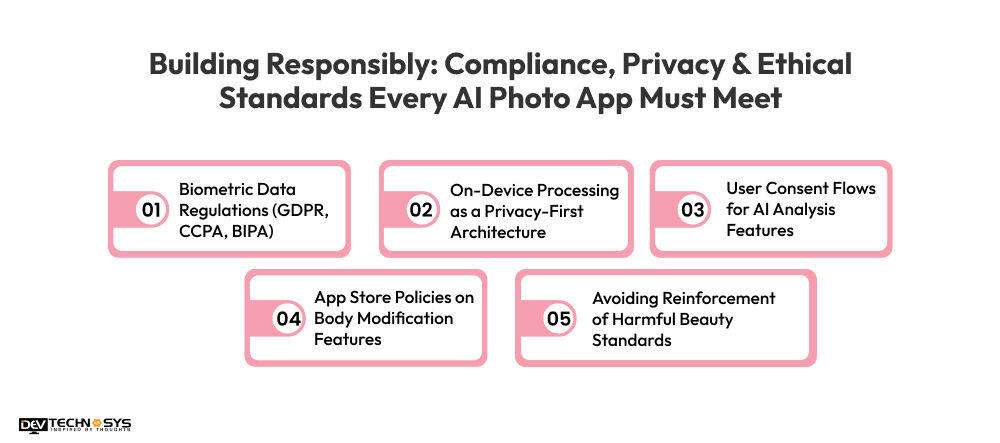
1. Biometric Data Regulations (GDPR, CCPA, BIPA)
AI photo apps collect facial geometry, legally classified as biometric data. GDPR requires explicit user consent and the right to erasure. CCPA mandates disclosure of data collection. Illinois BIPA demands written consent before capturing any facial recognition data, with steep per-violation penalties.
2. On-Device Processing as a Privacy-First Architecture
Processing AI edits directly on the user’s device, rather than sending photos to a cloud server, means sensitive image data never leaves the phone. This minimizes breach risks, reduces regulatory exposure, and builds user trust, especially in privacy-conscious markets like the EU and Germany.
3. User Consent Flows for AI Analysis Features
Before running face-shape analysis, skin tone detection, or body proportion tools, apps must present clear, plain-language consent screens. Consent must be freely given, specific, and revocable. Burying permissions inside lengthy terms of service violates GDPR Article 7 and increasingly triggers App Store rejections from Apple.
4. App Store Policies on Body Modification Features
Apple and Google have tightened guidelines around apps that alter body appearance, particularly for minors. Features like body slimming or skin whitening can trigger rejections or age-gate requirements. Developers must review platform-specific content policies pre-submission and implement safeguards preventing use by users under 13.
5. Avoiding Reinforcement of Harmful Beauty Standards
AI beauty tools trained on narrow datasets can embed bias, lightening skin, narrowing noses, or enlarging eyes as default enhancements. This raises serious ethical liability and PR risk. Responsible selfie editing app development requires diverse training data, opt-in-only reshaping features, and user controls to disable AI beauty suggestions entirely.
Want a chatbot demo or pricing? Fill the form and talk to our experts today.
Pick what you need below — you can select more than one — then tap Get detail to continue.
-
Chatbot demo dashboard
-
Cost to develop an app
-
Industry report
-
Case study
Tech Stacks are Required to Build an AI Photo Editing App Like Soda
A higher number of technologies are used to develop an AI photo enhancer app. These tech stacks cover various areas, such as frontend & backend development, AI & machine learning, cloud services, database, authentication, design UI/UX, and many more.
Development Layer |
Technologies |
Description |
| Frontend (Mobile App) | Swift, Kotlin, Flutter | Builds the user-facing app interface and handles camera, editing UI, and interactions smoothly on iOS and Android. |
| Backend Development | Node.js, Python | Manages APIs, user accounts, image processing requests, and overall server-side application logic. |
| AI & Machine Learning | TensorFlow, PyTorch, MediaPipe | Powers face detection, beauty enhancement, segmentation, and intelligent photo editing features. |
| Image Processing Engine | OpenCV, Core Image | Handles real-time filters, transformations, and pixel-level image editing operations. |
| Cloud Infrastructure | AWS, Google Cloud Platform (GCP) | Provides scalable computing power for AI processing, storage, and app hosting services. |
| Database & Storage | PostgreSQL, Firebase, Amazon S3 | Stores user data, photos, settings, and media files securely and efficiently. |
| Authentication & Payments | Firebase Auth, OAuth 2.0, Stripe | Manages secure login systems, user verification, subscriptions, and monetization. |
| DevOps & Analytics | Docker, Kubernetes, Firebase Analytics | Ensures smooth deployment, scaling, and monitoring, and tracks user behavior and app performance. |
Build Vs Buy Vs Partner: Which Fits Your AI Photo Editing App Development
Are you still confused about which development criteria are best for you? Offering a clear difference between these development approach and it mainly based on your project type and its complexity level.
Factor |
Build (In-house) |
Buy (Ready-made) |
Partner (Development Agency) |
| Time to Market | Slow (6–18 months) | Very fast (days–weeks) | Medium (1–6 months) |
| Cost Structure | High fixed cost (team, infra) | Low upfront, pay-as-you-go | Medium to high project cost |
| Control Over Product | Full control | Limited control | Medium control (depends on agency) |
| Customization | Fully customizable | Restricted to vendor features | Highly customizable (based on scope) |
| Technical Expertise Needed | Very high (ML + infra team) | Low (integration only) | Medium (agency handles tech) |
| Speed of Iteration | Medium (internal cycles) | Fast | Fast-medium |
| Scalability | Fully self-managed | Vendor-managed | Shared responsibility |
| Risk Level | High execution risk | Vendor dependency risk | Delivery risk (agency quality) |
| Differentiation Potential | Very high | Low (commodity features) | Medium-high |
| Best Fit Stage | Mature startups / AI-first companies | MVP / validation stage | Growth-stage startups needing execution support |
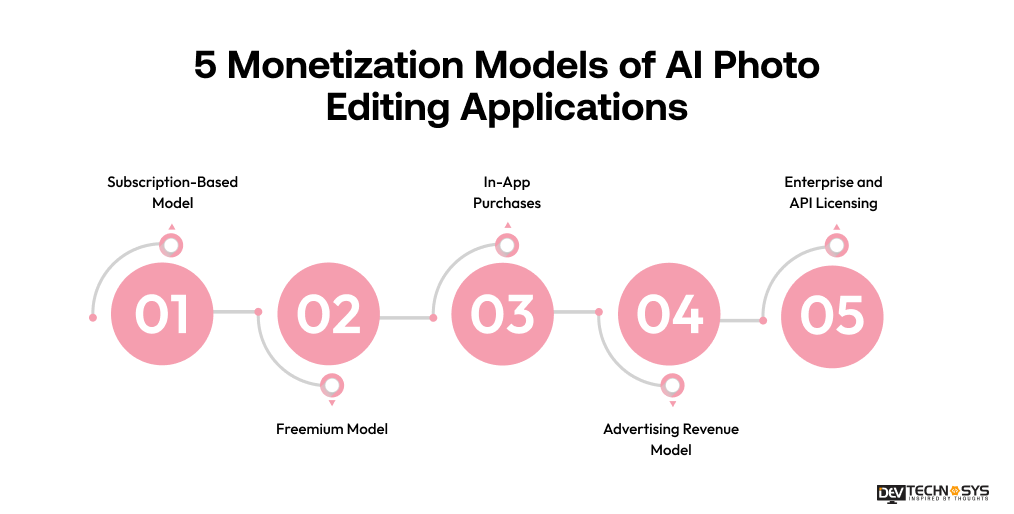
5 Monetization Models of AI Photo Editing Applications
AI photo editing applications offer multiple revenue opportunities beyond user downloads. By combining subscription plans, freemium access, in-app purchases, advertising, and enterprise licensing, businesses can maximize profitability while serving different customer segments. Choosing the right monetization strategy helps ensure sustainable growth, higher user retention, and long-term market success.
1. Subscription-Based Model
Offer users monthly or annual subscription plans that unlock premium AI features, advanced editing tools, exclusive filters, cloud storage, and ad-free experiences. This model generates predictable recurring revenue while encouraging long-term customer retention and continuous engagement with the application.
2. Freemium Model
Provide basic editing features for free while charging for advanced AI capabilities, premium filters, HD exports, and exclusive content. The freemium approach attracts a large user base, allowing businesses to convert engaged free users into paying customers over time.
3. In-App Purchases
Allow users to purchase individual features, editing packs, beauty filters, stickers, templates, or AI credits as needed. This flexible monetization strategy appeals to users who prefer one-time purchases instead of recurring subscriptions, increasing revenue opportunities from diverse audiences.
4. Advertising Revenue Model
Generate income by displaying targeted advertisements, sponsored filters, branded effects, or video ads within the app. Businesses can monetize a large free-user base while maintaining accessibility, making this model particularly effective for applications with high user engagement.
5. Enterprise and API Licensing
License AI photo editing technology to businesses, brands, agencies, and software providers through APIs or custom solutions. This business-to-business model creates high-value revenue streams by enabling organizations to integrate advanced photo editing capabilities into their platforms.
How Dev Technosys Helps to Build an AI Photo Editing App Like Soda?
Dev Technosys is a highly experienced mobile application development company who have 15+ years of experience in developing mobile apps using AI technology for more enhancements.
As per our CTO, Mohit Nag, says that we have already developed around 20+ AI photo editing applications, and we integrate unique features to engage users and prioritize client satisfaction.
We use advanced AI models like PyTorch, TensorFlow, CoreML, and other mobile app development frameworks.
Final Words!
To build an AI photo editing app like Soda, need reliable AI models, focus on user experience, advanced functionalities, and scalable architecture. Many features must integrate, such as lightweight performance, face detection, real-time beauty filters, skin smoothing, and Generative fill. Selecting the best AI models is very important for developing professional AI image editing tools, involves TensorFlow, CoreML, and many more.
Are you ready to develop an app like Soda? Connect with a reputable video editing app development services provider to receive a highly customized AI-based photo editing application.
Frequently Asked Questions
Find answers to the most common questions related to this article.
The cost to develop an AI photo editing app like Soda is around $30,000 to $150,000, based on the higher project complexity and requirements. It involves various factors, such as features, functions, integrations, AI models, backend infrastructure, deployment platforms, tech stacks, and development team.
To make an AI photo editing app like Soda with basic functionalities takes around 2 to 4 months. With the AI-powered features like facial recognition, AI style filters, and background removal, it usually takes around 3 to 6 months. The development time can be affected by several factors, such as project size, third-party integrations, and the number of features.
Soda, SNOW, and B612 are camera and photo-editing apps by SNOW Corporation. Soda focuses on natural beauty filters and portraits, SNOW offers fun AR stickers, effects, and social features, while B612 specializes in selfies with beauty tools, makeup filters, and creative editing options. Each targets a different photography style and user preference.
Adding AI filters to a mobile app can cost anywhere from $5,000 to $20,000+, depending on complexity. Basic filters using existing AI APIs are cheaper, while custom real-time filters, advanced image processing, and model training require higher development, infrastructure, and maintenance costs.
For developing an AI camera app, use CoreML, which is best for the iOS platforms, and TensorFlow Lite is ideal for cross-platform applications. CoreML offers low latency, seamless integration with Apple devices, and optimized performance. TensorFlow Lite supports both devices like Android and iOS devices and reaches broader audiences.