






















The growth of short-form videos, content creators, and digital marketing is driving a demand for smarter, faster, and more intuitive video editing solutions. Traditional video editing solutions require a lot of time and expertise, while AI video editing apps can help automate this process to complete tasks like cutting, trimming, transitions, effects, and music suggestions.
The global video editing software market is expected to reach $3.5 billion by 2030 at a compound annual growth rate of 5.6%, driven by AI-led automation to bring on the next wave of innovation.
For startups and businesses, an AI video editing app provides a viable opportunity to capitalize on this growth market while also catering to creators to produce professional-quality content with ease, as they need more and more videos for entertainment, social media, and advertising.
In this blog, we will explore how to develop an AI video editing app and how it can be a lucrative opportunity for businesses. So let’s get this blog started.
Key Takeaways:
-
- Development cost ranges between $8,000 and $25,000 depending on complexity.
- The AI video editing market will surpass $9.5B by 2030.
- Offers faster editing, lower production costs, and professional-quality video creation.
- Monetization possible through freemium plans, subscriptions, advertisements, and in-app purchases.
What is an AI Video Editing App?
An AI video editing app is a software application that utilizes artificial intelligence to automate various aspects of the video editing process. These best video editing apps utilize machine learning to perform tasks that are normally done by a human video editor, for example, annotating transcripts, adding subtitles, generating rough cuts, and identifying/ removing silences or filler words.
Some apps can even create a complete video from scratch using a text prompt, automatically adding b-roll, music, and transitions. This makes video editing more accessible and much faster, especially for beginners and social media content creators.
Market Stats on AI Video Editing App To Look At!
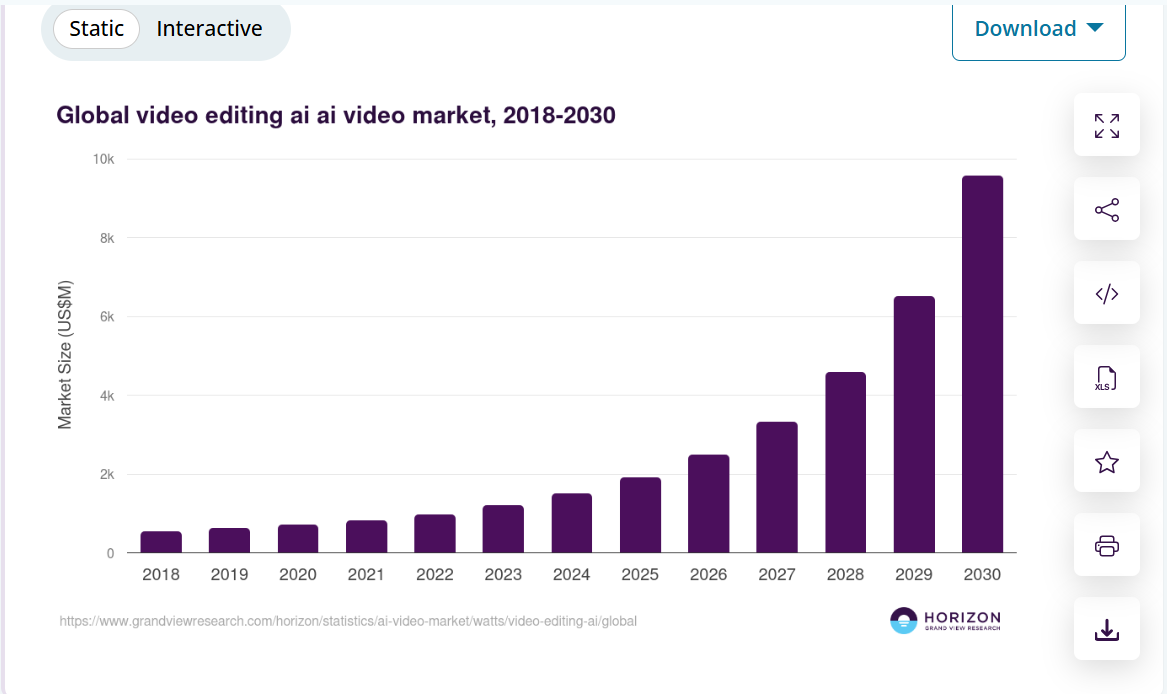
- According to Grandview Research in 2024, the global AI video editing market generated approximately USD 1,497.8 million, projected to surge to about USD 9,562 million by 2030, at a CAGR of 38%.
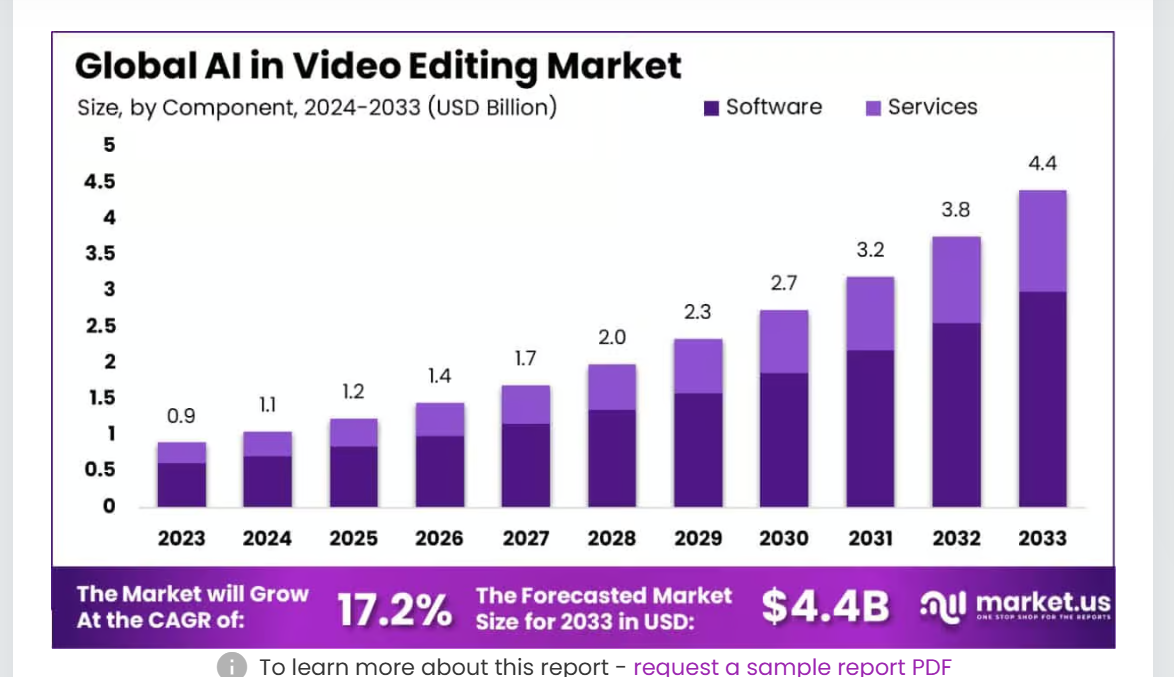
- According to Market Us report, more conservative estimates peg the broader AI in Video Editing market at USD 0.9 billion in 2023, expected to grow to USD 4.4 billion by 2033, at a CAGR of ~17.2%
- Market insights by Allied Market Research predict that the AI video generator/editor market will go from 8 billion in 2022 to USD 9.3 billion by 2033, with a compound annual growth rate (CAGR) of ~30.7%.
- General patterns in the industry predict that the AI video market will reach USD 13.4 billion by 2026.
- On average, AI-based video editing tools can reduce average editing time by as much as 50%. 60% of creators plan to use AI video editing tools in the next year.
- Cloud-based solutions are the most widely used software deployment type (72-73% of the market share) in 2023, but although desktop programs still registered the greatest usage, mobile editing apps are gaining popularity, with a CAGR of ~34% to 2033.
- The Asia Pacific region, especially India and China, collectively accounts for ~38% of the Short‑Form Video AI Edit App market (USD ~900 million in 2024), and is also the highest growing region with a projected CAGR of ~21.2%, respectively.
5 Leading AI Video Editing Apps in 2025
If you want to build an AI video editing app in 2025, you must know what exactly exists in this Market. Here we have compiled a list of some incredible AI video editing apps in 2025.
1. Runway
Runway is one of the top AI video editing apps that provides text-to-video, background removal, motion tracking, and VFX. Runway assists creators in effortlessly generating cinematic-quality video content. It is widely used in filmmaking, marketing, and social media video content creation.
Attribute |
Details |
| Launch Date | January 2018 |
| Founder(s) | Cristóbal Valenzuela, Alejandro Matamala, Anastasis Germanidis |
2. Descript
Descript combines AI video editing with audio features. Descript has capabilities that include overdub voice cloning, automatic transcription, and text-based video editing. Its screen recording, multi-track editing, and podcast-friendly features make it exceptional for creators, educators, and professional content creators.
Attribute |
Details |
| Launch Date | 2017 (Video editing features by 2022) |
| Founder(s) | Andrew Mason |
3. Pictory
Pictory converts scripts, blogs, or longer videos into captivating short clips, as captions and summaries. Pictory uses AI to highlight key moments and produce subtitles. It is excellent for YouTube, social media marketing, and repurposing content without complicated edits.
Attribute |
Details |
| Launch Date | July 2020 |
| Founder(s) | Vikram Chalana, Vishal Chalana, Abid Mohammed |
4. Kapwing
Kapwing provides easy AI-powered editing for social media videos. It offers auto-subtitles, background removal, text-to-speech, meme creation, and resizing for various platforms with simplicity. Kapwing is a beginner-friendly cloud-based editor and allows for team collaboration to quickly create polished, professional content.
Attribute |
Details |
| Launch Date | October 2017 |
| Founder(s) | Julia Enthoven, Eric Lu |
5. Wondershare Filmora AI
Filmora AI goes beyond video editing with traditional tools to allow users to add AI effects, smart cut out, motion tracking, and auto-beat sync. If businesses develop an app like Filmora, it offers drag-and-drop editing for both beginners and professionals, helping users create polished, cinematic videos for social media, YouTube, and marketing campaigns.
Attribute |
Details |
| Launch Date | Original 2015; AI edition in 2024 |
| Founder(s) | Wondershare Technology Group |
Also Read: Top Apps like Funimate
Why Do Entrepreneurs Want to Create an AI Video Editing App?
Several entrepreneurs are rushing to invest in video editing app development services for a few specific reasons. Yes, you heard it! In this section, we have covered some reasons why it has become a massive and rapidly growing market.
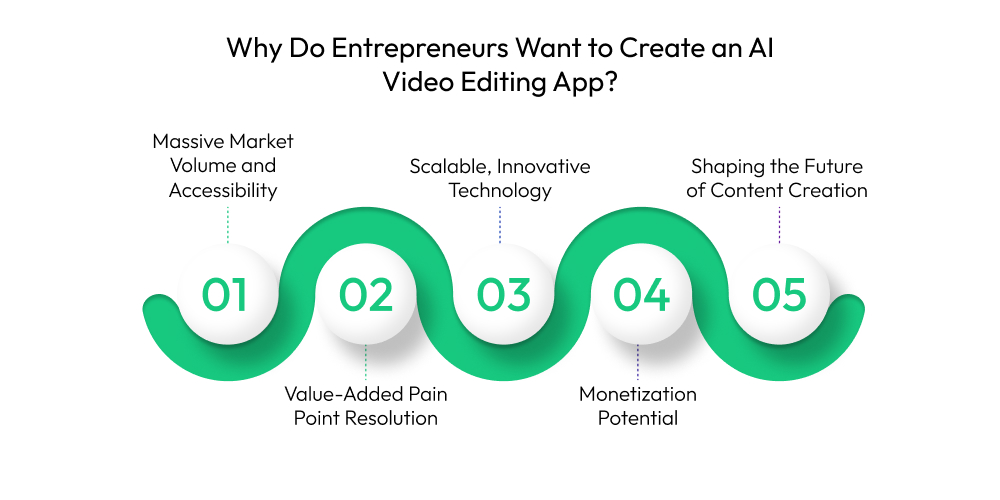
1. Massive Market Volume and Accessibility:
The demand for video content in social media, marketing, and education is skyrocketing. Traditional video editing is often complicated and time-consuming, however.
The emergence of AI video editing apps is designed to fill a need for an enormous audience of non-professional video creators, such as small business owners, marketers, and general social media users, who require a fast and easy way to create professional-quality videos.
2. Value-Added Pain Point Resolution:
AI apps provide a high-value solution to a painful issue experienced by video creators: the time and costs associated with video production. Many video editing app development solutions streamline labor-intensive work by automating repetitive tasks and removing filler words for a more polished end product.
By providing high-quality solutions that save users time and money, the founders of AI video editing apps are producing products that offer a tremendous return on investment. Founders are building AI apps that can help users save many hours and achieve thousands of dollars in savings in their work.
3. Scalable, Innovative Technology:
AI presents a canvas for unlimited innovation and enables entrepreneurs to launch their apps with limited features and then continue to innovate by introducing advanced proprietary AI models to the product mix to provide differentiation in a crowded marketplace.
AI technology is a scalable platform that can be employed by casual and individual creators, while also providing functionality for enterprises. Despite the disparity in the scale of users, founders can build multiple revenue streams by tiering pricing in subscription plans as the features grow and the capacity of the end users grows.
4. Monetization Potential:
The “freemium” pricing model works exceptionally well in this space. By offering a free version of an app with limited features, hundreds of thousands of potential users will use the app.
Once the users are using the app, you can offer premium subscription services such as AI-enhanced text-to-video generation with advanced features like a “brand kit” or collaboration for groups. According to the mobile application development company, there is a clear path towards making these businesses profitable and scalable.
5. Shaping the Future of Content Creation:
AI has formally been elevated from just a tool to a revolution. Entrepreneurs are eager to be on the fringes of this revolution to create apps that define the future of content creation, and when utilizing some of the latest AI technology, they can create products that are useful and disruptive to the creative process, which helps in a fast-changing market.
6 Stages to Develop an AI Video Editing App
A proper approach to develop an AI video editing app must be crafted in stages to ensure performance, user experience, and market viability. By finding the ideal development partner, they can simplify the mobile app development process through the following stages:
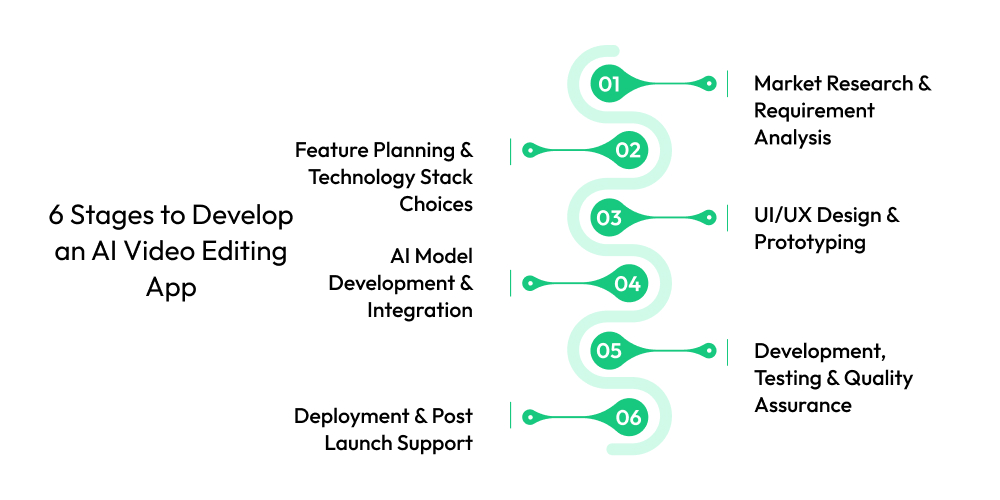
1. Market Research & Requirement Analysis
The first stage to build an AI video editor app is to conduct market research to understand the trends, target audience, and competitors. Your AI video editor app development partner will research user needs and formalize the must-have AI features for the app.
They may include (auto-editing, background removal, smart effects). This stage ensures you have a competitive advantage and adapts to a rapidly changing market.
2. Feature Planning & Technology Stack Choices
In the next stage, your Generative AI development company will identify and plan core and advanced features, and those that relate to AI (AI transitions, voice-to-subtitle, smart recommendations).
Simultaneously, the team specifies the appropriate technology stack, like the AI framework, data storage, and cloud service options, and API types. Selecting compatible components is critical for integration and scalability.
3. UI/UX Design & Prototyping
In the third stage to develop AI video editor apps, designers create layouts and interactive prototypes to demonstrate how applications function, which assists stakeholders in visualizing the user-flow experience. This phase focuses on ease of use, low learning curves for end-users, and spatial designs to fit mobile, desktop, or cloud-based applications.
4. AI Model Development & Integration
Hire technical AI developers from a video streaming app development company to build AI models that are trained to perform techniques like auto-cut and color correction, suggestions to use background music, and noise cancellation that will save video producers time, resources, and needless stress.
Skilled and informed developers use a combination of machine learning and computer vision so users experience intelligent video file processing in real time, or in batch, while producing a professional-quality edited video file.
5. Development, Testing & Quality Assurance
In the fifth stage to make an AI video editing app, the AI video editing software development team begins their code and creates the front-end and the back-end, and plugs in the AI algorithms and Cloud app functionality. They complete multiple levels of tests to ensure that the application performs, is secure, and works bug-free.
The Quality Assurance tester ensures the application will run smoothly on multiple devices and without glitches, all while completing the high-resolution video editing task.
6. Deployment & Post Launch Support
Let’s move to the last stage to make an AI video editing app. The application is deployed to the App Stores or on your web page. You could expect your trusted development company to provide you with reasonable maintenance support even after a positive launch.
The AI development company should help you by monitoring the performance of your AI model and its cloud resources, so they can provide you with updates or investments in continued development. Continuous support ensures your AI video editing app remains competitive, scalable, and aligned with user expectations in the fast-evolving digital landscape.
Which is the Best AI Video Editing App?
The best AI video editing app is RUNWAY. Let’s know why:
Founded in 2018 at NYU by co-founders Cristóbal Valenzuela, Anastasis Germanidis, and Alejandro Matamala, the objective of Runway was to allow players access to AI tools across the many creative areas and demo a platform that would allow artists to experiment with AI within multimedia. Runway’s first funding round raised $2 million and launched a platform.
Bonus Read: Develop An App Like Noizz
Soon after, the co-founders raised $8.5 M, Series A, and $35 M, Series B, and in early 2023, the team released Gen-1 and Gen-2, one of the first public text-to-video tools. Runway’s growth trajectory continued, and revenue jumped from $4.5 M in 2022, $48.7 M in 2023, to $121.6 M in 2024, with about 100,000 customers.
Runway continued raising capital and in April 2025 raised a Series D at $308 M, valuing the company at over $3 billion with General Atlantic, SoftBank, Nvidia, and Fidelity among its investors. Runway is now widely available in Hollywood visual effects (VFX), independent films, and creative teams within major brands.
Why Are Users In Love With the AI Video Editing App?
You must know some of the impressive reasons why the AI video editing application is chosen by multiple customers in 2025. And yes, wait for it to go beyond.
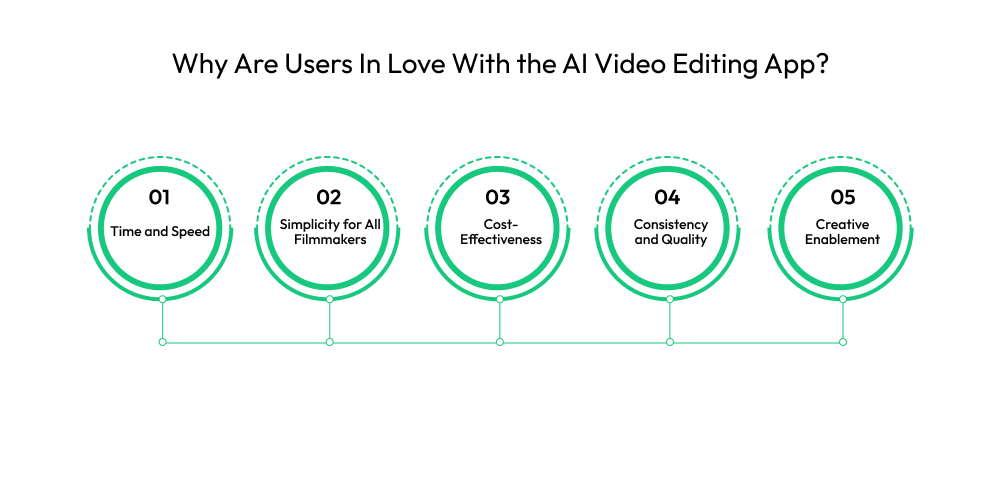
1. Time and Speed:
AI video editing apps automate many time-consuming tasks, such as audio transcription, subtitle generation, filler word elimination, and silence removal. The result is users spending minutes to generate high-quality videos with clarity instead of hours and days.
2. Simplicity for All Filmmakers:
AI video editing apps are much simpler than typical editing software with complex features. The apps also serve all levels of editor experience and provide entry-level accessibility for advanced software capabilities.

3. Cost-Effectiveness:
Diminishing the cost barriers that typically accompany sophisticated software, gear, and consultation of professional editors, AI apps can offer an affordable way to produce a more polished piece of video content that is suitable for those who are cost-conscious.
4. Consistency and Quality:
Free AI video editor apps provide a means for brands to ensure consistency. Tools can also ensure overall video and audio quality by automatically stabilizing shaky footage, color correcting, and audio enhancement.
5. Creative Enablement:
AI acts to automate much of the mundane work of a user, where app-based tools allow users to focus on the creative parts of telling a story. Some apps can even include higher-end features such as text-to-video generation, which can generate more ideas or amplify individuals’ creative visions with low effort.
Key Features of an AI Video Editing App For Different Panels
Having a list of essential features of an AI video editing app is a must if you want your upcoming application to be successful in 2025-2030. Here are a few essential features, presented across three different panels, that you should be aware of.
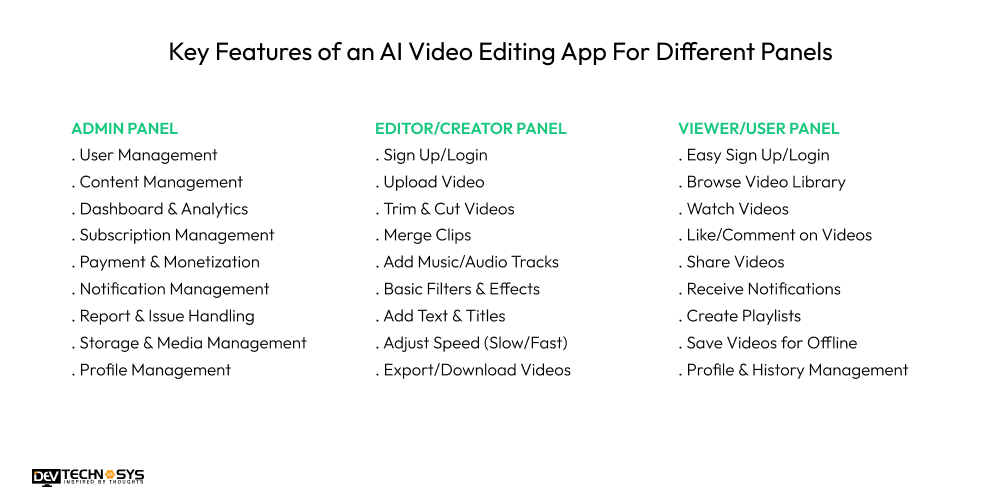
Admin Panel |
Editor/Creator Panel |
Viewer/User Panel |
| User Management | Sign Up/Login | Easy Sign Up/Login |
| Content Management | Upload Video | Browse Video Library |
| Dashboard & Analytics | Trim & Cut Videos | Watch Videos |
| Subscription Management | Merge Clips | Like/Comment on Videos |
| Payment & Monetization | Add Music/Audio Tracks | Share Videos |
| Notification Management | Basic Filters & Effects | Receive Notifications |
| Report & Issue Handling | Add Text & Titles | Create Playlists |
| Storage & Media Management | Adjust Speed (Slow/Fast) | Save Videos for Offline |
| Profile Management | Export/Download Videos | Profile & History Management |
Advanced Features of an AI Video Editing App
Essential features of an AI video editing app aren’t enough to become the chosen AI video app in the market of 2030. Yes, you heard it right. Look, everybody wants to be the CHOOSEN, but do you know what makes them stand out? Some advanced and unique functionalities which we have compiled for you in this segment of our blog. So without further ado, let’s note it down.
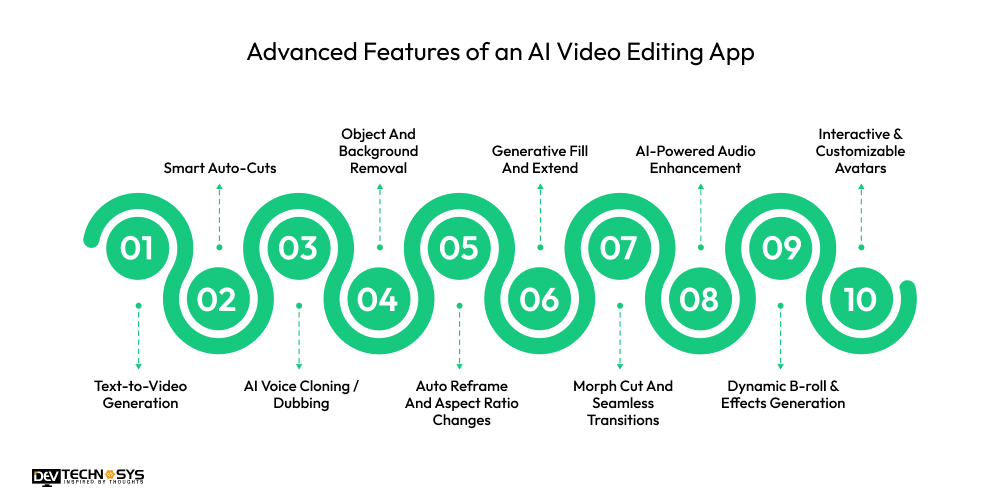
1. Text-to-Video Generation:
Generates full videos from a simple script, automatically adding relevant footage, music, and voice-overs that align with the script.
2. Smart Auto-Cuts:
An AI-powered video editor analyzes content and identifies the most engaging portions of a long-form shot, then automatically trims them into highlight reel-style short videos.
3. AI Voice Cloning / Dubbing:
An app like Lightroom enables users to add a voice-over to a video or to facilitate instant translation and dubbing into multiple languages using a consistent voice.
4. Object And Background Removal:
Automatically removes objects, people, or entire backgrounds from a video without a green screen, so a scene change can be seamless.
5. Auto Reframe And Aspect Ratio Changes:
AI-powered video creators use smart tracking to keep the main subject of the video centered while automatically adjusting the frame to different aspect ratios.
6. Generative Fill And Extend:
Uses AI to magically fill in segments of a video frame that may be missing, to extend the length of a clip, or to create new content that seamlessly integrates into an existing shot.
7. Morph Cut And Seamless Transitions:
A video editing app with AI features uses face tracking and optical flow technology to create smooth, professionally cut transitions between different shots, even with rough jumps and cuts.
8. AI-Powered Audio Enhancement:
Removes distracting background noise, improves sound quality, and does audio ducking (lowering music when people talk) for professional sound.
9. Dynamic B-roll & Effects Generation:
Will automatically find and insert B-roll (stock footage), sound effects, and animation selections that dynamically enhance the appeal of the video narrative for visual storytelling.
10. Interactive & Customizable Avatars:
Uses the script to create an avatar that is lifelike, lip-synced, and gestures to generate training and instructional videos, presentations, or marketing without needing a real person.
Types of AI Video Editing Apps
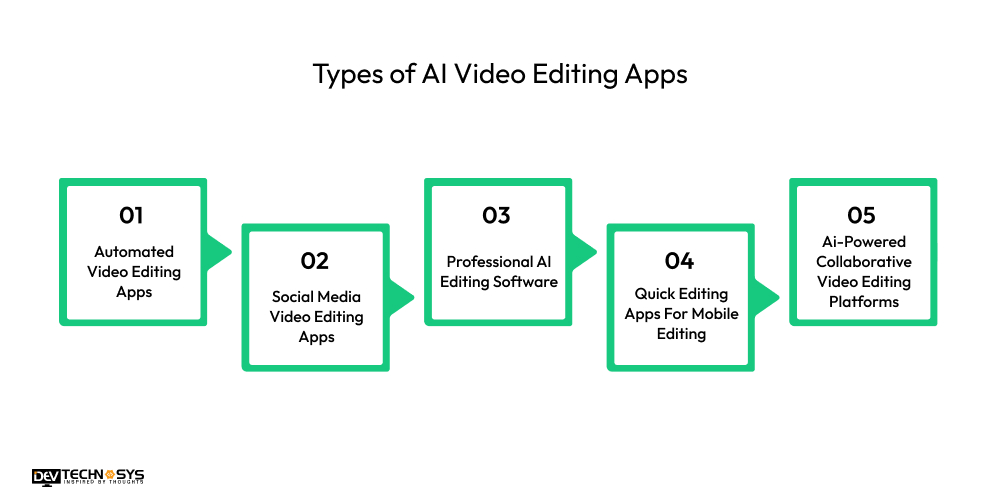
1. Automated Video Editing Apps
These apps will automatically edit video clips into polished videos using pre-defined templates, transitions, etc. They provide a speedy batch creation method with minimal manual work.
2. Social Media Video Editing Apps
These video editing apps like CapCut are designed specifically for creators, influencers, marketers, brands, etc. The app’s output videos, usually with optimized sizing and aspect ratios to stay in tune with platforms like Instagram, TikTok, and YouTube, with an added ability to use trending templates for branded content.
3. Professional AI Editing Software
These AI video editing tools are directed at professional creators but do have automation capabilities that, paired with manual editing, will allow creators the ability to finely edit videos. You can add effects, transitions, audio, etc., after AI has suggested and created everything else.
4. Quick Editing Apps For Mobile Editing
These apps are lightweight enough to use on mobile, with just enough small tools for rapid editing with layman editing, so they offer these tools and AI suggestions instantly.
5. Ai-Powered Collaborative Video Editing Platforms.
These on-demand app development solutions help teams juggle their schedules and act collaboratively in real-time. They can use automated upload presets for scene organization, auto-captioning, media management, etc., and invite their team members to contribute.
Pick what you need below — you can select more than one — then tap Get detail to continue.Want a chatbot demo or pricing? Fill the form and talk to our experts today.
Chatbot demo dashboard
Cost to develop an app
Industry report
Case study
How Much Does it Cost to Develop an AI Video Editing App?
The cost to build an AI video editing app can be anywhere from $8,000 to over $25,000, depending on some important factors. If applying a basic video editing app with basic features, then it will likely be in the lower range. If building out a complex, feature-rich platform that has AI features, then the cost will likely be much higher.
Here are some of the important factors that will affect the total AI video editing app development cost:
1. Complexity and Features:
The number of AI features and the complexity of the features will have the largest effect on the cost to build an AI video Editing app. A very basic app that only auto-subtitles content is not going to cost the same as a very comprehensive app that provides text-to-video generation, AI voice cloning, and real-time object tracking.
All of these complex features require far more complex AI algorithms, custom development, and costly time when developing.
Level |
Cost Impact |
| Basic | $8,000 – $12,000 |
| Moderate | $12,000 – $18,000 |
| Advanced | $18,000 – $25,000+ |
2. AI and Machine Learning Models:
Developing custom AI models and training is expensive; however, you can significantly reduce the AI video editing app development cost of paying for training models by using pre-built or open-sourced AI models. The cost to develop an AI video editing app will vary depending on whether you are building proprietary technology or buying AI built-ins that are essentially off-the-shelf.
Type |
Estimated Cost |
| Pre-built / Open-source | $8,000 – $12,000 |
| Hybrid Approach | $12,000 – $18,000 |
| Custom-trained Models | $18,000 – $25,000+ |
3. Platform and Device Compatibility:
The cost to create an AI app like video editing can be impacted if the app being developed is for one platform (e.g., iOS only) versus multiple platforms (e.g., iOS, Android, and the web). Cross-platform development tools will assist with costs but a full-native build for each platform is expensive.
Platform Type |
Estimated Cost |
| Single Platform | $8,000 – $12,000 |
| Cross-Platform | $12,000 – $18,000 |
| Full Native Multi-Platform | $18,000 – $25,000+ |
4. Development Team and Location:
The hourly rates charged by your development team will differ greatly based on their geographic location. Working with a team in either North America or Western Europe will be much more expensive compared to a great vendor out of regions like Eastern Europe or Asia, which can provide a good balance of skill and AI video editing app development cost.
Region |
Estimated Cost |
| Asia / Eastern Europe | $8,000 – $12,000 |
| Western Europe | $12,000 – $18,000 |
| North America | $18,000 – $25,000 |
5. UI/UX Design:
The time taken by skilled designers is proportional to the complexity of a user interface and how much customization and/or interactivity are requested. Simple, template-based designs will be cheaper (Chris Miles has a great custom design company).
User adoption is most important and the look and feel of a user-friendly, professional-looking interface can add significant amounts of money to your overall cost to build an AI video editing app.
Design Complexity |
Estimated Cost |
| Basic / Template | $8,000 – $12,000 |
| Moderate | $12,000 – $18,000 |
| Advanced | $18,000 – $25,000+ |
6. Backend Infrastructures:
Great back-end infrastructure is critical to be able to expand in the future – being able to upload large files of video, being able to process AI tasks, and/or store items in the cloud. All of the costs for servers, databases, and third-party integrations (cloud services) will affect the one-time cost to build an AI video editing app.
Infrastructure Type |
Estimated Cost |
| Basic | $8,000 – $12,000 |
| Scalable | $12,000 – $18,000 |
| High Performance | $18,000 – $25,000+ |
7. Maintenance and Support:
The maintenance and video editing app development costs are not finished at the “day one” launch of your service or start of operations. The costs of bugs, security updates, maintenance on servers, and development of additional features to keep your service relevant will follow you long after launch.
We typically suggest adding a budget to any organization post-launch for support in dealing with bugs, regular updates, and maintaining a competitive edge.
Support Level |
Estimated Cost (per year) |
| Basic Maintenance | $2,000 – $5,000 |
| Regular Updates | $5,000 – $10,000 |
| Full Ongoing Support | $10,000 – $20,000+ |
Technology Stack Utilized in AI Video Editing App Development
Category |
Technologies / Tools |
| Programming Languages | Python, Swift (iOS), Kotlin (Android), JavaScript (for Web) |
| Frameworks & Libraries | React Native / Flutter (Cross-platform), FFmpeg (Video Processing), OpenCV (Computer Vision) |
| AI & Machine Learning | TensorFlow, PyTorch, OpenAI APIs, MediaPipe, Hugging Face Transformers |
| Cloud & Storage | AWS S3, Google Cloud Storage, Firebase, Microsoft Azure |
| Database | MongoDB, PostgreSQL, MySQL, Firebase Realtime Database |
| Backend Development | Node.js, Django, Flask, Express.js |
| Video Processing & Editing | FFmpeg, AVFoundation (iOS), Android MediaCodec, WebRTC |
| Real-time Features | Socket.io, WebSockets, Agora SDK, AWS IVS (for live streaming) |
| Authentication & Security | Firebase Auth, OAuth 2.0, JWT, SSL/TLS Encryption |
| Deployment & Hosting | AWS EC2, Google App Engine, Docker, Kubernetes |
| Third-party APIs | OpenAI (AI models), Deepgram/AssemblyAI (Speech-to-Text), Cloudinary (Media Management) |
| Testing Tools | Jest, Mocha, Appium, Selenium, Postman |
| CI/CD Tools | GitHub Actions, Jenkins, GitLab CI/CD, Bitrise |
How Dev Technosys Can Help You Develop an AI Video Editing App?
Hopefully you liked this blog and now you know how to and how much does it cost to develop an ai video editing app. To invest in video streaming or editing application development it is advised to connect with prominent partners. Dev Technosys is a leading video editing app development company that specializes in developing AI-based video editing applications specifically for your business.
With over 15 years of mobile app development experience, be assured that our experienced team will include standard features, such as smart trimming, auto-edits, and ready-to-export, to deliver high-performance solutions. You can launch a well-functioning, competitive AI video editing app, and engage more customers to drive revenue with our team. So are you ready to invest now!
People’s Most Searched Questions on AI Video Editing App Development
Q1. How Do I Start to Develop an AI Video Editing App?
- Conduct market research and competitor analysis
- Define core functionality and features
- Choose the right tech stack for AI-based capabilities
- Develop an MVP to test the idea
- Hire an experienced AI app development company.
Q2. What Are The Best Ai Video Editing Apps?
Some of the best AI video editing apps are Runway, Descript, Pictory, Kapwing, Wondershare Filmora AI, all of which offer smart editing capabilities, text-to-video functionality, auto-captions, background removal and other impressive AI-driven effects so you can effortlessly create professional videos.
Q3. How Long Does It Take To Create An Ai Video Editing App?
- Basic MVP: 4–5 months
- Medium-complexity app: 6–7 months
- Feature-rich, multi-platform app: 8+ months
- Timeline depends on team size and resources
- Testing and deployment may extend the schedule
Q4. What Is The Cost To Develop An AI Video Editing App?
Here is the breakdown of AI video editing app development cost which you should know:
- Simple MVP: $8,000–$16,000
- Mid-level app: $16,000–$25,000
- Advanced app: $25,000+
- Cost varies by features, design, and AI complexity
- Developer location also impacts pricing
Q5. Can I Monetize An Ai Video Editing App Effectively?
- Offer freemium plans with limited features
- Provide premium subscriptions for advanced tools
- Include in-app purchases for effects and templates
- Integrate ads for free users
- Partner with brands or use affiliate marketing














