




Key Takeaways:
- To build an employee time tracking app, follow several development steps, such as gathering project requirements, tech stacks, designing the user interface, backend development, testing, QA, deployment, and maintenance.
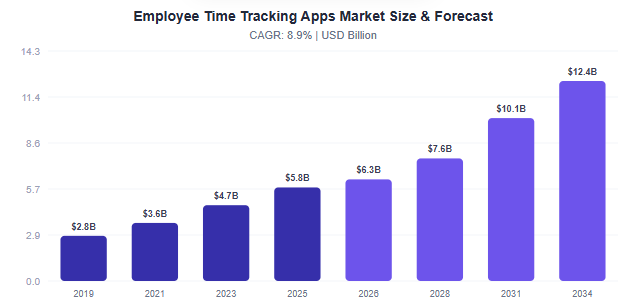
- As per Data Intelo, the employee time tracking app market is valued at around $6.3 billion in 2026; it is expected to grow to around $12.4 billion by the end of 2035.
- The cost to build an employee time tracking app lies between $30,000 and $150,000, based on the various factors such as the number of features, third-party integrations, tech stacks, project complexity, and more.
- There are many opportunities to generate revenue from employee time tracking by using techniques like subscription models, advertisements, in-app purchases, freemium models, and more.
For businesses to increase productivity, simplify payroll, and facilitate remote or hybrid teams, accurate management of employee work hours has become essential, rather than just a luxury. In order to help organizations monitor attendance, log project hours, manage overtime, and obtain useful real-time insights into their workforce, the use of an employee time tracking application is key.
As more companies seek flexible work environments, they are investing in custom time tracking solutions that fit the unique needs of their operations. However, the successful construction of an application requires proper planning, an appropriate feature set, and an understanding of the costs associated with it.
In this guide, we will look at key features of an employee time tracking application, how to develop one, technology factors to consider, and the estimated cost of developing such an application.
Market Statistics of Employee Time Tracking Application
- According to Data Intelo, the employee time tracking application market is projected to grow with a CAGR of 9% during the forecast period from 2026 to 2034.
- Compared to the region-wise, the North America region is one of the quickest growing regions and holds a market share of around4% in 2026.
- As per the deployment mode-wise, the cloud deployment mode segment holds a revenue share of around5% in 2025 and generates revenue of around $3.97 billion.
- Looking at the application-wise, the payroll management application in the employee time tracking market records around 2% market share in 2025 and revenue of around $2.22 billion.
- Enterprise size-wise, the small and medium enterprises captured a share of around 8% in 2026 with revenue of around $3.24 billion.
What is an Employee Time Tracking App?
An employee time tracking app is a platform where an organization can track its employees’ working hours, how they spend their time, and track their work in real-time. It basically helps companies to make sure that employees’ working hours are counted in productivity and efficiency.
This enables staff or employees to check in or check out, manage attendance, record working time, and more. While managers can monitor their team members’ daily tasks or operations, overtime, and productivity.
How Does an Employee Time Tracking App Work?
The steps help users to understand the employee time tracking app’s working steps and their criteria. It includes the working steps from the beginning of the employee time tracking app to the final working step. Let’s explore step by step:
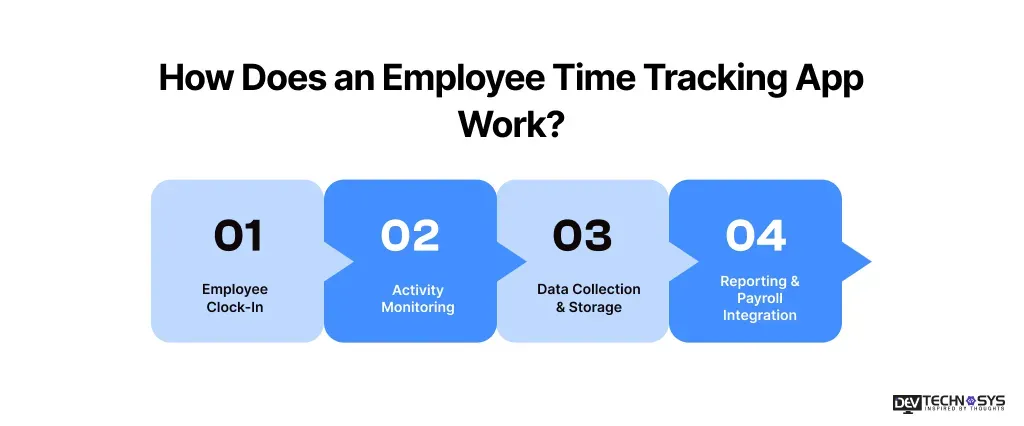
1. Employee Clock-In
Employee begin their working day through clock-in on the employee time tracking app via mobile devices, biometrics authentication, desktops, and more.
2. Activity Monitoring
After clock-in, the application tracks employees’ working hours, task progress, attendance management, and breaks. This makes sure the employee’s working patterns and productivity.
3. Data Collection & Storage
The employee time tracking app stores the employee data, such as entries, activity data, schedules, and more, securely stored on a database and accessed through verified members.
4. Reporting & Payroll Integration
Managers and heads of organization can easily generate a detailed sheet of employees, and the application syncs automatically with payroll integration, with approved working hours.
Look, What Business Insider Says About Employee Time Tracking Apps:
Large companies such as Meta, JPMorgan Chase, Amazon, and KPMG are increasingly tracking employee technology usage and AI adoption to understand productivity and justify technology investments.
Why Do Organizations Want To Invest In Employee Time Tracking App Development?
To stay competitive in an ever-changing business environment, companies require an intelligent means of tracking productivity, time, and employee performance. By implementing employee time tracking software, organizations are able to automate employee time management, improve payroll accuracy, effectively supervise staff who work from multiple locations, manage project budgets, and efficiently gather data used to improve overall business performance
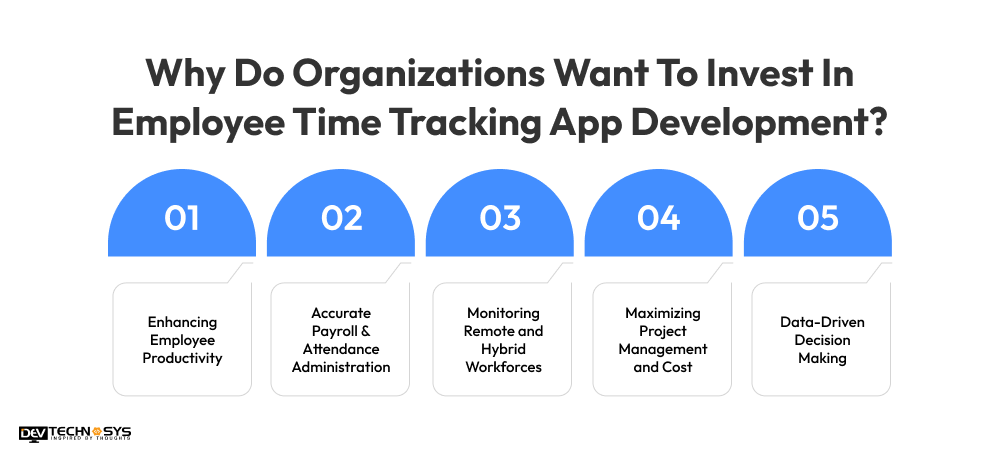
1. Enhancing Employee Productivity
Time tracking on-demand app development solutions give businesses greater insight into how to use their employees’ time. With the ability to identify productivity gaps, eliminate wasted time, and streamline workflow, businesses are able to keep their employees laser-focused on the tasks that matter, leading to higher performance levels.
2. Accurate Payroll & Attendance Administration
Using manual attendance tracking methods can lead to errors in the calculation of pay and disputes around payroll. Also, it can be time-consuming for HR and finance teams. By using a time tracking application to automate the clock-in / clock-out process, calculate overtime, and track leaves of absence, businesses can ensure they are paying employees accurately while at the same time reducing administrative burden for HR and finance teams.
3. Monitoring Remote and Hybrid Workforces
With remote and hybrid work models continuing to grow, businesses need to have a reliable way to monitor the work hours and performance of their employees. Time tracking apps provide managers with real-time visibility into where their employees are working, how they’re using their time, and how their work is progressing.
4. Maximizing Project Management and Cost
HRMS software development solutions provide businesses with insights into how much time their employees are working on various projects, customers, or tasks. This data can then be used to provide better resource allocation and better budget estimates for projects. Provide more visibility into billing and chargebacks to customers, and optimize costs, all of which ultimately lead to increased profitability and productivity.
5. Data-Driven Decision Making
Today’s time tracking applications provide businesses with comprehensive reports and detailed analytics on employee time, productivity patterns, project performance, and workforce usage. Using the information contained within these reports, companies can develop optimized planning of the workforce as well as identify areas of opportunity for process improvement. Therefore, the data gathered can also facilitate the development of longer-term business growth strategies.
Planning a Mobile App?
Get a tailored development cost estimate in 3 simple steps — app basics, features, timeline, and your contact details.
- 3 quick steps
- 100% free
- Reply in 1 business day
2 Minutes Read
7 Key Steps to Build an Employee Time Tracking App
From project requirement gathering to post-launch maintenance services, this section provides everything on how an application is actually developed and what the criteria are. These development steps explain every technical knowledge and depth. Explore the step-by-step employee time tracking app development process.
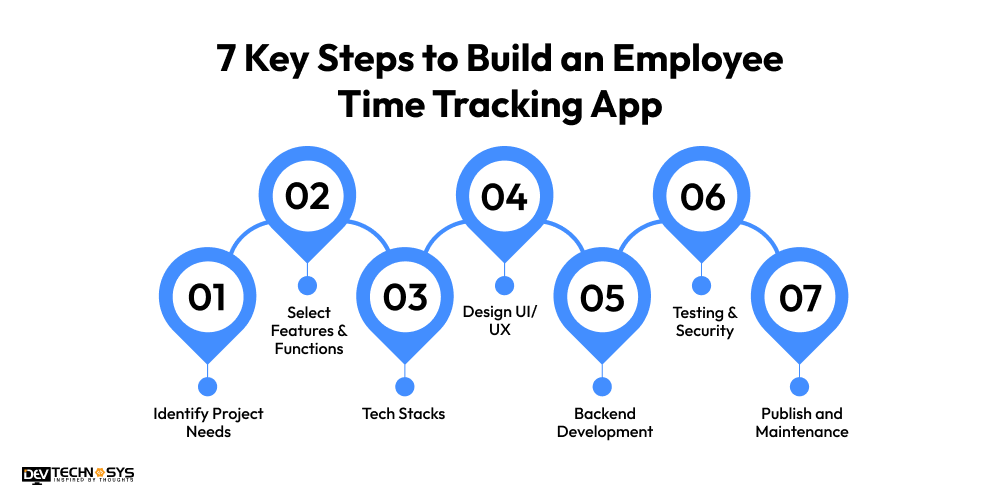
1. Identify Project Needs
First of all, identify the business requirements and what product they want, and their future scope. Hire an HRMS software development company to make a clear list of needs and demands to reduce misunderstandings and also save development time. Research about the existing time tracking applications to observe their features and functions, understand their working criteria, and what services users really want from an employee time tracking app.
2. Select Features & Functions
Move to the second stage to make an employee time tracking app, and find out the basic and advanced features that must be integrated in a staff time monitoring app. It includes various features such as GPS tracking, overtime monitoring, task management, attendance tracking, clock-in/clock-out, timesheets, reporting dashboards, and many more. Businesses can also review or observe the competitors’ application features, and a rich set of features can increase user engagement.
3. Tech Stacks
Let’s come to the next step: hire professional developers from a mobile app development company to select the best tech stacks for a successful employee time tracking app development. There are various types of tech stacks used for specific development areas:
Frontend: AngularJS, HTML5, CSS3, JavaScript
Backend: Python, Node.js, Java, PHP
Designing: Figma, Sketch, Marvel, Zeplin
Database: MongoDB, MYSQL, PostgreSQL, SQL
Cloud Services: AWS, Azure, Oracle, Google Cloud
Security: OAuth 2.0, JWT, OpenSSL, AES
4. Design UI/UX
In this development process, employ creative designers to design a user interface with next-level templates and themes to attract users and gain a competitive advantage over others. There are different types of UI elements available, such as themes, fonts, styles, textures, templates, images, navigation bars, and many more. Make sure that design layouts are clear, and it would be responsive designs for all screen types, such as mobile, desktop, tablets, and laptops.
5. Backend Development
Hire backend coders with higher experience from a web app development Company to implement various backend processes. Develop a secure backend to manage operations like attendance management, work hours, user data, and reports.
Integrate the strong security measurements like two-factor authentication, encryption techniques, biometrics, firewalls, and many more to protect employees and the organization’s data. Make sure that the backend process handles a higher number of users efficiently.
6. Testing & Security
In this development step, test the employee time tracking app to make sure that all features and services are working perfectly and seamlessly. It involves various types of testing methods, such as unit testing, functional testing, integration testing, security testing, black-box and white-box testing, and more. Implement the strong security methods to protect the sensitive and confidential data.
Finally, development is going to a successful end. Release the application on the specific stores, such as the Play Store and App Store. After launching the app, monitor their performance and user engagement.
Hire top HRMS development companies to begin the maintenance services, such as fixing bugs or glitches, performance optimizations, upgrading the OS version, updating outdated features, regular updates, networking, and more. These maintenance services help applications to keep their data up-to-date and maintain load times.
Real Case Study: Employee Time Tracking App
We developed an employee task monitoring app for a UK-based client for their organization. In this project, we are a team of various members, such as 5 developers, 2 UI/UX designers, testers, 2 QA engineers, 1 architect, and 1 project manager. When we start the project, the initial development cost is $20,000, but clients need more advancements in functionalities, so the cost increases as per the demands. We face many challenges during development, like integrations to existing systems, unique design, and many more. But our developers and designers created an outstanding application, and the client was happy to show the overall design layouts and backend functionalities.
Navneet Rajppot – Delivery Head
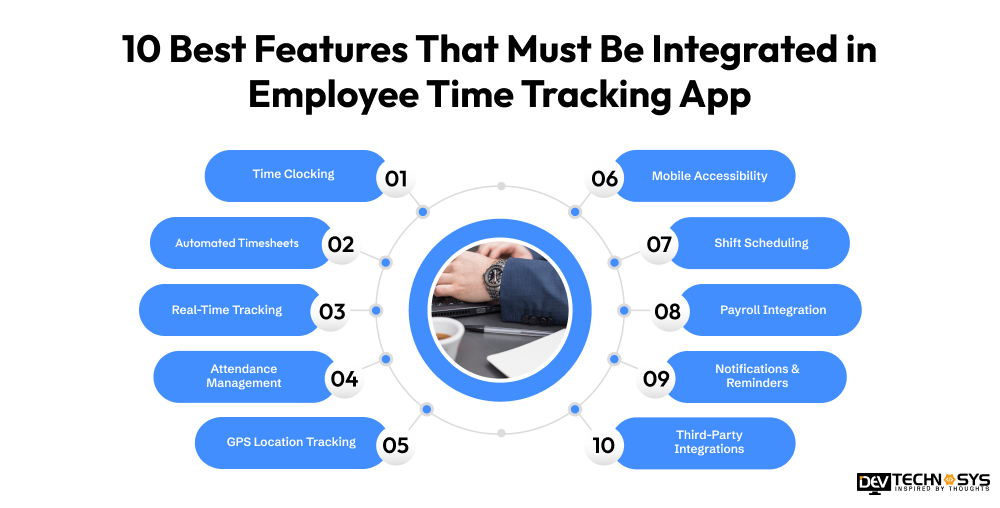
10 Best Features That Must Be Integrated in Employee Time Tracking App
Before starting the development process, one must know what type of features must integrate in a employee time tracking application. These below features can increase the users’ engagement and easily gain a competitive advantage over others.
1. Time Clocking
The employee time tracking applications enable employees to clock in and clock out using mobile devices, biometric systems, desktops, and more for daily, accurate attendance.
2. Automated Timesheets
Work hours tracking app automatically converts working hours into a structured sheet to reduce manual entry work and enable managers to quickly review the employees’ productivity.
3. Real-Time Tracking
Employee attendance tracking app tracks the employees’ working hours in real-time and allows managers to track the ongoing tasks and operations of employees and keep updated.
4. Attendance Management
A biometric attendance system software manages the employees’ attendance, such as late arrival, paid leaves, sick leaves, comp off, overtime, and more. It helps organizations to maintain discipline.
5. GPS Location Tracking
Employee time tracking software uses geolocation technology to track the employees’ working and clock-in locations. It is mainly ideal for remote teams to know their productivity in real-time.
6. Mobile Accessibility
An employee scheduling and time tracking app enables employees to clock in and clock out through mobile devices. This enables employees to manage tasks, log hours from anywhere and anytime.
7. Shift Scheduling
Employee timesheet management software allows managers to schedule the shifts of employees according to the work pressure, and it can improve the overall operational planning.
8. Payroll Integration
Staff time tracking solution easily integrates with payroll to ensure accurate salary calculation, reduce payroll errors, and speed up the monthly compensation of employees.
9. Notifications & Reminders
Sends automated alerts for clock-ins, missed entries, shift changes, and approvals, ensuring employees and managers stay informed and maintain timely workflow coordination.
10. Third-Party Integrations
Shift scheduling software connects with HR, payroll, accounting, and project management tools, creating a unified system that streamlines operations and improves overall business efficiency across departments.
Industry Insights: According to the PwC, it uses Workday to manage workforce data and HR operations for approximately 58,000 employees.
What is the Cost to Build an Employee Time Tracking App in 2026?
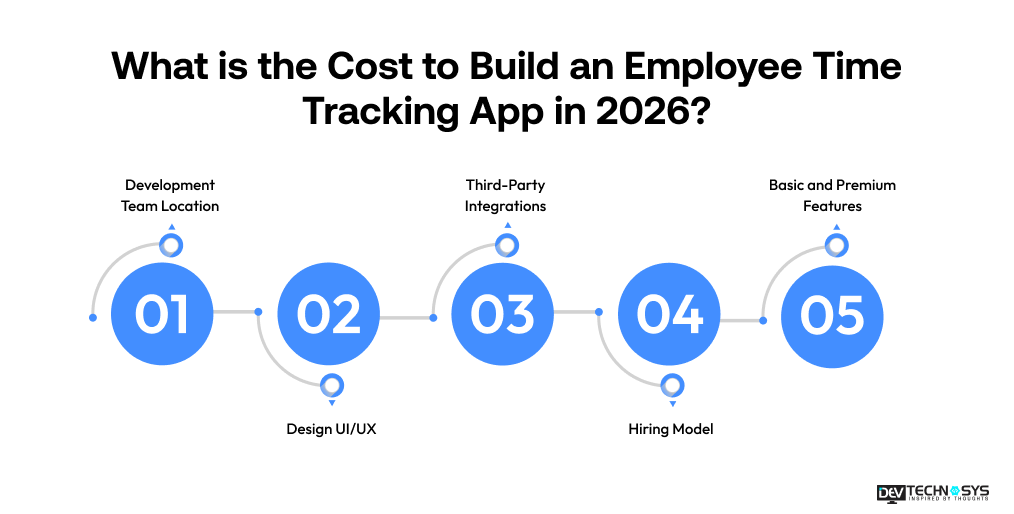
The cost to develop an employee time tracking app starts from $30,000 to $150,000; it can also go higher due to the customization level. The basic or simple application can be built at a lower cost, but an AI-powered employee time tracking app development is expensive because of modern features and services. There are many cost-affecting factors involved, such as features, number of third-party integrations, deployment platforms, project size & complexity, development team, and more.
App Complexity |
Features Included |
Estimated Cost (USD) |
| Basic App | Clock-in/out, attendance tracking, timesheets, employee dashboard, reports | $30,000 – $50,000 |
| Medium App | Basic features + GPS tracking, shift scheduling, payroll integration, push notifications | $50,000 – $90,000 |
| Advanced App | Medium features + productivity monitoring, AI analytics, biometric authentication, custom integrations, multi-location support | $90,000 – $150,000+ |
Note: As per our delivery head, Narayan Das, says that we developed around 44+ employee time tracking app with proper customization. So, the estimated average cost is $30,000 to $150,000; it can fluctuate as per the client’s specific requirements and demand.
1. Development Team Location
The location of your development team significantly impacts HRMS software development cost. Developers in North America and Western Europe typically charge higher rates, while teams in Asia and Eastern Europe offer more cost-effective services. Choosing the right location helps balance budget, quality, communication, and project timelines without compromising the app’s overall functionality.
2. Design UI/UX
A well-designed user interface and user experience increase employee time tracking app development cost but improve usability and adoption. Simple designs require less effort, while custom dashboards, interactive reports, and responsive layouts demand additional design resources. Investing in intuitive UI/UX helps employees use the app efficiently and reduces training requirements.
3. Third-Party Integrations
Integrating payroll systems, HR software, project management tools, and communication platforms adds to the employee time tracking app development cost. The number and complexity of integrations determine the overall mobile app development cost. Seamless third-party connections improve workflow automation, reduce manual work, and enhance the app’s functionality, making it more valuable for businesses.
4. Hiring Model
Your hiring approach directly affects development costs. In-house teams require salaries, benefits, and infrastructure, while freelancers may offer lower upfront costs. Outsourcing to a dedicated development company provides access to specialized expertise and flexible pricing. The right hiring model depends on your budget, timeline, and project scope.
5. Basic and Premium Features
The feature set is one of the biggest cost drivers. Basic features include time tracking, attendance monitoring, and timesheets. Premium features such as GPS tracking, shift scheduling, payroll integration, productivity analytics, AI-powered insights, and biometric authentication require additional development effort, increasing both project complexity and overall cost to build an HR service delivery model.
Factor |
Estimated Cost Impact (USD) |
How It Affects Cost |
| Development Team Location | $15–$150+/hour | Developer rates vary by region, with North America costing significantly more than Asia or Eastern Europe. |
| UI/UX Design | $3,000–$15,000 | Custom interfaces, dashboards, and responsive designs require additional design and prototyping efforts. |
| Third-Party Integrations | $2,000–$20,000 | Integrating payroll, HR, accounting, and project management tools adds development and testing costs. |
| Hiring Model | $20,000–$50,000+ | Costs differ based on whether you hire freelancers, an in-house team, or an outsourced development agency. |
| Basic & Premium Features | $10,000–$60,000+ | Advanced features such as GPS tracking, AI analytics, biometrics, and custom reporting increase development costs. |
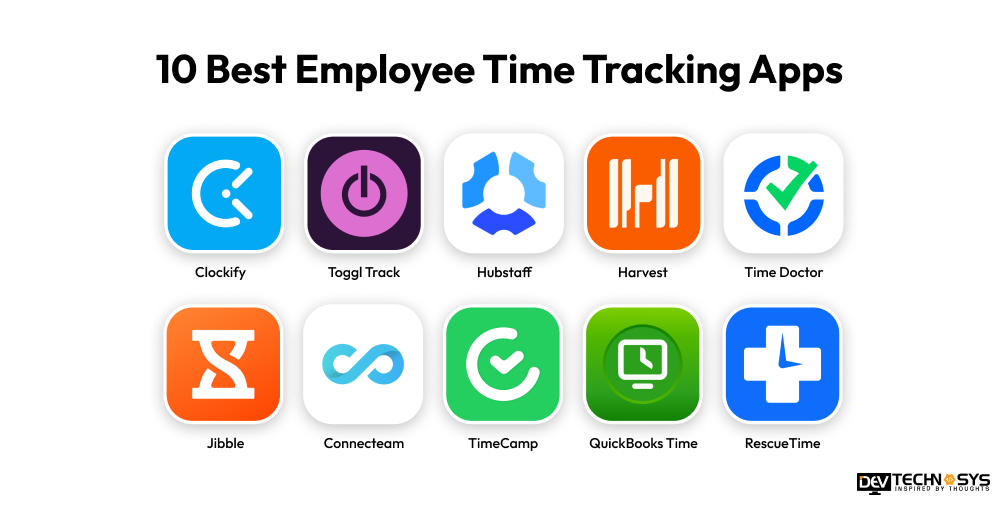
10 Best Employee Time Tracking Apps
There are various employee time-tracking apps available on the market. Explore employee time tracking apps with launched years, best for, platform availability, and downloads.
App |
Launched Year |
Downloads / Users (Approx.) |
Best For |
Platform Availability |
| Clockify | 2017 | 5M+ users | Free unlimited time tracking for teams | Web, Android, iOS, Windows, Mac, Linux |
| Toggl Track | 2006 | 5M+ users | Simple tracking for freelancers & teams | Web, Android, iOS, Windows, Mac, Linux |
| Hubstaff | 2012 | 100K+ companies | Remote teams + GPS + productivity monitoring | Web, Windows, Mac, Android, iOS |
| Harvest | 2006 | 70K+ companies | Time tracking + invoicing for clients | Web, Android, iOS, Mac, Windows |
| Time Doctor | 2012 | 20K+ companies | Employee productivity monitoring | Web, Windows, Mac, Android, iOS |
| Jibble | 2018 | 200K+ companies | Free attendance + GPS + face recognition | Web, Android, iOS |
| Connecteam | 2016 | 36K+ businesses | Deskless & field workforce management | Web, Android, iOS |
| TimeCamp | 2008 | 100K+ users | Automated time tracking + reporting | Web, Android, iOS, Windows, Mac |
| QuickBooks Time | 2011 | Millions of users | Payroll + QuickBooks ecosystem | Web, Android, iOS |
| RescueTime | 2008 | 2M+ users | Personal productivity & focus tracking | Windows, Mac, Android, iOS |
1. Clockify
Clockify is one of the most famous and used employee time tracking applications. It helps businesses to monitor employee working progress in real-time, project progress, and an attendance management system. Managers can access the detailed report of employees and make sure efficient productivity. This application mainly supports payroll preparation, team collaborations, and scheduling.
2. Toggl Track
Toggl Track is the best employee time tracking app, that mainly for freelancers, teams, and businesses. It helps employees to track their working hours, productivity profits, analyze productivity, and more. With the help of an employee time tracking app, these automated tracking and reminders simplify time management with no manual errors.
3. Hubstaff
Most of the organizations use the Hubstaff platform to track employee working activity, and it combines productivity measurements and time tracking. This application offers advanced features, such as automated timesheets, payroll support, GPS tracking, and many more. The organization uses Hubstaff to maintain its staff members remotely and measure their productivity.
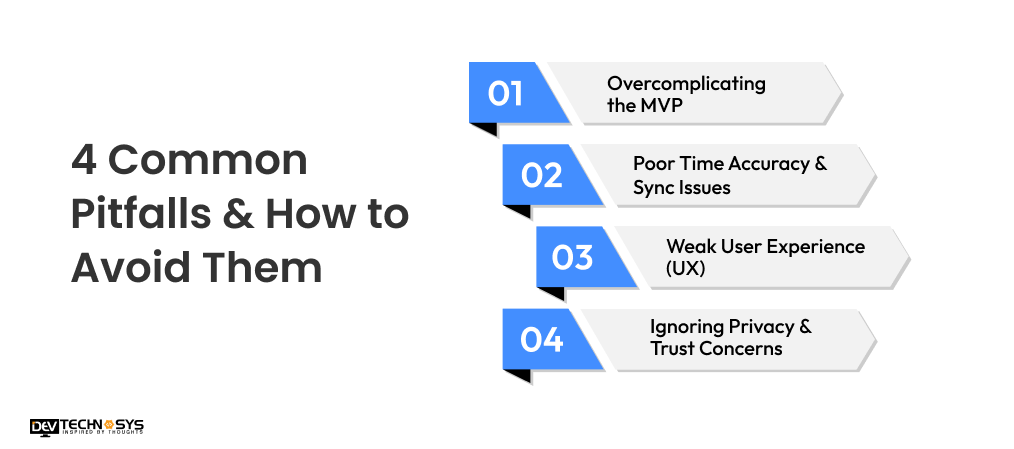
4 Common Pitfalls & How to Avoid Them
During the development process, there are many common pitfalls that exist, and businesses have no idea about them or no solution to address these. This section explains various common pitfalls and provides ways to avoid them.
1. Overcomplicating the MVP
First of all, the development team adds too many features, like payroll, attendance management, real-time employee tracking, analytics, and many more. These many advanced features can delay the launch, and it can also lead to critical bugs and errors.
How to Avoid:
You must start with basic or simple features, such as clock-in/clock-out, basic reporting, user authentication, and more. Developers observe the users’ feedback to know which features to add next.
2. Poor Time Accuracy & Sync Issues
In employee time tracking apps, using device time instead of server time, ignoring global time zones, and offline syncing. This can lead to incorrect log times and payroll disputes.
How to Avoid:
Use proper time zone handling and install offline syncing automatically. Always use server-side timestamps, which can help organizations to provide accurate payroll information.
3. Weak User Experience (UX)
Basically, if the application is too slow, takes too many steps, or is confusing, then it can lead to providing incorrect user data, and some data is missing as well.
How to Avoid:
Design a simple or basic user interface with one-tap clock-in or clock-out, a simple dashboard, and more. This makes it easy for users to easily access all the functionalities and services of the app.
4. Ignoring Privacy & Trust Concerns
If the employee time tracking provides excessive monitoring, such as hidden tracking of employees’ work, and taking screenshots. This can definitely lead to reducing users’ trust and transparency.
How to Avoid:
Be trustworthy and transparent about tracking features, gather only needed information, and follow the privacy and labor laws.

Build vs Buy vs Development Agency: Which is the Best Development Strategy?
Choosing between Build, Buy, or Development Agency depends on budget, timeline, and control needs. Build offers full customization but is costly and slow. Buy is fast and affordable, but limited. Agencies balance cost, speed, and customization, making them ideal for most businesses.
Factor |
Build (In-House) |
Buy (Ready Software) |
Development Agency |
| Cost | High ($80K–$300K+) | Low ($10–$50/month per user) | Medium ($30K–$150K) |
| Time to Launch | Slow (4–12+ months) | Very fast (1–7 days) | Medium (1–4 months) |
| Customization | Very high (full control) | Low (limited features) | High (tailored solutions) |
| Control & Ownership | Full ownership | Limited (vendor-controlled) | Shared/contract-based ownership |
| Scalability | High but resource-heavy | Limited by platform | High and professionally built |
| Maintenance | Fully in-house responsibility | Managed by vendor | Handled by agency or contract |
| Risk Level | High (development + hiring risk) | Low (already built product) | Medium (depends on agency expertise) |
| Best For | Large enterprises with long-term vision | Small teams needing quick deployment | Startups & businesses want a balance of cost and quality |
You can reach out anytime; we are available 24/7. Our team provides a quick response.

Tech Stacks are Used for an Employee Time Tracking App Development
There are various types of tech stacks used to build an HRMS for small businesses or enterprises. These tech stacks cover various development areas, such as frontend, backend, database, cloud computing storage, authentication, cloud hosting, third-party APIs, and many more.
Layer / Component |
Options / Technologies Used |
Purpose |
| Frontend (Web App) | React.js, Angular, Vue.js | Build a dashboard for employees & admins |
| Mobile App | Flutter, React Native, Swift (iOS), Kotlin (Android) | Track time on mobile devices |
| Backend (Server) | Node.js (Express), Django, Spring Boot, .NET Core | Handle business logic, time logs, and users |
| Database | PostgreSQL, MySQL, MongoDB, Firebase Firestore | Store users, attendance, logs, reports |
| Authentication | OAuth 2.0, JWT, Firebase Auth, Auth0 | Secure login & role-based access |
| Cloud Hosting | AWS, Google Cloud Platform (GCP), Microsoft Azure | Deploy and scale the application |
| Real-time Tracking | WebSockets, Socket.io, Firebase Realtime DB | Live clock-in/clock-out updates |
| APIs | REST API, GraphQL | Communication between frontend & backend |
| Notifications | Firebase Cloud Messaging (FCM), OneSignal | Alerts for attendance, reminders |
| DevOps / CI-CD | Docker, Kubernetes, Jenkins, GitHub Actions | Deployment automation & scaling |
How to Monetize App Owners’ Employee Time Tracking Apps?
On behalf of app owners, generating revenue from their own application is very important to grow their valuation and expand their business into more global areas. It involves various monetization techniques, such as per-user pricing, subscription models, paid integrations, white-label solutions, and more.
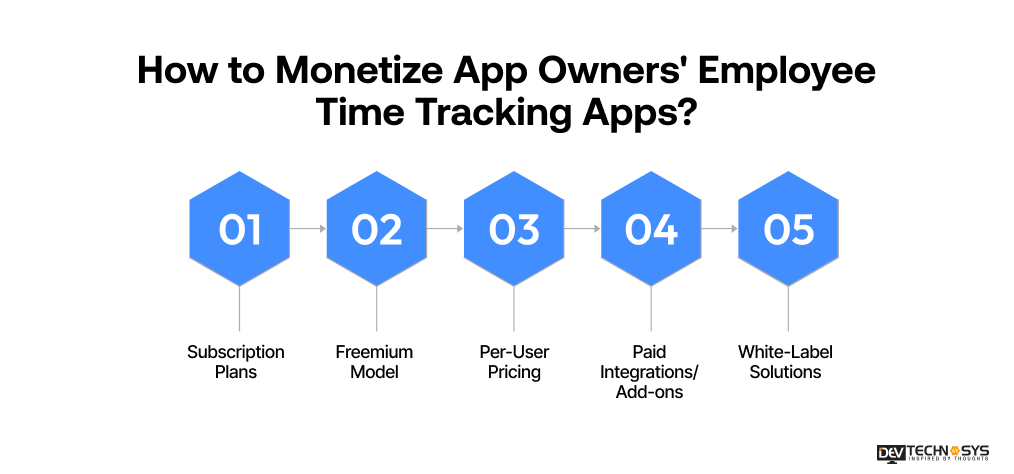
1. Subscription Plans
These custom software development solutions provide customers with a monthly or yearly subscription based on the number of users, their feature needs, or the size of the business. Customers make recurring payments for access to advanced reporting, workforce analytics, integration with payroll and project tracking, resulting in predictable and repeatable revenue.
2. Freemium Model
Freemium provides basic features of time tracking for free, but customer fees are charged for additional features like GPS, auto-generated timesheets, custom reports, integrations, and team management. This model attracts a greater volume of users and allows customers to upgrade as they grow.
3. Per-User Pricing
You can charge your customers based on how many of their employees are currently using your solution. Therefore, your business can increase its revenue as the workforce grows. This model is simple, easy to understand, and is preferred by businesses that are looking for scalable solutions.
4. Paid Integrations/Add-ons
You can create additional revenue streams by offering premium integration with customer payroll and HR systems, accounting, and project management tools. Customers can purchase specific add-ons to improve their overall functionality. By allowing customers to purchase additional features, you can generate revenue beyond your core subscription fees.
5. White-Label Solutions
By licensing the app (as a white-label) to enterprises, human resource agencies, and software providers, you provide them the opportunity to rebrand and resell your app platform. You can generate a near endless reoccurring revenue stream by charging a setup fee, a fee to customize their app, and collecting recurring license fees.
Conclusion
For companies looking to optimize their operational effectiveness via workflow improvement and increased visibility into labor output, build an employee time tracking app is an investment in the future of the company. By developing a solution that meets their unique operational needs through the application of the correct features, the right technology stack, and an understanding of the development costs, businesses have an opportunity to improve productivity rates.
Working with an experienced HRMS software development services team will help ensure that you develop an employee time tracking app that meets the expectations you have set for your organization’s success from both a scaling and secure systems.
Frequently Asked Questions
Find answers to the most common questions related to this article.
The cost to develop an employee time tracking app is around $30,000 to $150,000, depending on the crucial factors and customization of the project. Involve factors like the number of premium features, functions, security measurements, backend infrastructure, development team, deployment platforms, and other factors.
To create an employee time tracking app with normal features and functions, it mainly takes around 2 to 4 months. Developing an advanced or AI-powered employee time tracking app usually takes 3 to 6 months or longer, based on the customization level. It includes many factors that affect the cost, such as project complexity, backend infrastructure, premium features, and integrations.
There are many popular employee time tracking apps for small businesses, such as Clockify, Toggl Track, Hubstaff, and more. It offers advanced features like real-time tracking, reporting, monitoring, payroll integration, and employee attendance management. Basically, the best employee time tracking app is based on the budget and specific requirements.
Yes, the employee time tracking app successfully integrated with payroll systems. This integration automatically transfers employee work hours, overtime, attendance, and leave data into payroll software, reducing manual data entry and calculation errors. It streamlines payroll processing, improves accuracy, saves administrative time, and ensures employees are paid correctly and on time.
It includes various tech stacks to build an employee time tracking application; these tech stacks cover different development areas.
Java
Python
JavaScript
MongoDB
PostgreSQL
AWS
PHP