






















Key Takeaways
-
- Mobile POS apps are an upgrade from traditional POS systems that combine payment infrastructure with inventory management, analytics, and product catalogs on portable devices such as smartphones and tablets.
- According to Market Research Future, the mobile POS industry is expected to grow to $84.31 billion by 2035, at a CAGR of 8.36% in the 2025-2035 period.
- The custom mobile POS app development costs in USA starts from $20,000 and ranges up to more than $120,000, depending on your business requirements and operations
- To make the mPOS app safe and secure, the app needs to follow PCI DSS compliance and use EMV chips, payment tokenization, and follow data privacy regulations like GDPR and CCPA.
POS systems need not be stuck behind the cash counter. A shopkeeper or retailer can take it to customers near product shelves; bills can be closed at the restaurant table, or even for door-to-door sales, making billing easier. The flexibility brought by Mobile POS is the driving force for businesses in the point-of-sale market.
By investing in mobile POS App development, businesses can transform the customer experience at the time of ordering and checkout by streamlining the processes. You can build according to the required business model, bringing essentials like payments, product catalogs, inventory, and previous customer records together. But the most difficult part comes in this step: connecting the software with hardware.
That’s where we come in. In this blog, we will go through the architecture of mobile point-of-sale systems, how they work, and how you can develop and integrate them with your business. So before you start raising questions, let’s get started.
What is a Mobile POS?
Mobile POS, or mPOS, is a portable system that helps businesses handle sales and payments through a portable device such as smartphones, tablets, or dedicated handheld POS systems. They do not rely on a fixed terminal to check inventory, product catalogs, or billing. This setup works by connecting a POS app with payment hardware and fixed point-of-sale systems, connecting with the entire business to manage sales.
The thing that is very important to understand is that a mobile POS is not just a payment app. mPOS apps can bring product catalogs, process orders, print receipts, and manage customer records with sales data from one place. You can manage inventory, check for product availability, create an order for missing ones, accept payment, and update stock while you’re going and managing everything from every shelf.
This is implemented by using a mobile POS app architecture to connect mobile phones or portable devices with backend services, payment integration, and business systems through APIs. Everything depends on the business model you are working on, with your underlying setup and payment infrastructure through a fixed POS system.
Ultimately, with the help of mobile point-of-sale systems, employees do not need ot stand or stay tied behind the counter; they can actively help customers with their shopping and checkout inside the store.
Why Are Businesses Adopting Mobile POS Systems?
A report from Market Research Future states that the mobile POS industry is going to grow from $37.77 billion in 2025 to $84.31 billion by 2035, at a CAGR of 8.36% in that period. North America in particular is witnessing a notable growth in adoption of contactless payments. This is making different types of industries turn to mPOS solutions for better customer service and operational efficiency.
Faster and More Flexible Checkout
One of the biggest advantages posed by portable POS systems is “Checkout”. Customers do not have to go to the fixed counter; employees can make the checkout bills with customers while they are shopping, with a unique identification number assigned to the customer. A restaurant can take orders and provide the bill to the customer at the table itself. This not only improves customer experience but also improves operational efficiency, reducing long queues and unnecessary movement of employees.
Growing Demand for Contactless Payments
Nowadays, cash is declining, and digital wallets and cards are increasing day by day. Customers are more willing to pay with a tap of a card, phone, or even wearable devices. Mobile POS with NFC payment integration and compatible payment hardware is key to success, providing customers a quick and better experience. You can also build POS software for small businesses with very little funding for MVP mobile point-of-sale systems.
Planning a Pos Project?
Get a tailored development cost estimate in a few simple steps.
- 3 quick steps
- 100% free
- Reply in 1 business day
2 Minutes Read
Mobile POS vs Traditional POS: What’s the Difference?
When you are using a traditional POS system, customers have to wait in a queue for their turn as they are fixed, while with mobile POS, employees can travel directly with customers and help them with prices and checkout. These are the main differences between traditional POS and Mobile POS:
Factor |
Mobile POS |
Traditional POS |
| Mobility | Can be used across different locations | Usually fixed to a checkout counter |
| Hardware | Smartphone, tablet, handheld terminal, or reader | Dedicated terminal and connected peripherals |
| Checkout location | Store floor, table, event, or field | Primarily at the counter |
| Setup | Usually faster and more flexible | Requires a dedicated checkout setup |
| Payment options | Cards, NFC, digital wallets, depending on setup | Cards, cash, and digital payments |
| Inventory access | Can provide real-time access through connected systems | Available through the POS system |
| Scalability | Easy to add mobile devices or checkout points | Expansion may require additional stations |
| Best suited for | Retail, restaurants, events, field sales, small businesses | High volume stores with fixed checkout areas |
When Does Mobile POS Make More Sense?
Let’s assume a customer from Aisle 4 wants to add bread; does he need to go there and come back? No. Mobile POS makes this possible by allowing employees to travel inside the store to add items and check out. With this, retail can check inventory and accept payment from the sales floor itself. This also helps restaurants manage tableside operations such as taking orders and checkout.
Mobile POS also opens up the path for cloud POS vs legacy POS approach, particularly when you need to access data from multiple locations at the point of sale.
Words of CEO
“Mobile POS is more than a payment solution; it is a smarter way for businesses to connect checkout, inventory, and customer experience in one platform.”
– CEO, Tarun Nagar, Dev Technosys
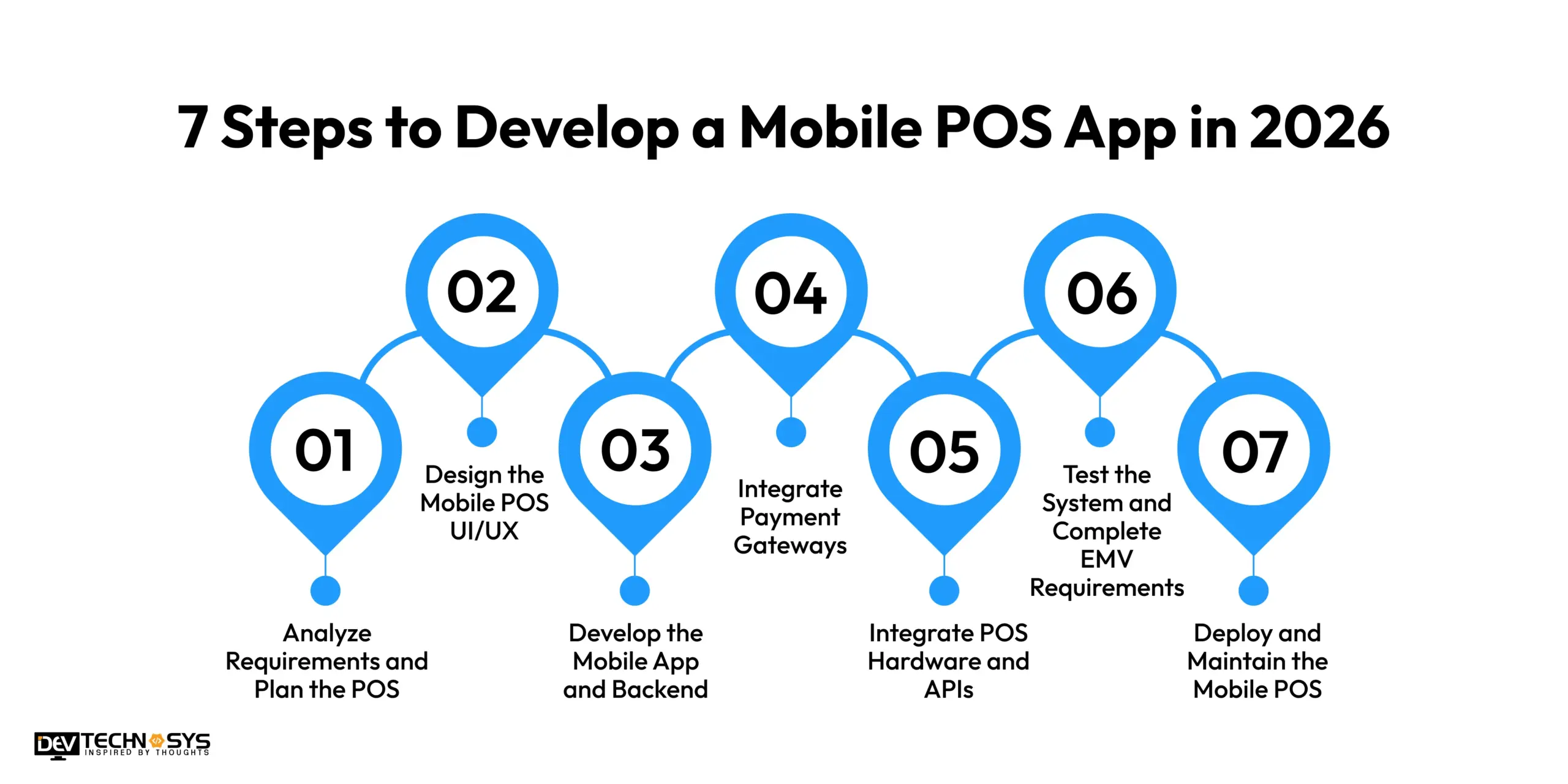
7 Steps to Develop a Mobile POS App in 2026
The development of a project like mobile POS starts from zero, then it becomes a hero. There are multiple stages to develop a successful business-oriented mPOS that actually solves operations for your organization. If you want to know how to build your own POS, read below:
Step 1: Analyze Requirements and Plan the POS
The first step is to analyze what type of POS your business actually needs, what operations you need to cover in the app, how much volume is going to transfer to it, hardware, etc. The answers to these questions will allow you to determine the requirements and scope of the mPOS you need.
Step 2: Design the Mobile POS UI/UX
The second stage is designing your POS app interface. The design should be easy to use and make processes like checkout quick, not slow. Employees are probably going to make hundreds of payments, checkouts, and inventory inspections. If it lags or is hard to use, then there goes the customer experience.
Step 3: Develop the Mobile App and Backend
The next step is to build the backend and connect it to the front end, the design. In the backend, you need to build a system to manage the product catalog, ordering, checkout, inventory management, etc. This is the core of a mobile POS app that needs to work smoothly and fast under a heavy load without any issues.
Step 4: Integrate Payment Gateways
The heart of any POS is its payment infrastructure that authorizes transactions. Your POS app should support a wide range of payment methods, such as cards, digital wallets, etc. The app should manage and handle situations such as payment responses, refunds, and failed transactions.
Step 5: Integrate POS Hardware and APIs
The mPOS app needs to communicate with different types of hardware and APIs, such as card readers, barcode scanners, receipt printers, etc, which need to be integrated with mobile POS systems, with APIs and SDKs allowing your app to exchange data and connect hardware to the software.
Step 6: Test the System and Complete EMV Requirements
Any product before launching is required to go through rigorous tests and quality analysis. This allows you to check for any issues, payment failures, network & hardware interruptions, transaction duplications, and inventory synchronizations. After load balancing the product, you can find out if there are any issues with the mPOS before launching.
Step 7: Deploy and Maintain the Mobile POS
Then comes the final stage: deployment. Deploy the mobile POS as your business continues to work through its operations. Now comes the main process of maintenance through managing devices, updating payment SDKs, integrations, patching security issues, etc. Hiring POS software development services is the best way to tackle maintenance while you work through your business operations.
Planning a Hospitality Pos Project?
Get a tailored development cost estimate in a few simple steps.
- 3 quick steps
- 100% free
- Reply in 1 business day
2 Minutes Read
What Features Should a Mobile POS App Have for US Businesses?
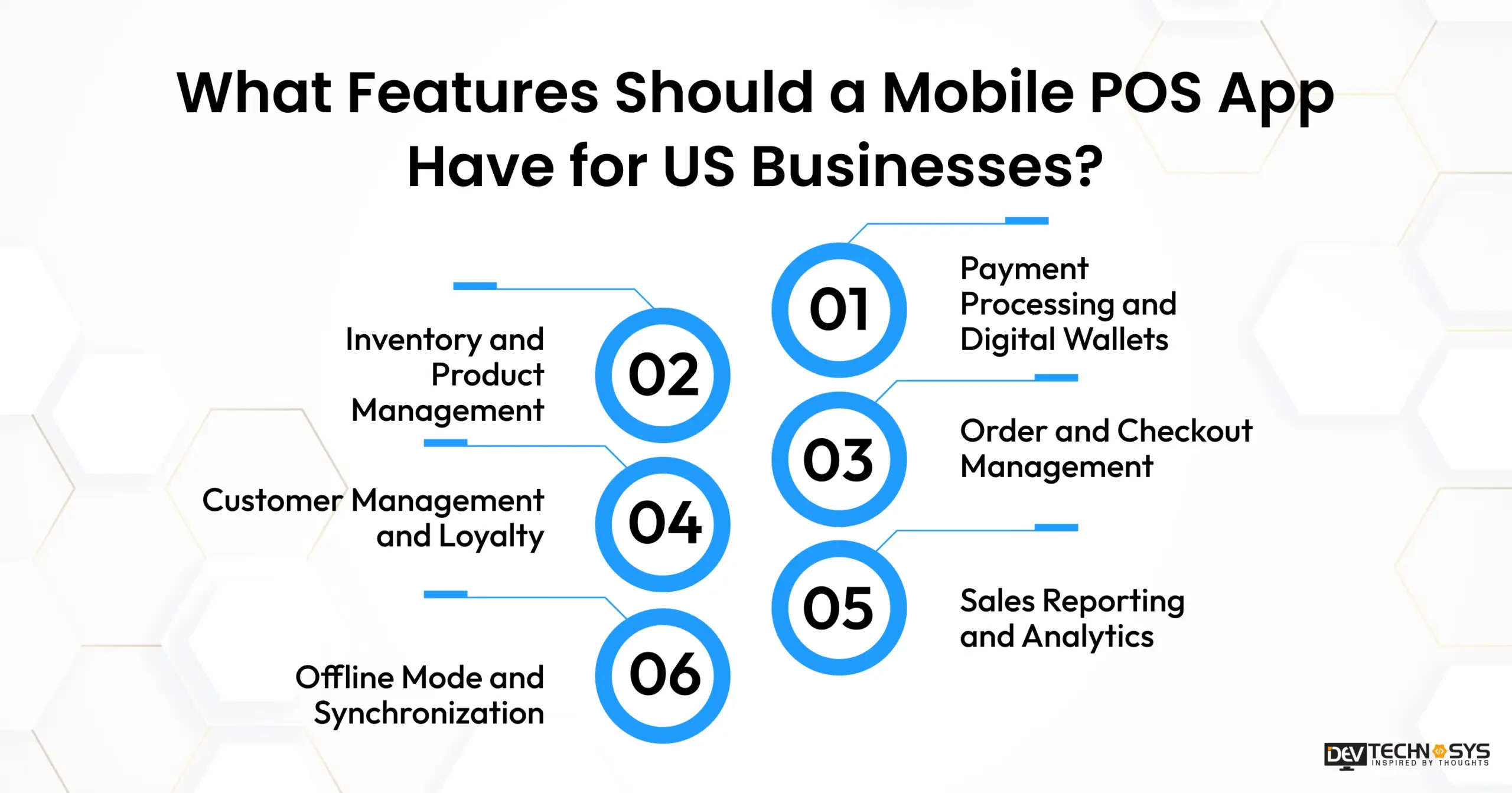
The number of features integrated with your mPOS depends on the operations you want to add to it. From checkout to inventory management & analytics, you can add quite a number of features. But mind that, as the number of features increases, the mPOS app development cost increases; vice versa, as the load on the app increases and requires more hours to build.
Payment Processing and Digital Wallets
Payment infrastructure is the most essential feature required for mobile POS app development. Your app should support multiple payment systems, from cards to digital payments, giving customers more options to pay with ease. While making the payment structure, you need to make it fast and secure using NFC payment infrastructure and payment tokenization to protect sensitive information.
Inventory and Product Management
Your mPOS should be connected with your inventory so that whenever you scan a product, it should immediately update the stock with the completed transaction. A real-time inventory system can help employees verify product availability and remind them of out-of-stock products.
Order and Checkout Management
The checkout should be smooth and quick to handle barcode scanning, product catalog, quantities, discounts, taxes, returns, etc. Integrations with hardware such as barcode scanners and receipt printers should be perfect, with dual connectivity for both wireless and wired devices.
Customer Management and Loyalty
A customer portal for managing customer profiles and purchase histories is required if you want to add a loyalty program to reward customers for their purchases. You can get POS software development solutions to get your business working with CRM tools without forcing your employees to use separate systems.
Sales Reporting and Analytics
This is the thing we were talking about: mPOS apps are not only a checkout point-of-sale system, but they can also analyze your sales, inventory, product catalog, and employees within a stated period of time. We can design a dashboard that can use POS data for insightful figures for your sales, inventory planning, and future business decisions.
Offline Mode and Synchronization
Your mobile point-of-sale device should work even if there is no internet connectivity. This gives businesses the flexibility to work even in those areas with weak or no connectivity. You can also add functionality so that it can sync with your backends once your device comes back into connectivity without making duplicate records.
How Long Does It Take to Develop a Mobile POS App?
The typical time to build a Mobile POS app is 2 to 9+ months, depending on which type of app you want to build. Basic MVPs take 2 to 3 months, mid-level mPOS can take 3 to 5 months, and advanced mobile POS systems can take up to 9+ months in development time. Enterprise mobile point-of-sale systems take much more time to build, as they require a higher number of integrations and functionalities, taking more than 9 months in development time. Below is a table explaining what actually goes into the development of POS apps.
Development Stage |
Estimated Timeline |
Key Activities |
| Discovery and planning | 1–2 weeks | Requirements, POS workflows, technical planning, and integration mapping |
| UI/UX design | 2–3 weeks | User flows, checkout screens, dashboards, and device-specific layouts |
| Mobile app development | 4–7 weeks | POS interface, authentication, checkout, cart, and core functionality |
| Backend development | 3–5 weeks | APIs, database, inventory, orders, users, and business logic |
| Payment and hardware integration | 2–4 weeks | Payment gateways, card readers, scanners, printers, and SDKs |
| Testing and certification | 2–3 weeks | Functional, device, security, payment, and EMV testing |
| Deployment | 1–2 weeks | Production setup, app deployment, monitoring, and final fixes |
DEV FACT: As per our Delivery Head, Narayan DAS, this cost and development timeline are derived from our past experience after building 17 POS software solutions to date, including SaraPOS.
How Does a Mobile POS App Process a Payment?
As we already know, it is critical to build payment infrastructure without any issues. It is used for only a few seconds to pay at the end of checkout, but if there are any issues with the payment, the whole transaction falls through. Your payment infrastructure should work with your underlying features and operations to make it successful, with better communication and record-keeping.
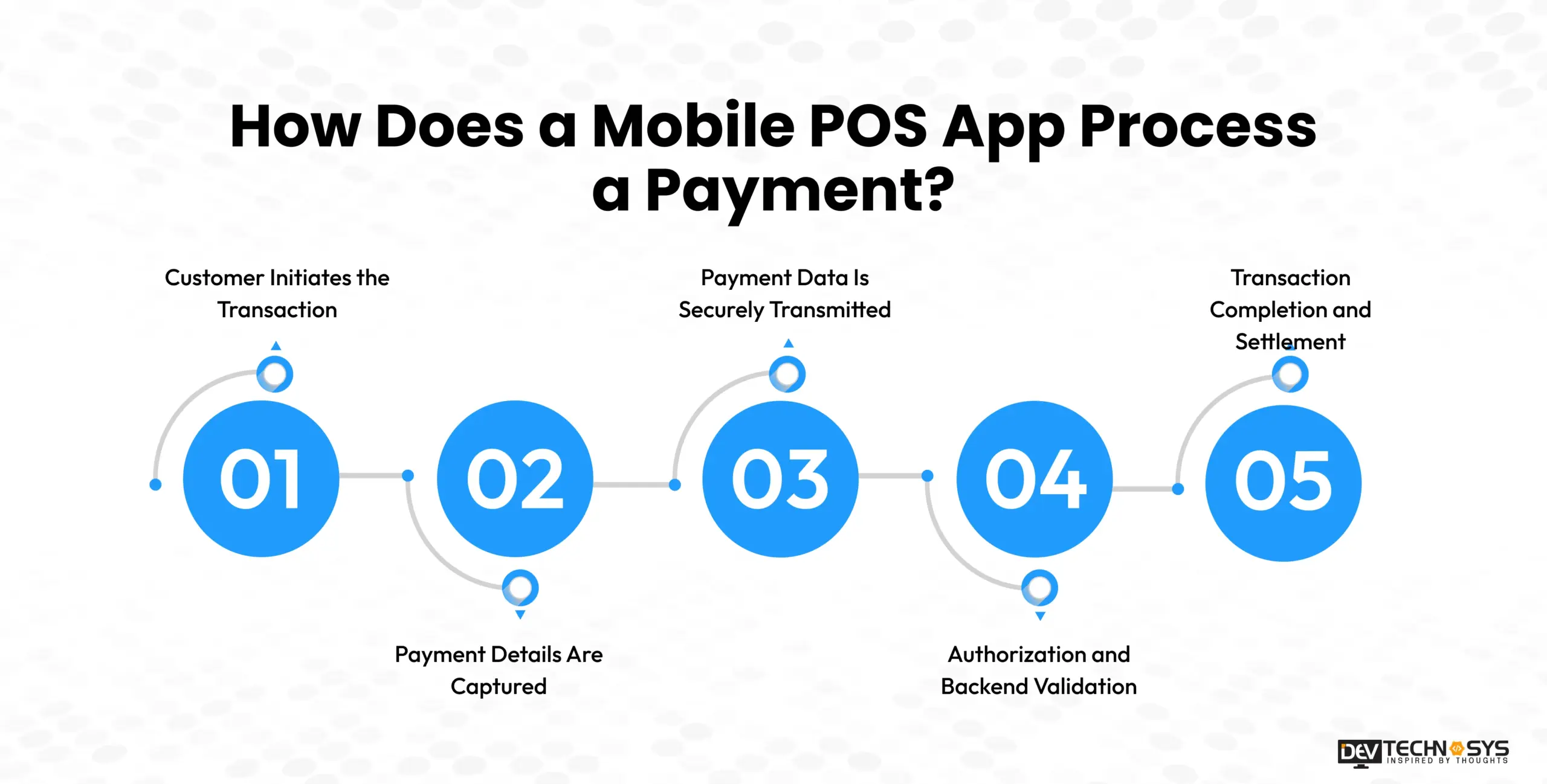
Customer Initiates the Transaction
The first step occurs when the customer requests to initiate a transaction by scanning products and placing an order. Once all the products are scanned, the mPOS calculates the final billing amount after applying discounts and taxes.
Payment Details Are Captured
The customer chooses the desired method of payment. It could be anything: cash, EMV chip card, contactless card, or digital wallets. The card reader scans the required information it needs to pass the transaction without exposing any details to the POS.
Payment Data Is Securely Transmitted
Once the mobile POS application scans all the required details, it sends them through its payment infrastructure or, simply, the backend. Integrating tokenization is crucial in this step, as it can change the sensitive information into tokens, making it safe and secure even if there is a breach. Then these tokens are routed towards the payment processor to process the payment.
Authorization and Backend Validation
Now comes a crucial step where the payment processor directly contacts the customer’s financial institution to finalize the payment. Meanwhile, the POS backend validates the order and waits for the confirmation of the transaction. Once the processor receives the approval or decline, it updates the POS with the status.
Transaction Completion and Settlement
If the payment is approved, the POS marks the order as paid, prints the order receipt, and sends a copy to the customer digitally. It also updates the inventory accordingly and adds a transaction to the sales report for future analysis.
Tech Stack Required for Mobile POS App Development
Choosing the right technology stack is essential, as it will help you support features like quick checkout, secure and reliable payment methods, hardware compatibility, and smooth data synchronization. The stack needs to be scalable, meaning that businesses can expand and add devices, locations, integrations, and users without having to start from scratch.
Technology Layer |
Recommended Technologies |
Why It Matters for Mobile POS |
| Mobile frontend | React Native / Flutter | Supports cross-platform development for compatible mobile devices |
| Native development | Swift / Kotlin | Provides deeper access to device capabilities and hardware SDKs |
| Backend | Node.js | Handles business logic, transactions, authentication, and integrations |
| APIs | REST / GraphQL | Connects the app with backend services and external platforms |
| Database | PostgreSQL / MongoDB | Stores products, orders, inventory, customer, and transaction data |
| Cloud | AWS / Google Cloud | Provides scalable infrastructure for connected POS operations |
| Payment integration | Payment gateway APIs | Connects the application with payment processing services |
| Hardware integration | SDKs / device APIs | Enables communication with card readers, scanners, and printers |
| Tokenization/encryption | Payment provider and platform security tools | Helps protect sensitive payment and application data |
| Analytics | Firebase/custom analytics | Tracks application usage and business performance |
| Infrastructure | CDN / cloud services | Supports reliable delivery, monitoring, and scalability |
Security and Compliance for Mobile POS Apps
A mobile POS app is a comprehensive system that stores several transaction records, customer information, employee identification for billing, and also sensitive business data. Hence, security becomes a major process that must be included when planning for mobile POS software development for Salons.
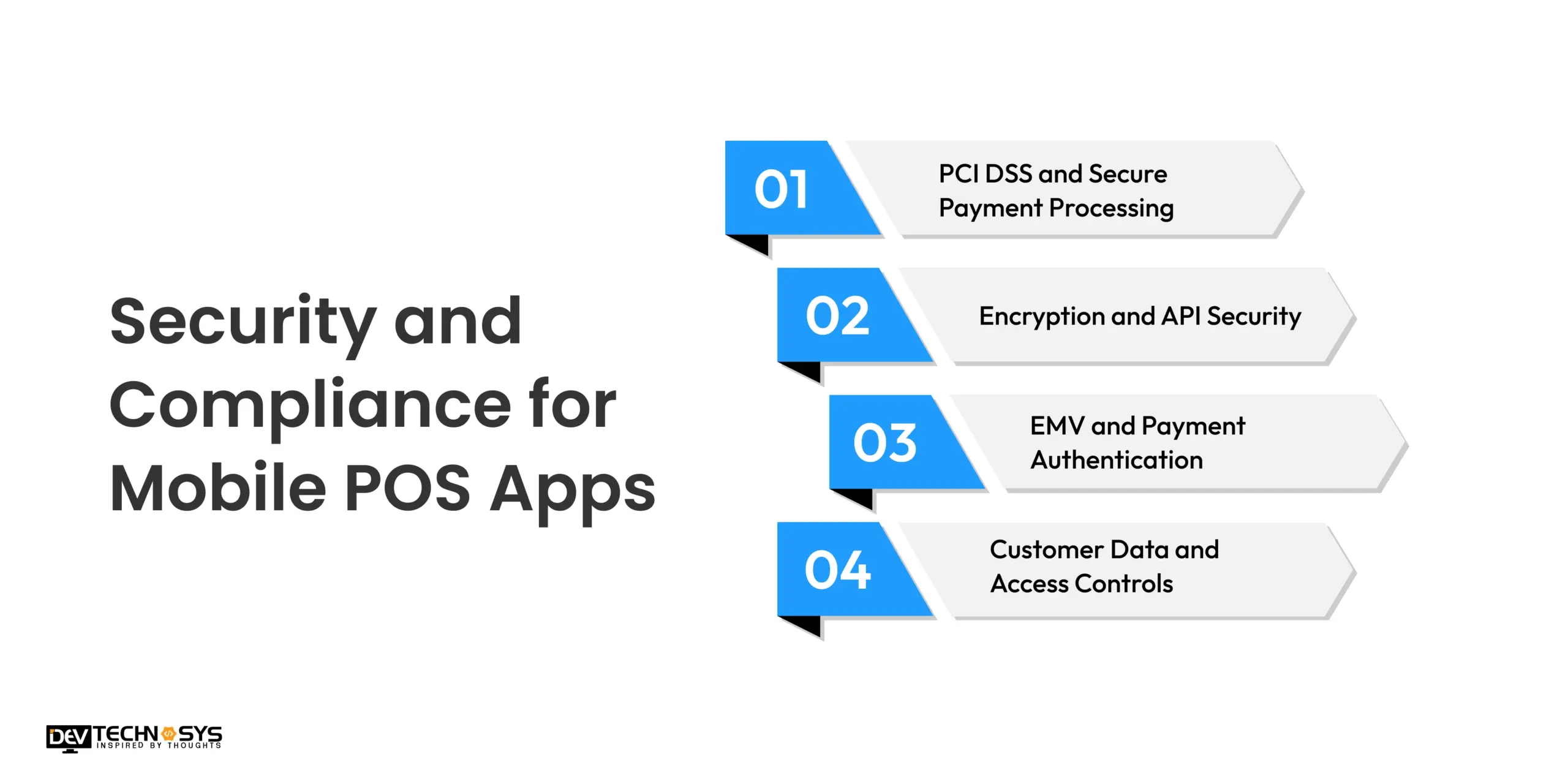
PCI DSS and Secure Payment Processing
If you integrate a payment system, PCI DSS compliance becomes crucial for US businesses. Your system should strictly avoid storing sensitive card data. This can be achieved through blockchain and payment tokenization to secure the mPOS from leaking sensitive data anywhere.
Encryption and API Security
Sometimes, even with very high security against cyberattacks, they still occur. To avoid exposure of sensitive data, use end-to-end encryption and data encryption at rest to safeguard it from any unauthorized access and interceptions. To secure your API authentication, use strong session controls and credentials to help protect the connection.
EMV and Payment Authentication
Whenever a POS machine uses a chip-based card transaction, EMV compliance is required to safeguard and protect data for that. Your mPOS application and hardware should follow requirements such as Strong Customer Authentication (SCA) and PSD2 when you serve in international markets.
Customer Data and Access Controls
GDPR and CCPA compliance is very important when you cater to US customers. A mobile point-of-sale should only take the information that is necessary for the transaction and refrain from storing other customer details or employee information.
Standard / Framework |
What It Covers |
Why It Matters for POS |
| ISO/IEC 27001 | Information security management | Supports structured controls for protecting POS and business information |
| SOC 1 | Controls relevant to financial reporting | Provides assurance around controls that may affect financial and transaction data |
| SOC 2 | Controls covering security and other trust principles | Demonstrates controls for protecting systems and sensitive data |
| GDPR | Personal data protection and privacy | Applies when the POS handles personal data covered by GDPR |
| CCPA | California consumer privacy | Relevant when businesses process personal information covered by California privacy law |
| PCI DSS | Payment card data security | Helps protect cardholder data in applicable payment environments |
How Much Does It Cost to Develop a Mobile POS App?
The custom mobile POS app development costs in USA start from $20,000 and range up to more than $120,000 depending on your business requirements and operations. Starting from basic checkout systems to enterprise-level POS software, the range varies due to features, complexity, integrations, etc. Below is a table with typical POS software development costs and the features associated with them.
Mobile POS Complexity |
Estimated Development Cost (USD) |
Typical Features |
| Basic | $20,000–$35,000 | Product catalog, checkout, basic payment integration, digital receipts, basic reporting |
| Mid-level | $35,000–$65,000 | Inventory management, customer profiles, loyalty, multiple payment methods, offline mode, analytics |
| Advanced | $65,000–$90,000 | Hardware integration, advanced inventory, multi-location support, detailed analytics, third-party APIs |
| Enterprise | $90,000–$120,000 | Multi-store management, custom workflows, advanced integrations, sophisticated reporting, stronger security controls |
Planning a Restaurant Pos Project?
Get a tailored development cost estimate in a few simple steps.
- 3 quick steps
- 100% free
- Reply in 1 business day
2 Minutes Read
Factors That Influence The Cost to Develop a Mobile POS App
The design and development of two custom mPOS apps cannot be the same, hence the cost. The cost to build a mobile POS app can vary due to factors like which platform you are building on, integration you need in your system, hardware integrations, offline functionality, etc. Below is the table with a comprehensive analysis of how the cost of POS app development changes depending upon business requirements.
Cost Factor |
Estimated Impact on Development Effort |
Why It Matters |
| Platform support | 10%–20% | Additional platforms and devices require more development and testing |
| Payment integrations | 10%–20% | Multiple gateways and payment methods increase integration complexity |
| Hardware integration | 10%–25% | Device SDKs and peripheral compatibility require additional engineering |
| Inventory complexity | 5%–15% | Advanced synchronization and multi-location inventory increase backend work |
| Offline functionality | 8%–15% | Local processing and synchronization require additional logic |
| Third-party integrations | 5%–15% | External APIs increase development and testing requirements |
| Security and compliance | 5%–15% | Additional security controls and compliance requirements increase scope |
| Multi-location management | 10%–20% | Centralized management and synchronization add complexity |
| Advanced analytics | 5%–12% | Custom reporting and dashboards require additional development |
Hardware and Peripherals for Mobile POS App Development
POS systems consist of two parts: software and hardware. Depending on business operations, your application may need an integration with payment readers, scanners, printers, cash drawers, and customer displays.
Hardware |
Primary purpose |
Typical use |
| Card reader | Card and contactless payment acceptance | Retail, restaurants, mobile sellers |
| Barcode scanner | Product identification and lookup | Retail and inventory |
| Receipt printer | Printing transaction receipts | Retail and hospitality |
| Cash drawer | Managing cash payments | Stores and restaurants |
| Customer display | Showing order and payment information | Retail and hospitality |
| NFC reader | Supporting contactless transactions | Retail, hospitality, events |
| Mobile device | Running the POS application | All mobile POS environments |
Why Integration Matters More Than the Hardware List?
Let’s take an example: when you scan a product barcode, it should retrieve the correct product, price, and inventory record rather than just providing the product number. With this, you can manage inventory and product catalog at once. This is possible through API integration between the mPOS app, device, and the backend.
You can integrate multiple APIs required as per your workflow in your business. For example, with wireless connections like a Bluetooth reader and printer, if any shortcomings occur, it could cause major blockages in your business. Hence, it becomes essential to manage and work around these interactions.
There are multiple instances where businesses also use RFID integration to create specialized inventory workflows. Basically, it depends on your transaction volume, store layout, payment methods, and how many operations you want to automate. When you work with integrating multiple peripherals, before deciding, you should understand how to integrate a POS system. This helps you understand which systems you work with and the connections between them.
Conclusion
Mobile POS has grown beyond just taking payments. It has become an ecosystem that is connecting checkouts, payments, inventory management, customer records, and hardware integration. Many businesses need it in just one smartphone; it not only assists employees but also improves customer service.
The typical mobile POS app development cost can range from $20,000 to $120,000. The custom cost for your business can vary according to your business requirements and the functionalities you need. The scalability of the platform is decided by the tech stack you choose for development and makes expansion in the future easier.
If you plan to build a custom mobile point-of-sale app in the USA, you can contact an experienced POS software development company that will help you finalize your scope and build it without breaking your budget. Your goal should be to launch a working mPOS app; your goal should be to make a digital solution that will help your business grow.
Frequently Asked Questions
Find answers to the most common questions related to this article.
In 2026, the cost to develop a mobile POS app starts from $20,000 and can range up to $120,000. The cost mainly varies due to the complexity of development, the range of functionalities you want in the app, and the number of integrations.
The time taken to build a mobile app is 2 to 9+ months. A basic MVP for POS can be built in 2 to 3 months, while mid-level and advanced mPOS apps can take 3 to 9 months. An enterprise-level mobile POS app takes more than 9 months to build due to the sheer size and complexity of the solution.
Yes, if you integrate offline functionalities into your mPOS app, it could work even without the internet. The data is synced whenever the portable device comes back into connectivity, assisting in managing inventory and sales.
Yes, you can integrate a mobile POS with traditional POS systems and existing business operations. You can integrate your existing CRM platforms, inventory systems, ecommerce platforms, and barcode scanners directly into a mobile POS, assisting you in making your business more efficient.
Absolutely, mobile POS apps are secure when they are built by following all the security and compliance requirements. A mobile POS app supporting PCI DSS compliance, payment tokenization, EMV chip card processing, and secure API authentication with end-to-end encryption is safe and secure for customers as well as employees.














