























Key Takeaways
- Take the time to evaluate your current system’s margins, demands of your business, equipment, and integration technologies so your replacement system can fulfill the requirements of your company.
- Check the correctness of product catalogs, client database, sales history, and stock levels before and after migration to avoid data loss and discrepancies in operations.
- Make certain that your new POS system is compatible with your payment gateways, accounting programs, stock control solutions, and existing hardware in order to ensure continued business activities.
- Focus on user access, security measures and compliance requirements. Carry out tests of critical processes such as making payments, returning things and updating stock levels before the system goes live.
- Train staff, ensure that backup facilities are available, and create rollback and downtime plans to ensure that all potential problems are tackled and the business continues without interruptions during the process of migration.
Changing an existing Point of Sale (POS) system can improve billing, inventory management, reporting, and everyday business operations. However, a successful POS system transition requires more than installing new software or purchasing updated hardware. Product records, sales history, payment processing, integrations, and employee workflows must all be considered during POS migration planning.
The main idea is that you must be prepared for the changes. A clearly organized POS system migration checklist will help you spot compatibility problems, save important business information, and allow the employees to start using the new system without any obstacles.
This POS migration guide covers nine necessary POS migration checks in relation to migrating the existing POS system, all accompanied by useful instructions for a reliable transition and effective POS migration strategy.
Why Is POS System Migration Important for Businesses?
The point of sale (POS) system acts as a hub for various functions in a business and ties together billing, inventory management, customer information, payment processing, accounting, and sales reporting. When an existing system becomes outdated, struggles with higher transaction volumes, or no longer supports essential requirements, POS technology migration can improve efficiency and business visibility.
Successful POS platform migration creates opportunities for data quality, downtime reduction, security enhancement, and better training of employees for using the new system. Also, POS migration allows for identification of irrelevant processes and their removal.
Businesses should evaluate cloud POS vs. legacy POS options when selecting a replacement, considering operational requirements, ongoing costs, integrations, and scalability.
POS migration should not only aim at replacing an existing system but also at ensuring that a new system works well in connection with the processes that are being used currently and will be required in the future.
Attempting to check compatibility, payment processing, integration, security, and staff preparedness before the system is put in operation will help to avoid migration risks.
9 Essential POS Migration Checks Before Replacing Your Existing System
It is important to do some POS migration checks on your existing system before replacing it completely. Here are the top 9 POS migration checks that business owners should do:
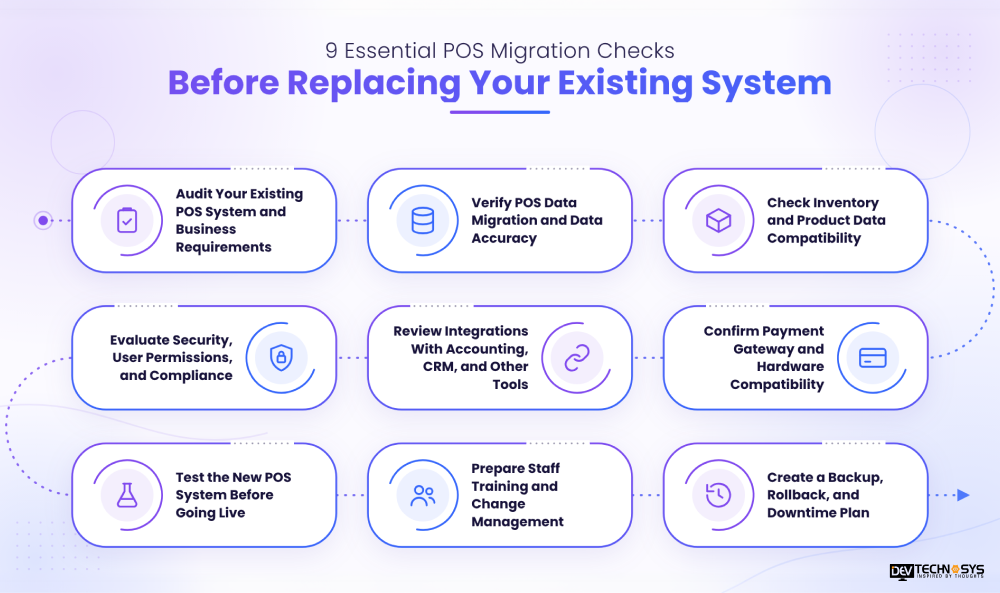
1. Audit Your Existing POS System and Business Requirements
Prior to changing your point-of-sale system, assess its present constraints, required attributes, analytics requirements, devices, and compatibility. Keep in mind how large your firm is, how many transactions it processes, and its future expansion.
Talk to staff members involved in billing, firing, and refunding to know what problems they face. Reviewing POS software development cost and long-term maintenance requirements can also help when evaluating a customized solution.
2. Verify POS Data Migration and Data Accuracy
Find out which records should be transferred, such as records for product catalogs, customer profiles, sales history, tax details, and loyalty points balance. Eliminate any duplicate or expired records and ensure the fields are aligned appropriately.
Once the data is migrated, check the total transactions and make sure that a few sample records are accurately migrated to the original system. This will help in spotting the errors before executing the complete migration process.
3. Check Inventory and Product Data Compatibility
Verify that the new POS supports your existing SKUs, barcodes, product variations, pricing rules, and stock-tracking methods. Confirm compatibility with your inventory management software development requirements and any existing integrations used to manage stock.
Check product inventories against stock levels at various company locations, particularly if you have multiple business locations. Establish whether reorder points and stock transfer processes are compatible. If possible, do a manual stock check to verify opening stock levels. These POS migration checks help maintain continuity throughout the POS infrastructure migration.
4. Confirm Payment Gateway and Hardware Compatibility
Determine if your barcode scanners, receipt printers, cash drawers, and payment terminals can work with the new point of sale system. Verify whether the POS will work with your payment provider, whether it accepts payment methods such as contactless payments and refunds, and whether it follows your settlement procedures with your payment provider.
Test the checkout process using your actual equipment for a successful launch. If your business needs additional payment capabilities, evaluate suitable payment gateway software development services and integration options.
5. Review Integrations With Accounting, CRM, and Other Tools
Make sure that the modern POS connects with vital accounting software, eCommerce systems, customer relationship management programs, customer loyalty apps, and inventory management software.
Investigate the amount of extra configuration or subscription fees. Validate the synchronization of sales, taxes, refunds, customer details, and inventory information. Proper POS API integration testing helps prevent inaccurate reports, duplicate records, and manual work after migration.
6. Evaluate Security, User Permissions, and Compliance
Prior to transferring any sensitive data, it is important to check user permissions, authentication, access log procedures, encryption, backups, and software upgrades. Employees should have only those functions related to their jobs.
Companies that handle credit cards must ensure that they check related PCI DSS requirements with their card tokenization company or security expert. Security duties must be clearly defined with the POS provider in order to safeguard the business’ information from unnecessary risks.
7. Test the New POS System Before Going Live
It is very important to test workflows relating to the activities of the business, which include refunds, discounts, sales, tax calculations, inventory management, payments, and closing the day’s financial records. Document failures, resolve critical issues, and repeat unsuccessful tests. Businesses may use internal QA teams or professional software testing services to validate critical workflows before launch.
8. Prepare Staff Training and Change Management
Before the migration to the new POS system, employees should be trained on how to use the system. The training should include checkout procedures, returning items, applying discounts, making inventory changes, and reporting as per the employee’s responsibilities.
Provide hands-on practice, simple reference guides, and clear support contacts. If the migration includes mobile POS app development or new mobile workflows, ensure employees understand how to use the relevant devices and features.
9. Create a Backup, Rollback, and Downtime Plan
Establish a reliable backup of important data and protocols to follow in case of migration failures. Set clear criteria for launching the system versus reverting back to the old one.
Establish POS migration best practices and how transactions during the migration will be accounted for. Identify who will assist during troubleshooting and who will make decisions. Testing recovery procedures in advance reduces possible disruption and protects business records.
Common POS Migration Mistakes to Avoid
Here are some of the common POS migration mistakes that you can avoid instead of facing major technical issues:
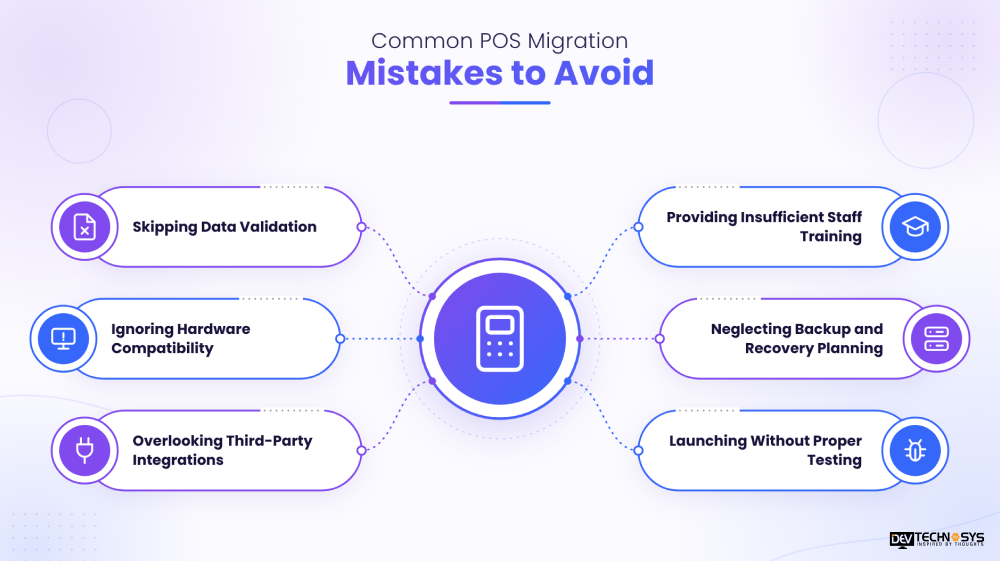
1. Skipping Data Validation
Transferring data without verification can result in lost sales records, faulty prices, duplicated customers, and discrepancies in stock. It is advisable for companies to verify transferred data with its previous source and review possible discrepancies before the system goes live. Test migration should be conducted to discover possible errors in advance.
2. Ignoring Hardware Compatibility
Also, assuming that one’s current hardware is adequate for the new POS system may bring in unanticipated costs and delays in operation. Barcode scanners, printers, cash registers, and payment terminals may be incompatible with the new technology. Please confirm the device requirements with the POS provider and check the functionality of the required devices.
3. Overlooking Third-Party Integrations
New POS systems might not integrate easily with the accounting software, e-commerce solutions, CRM applications, and inventory systems that are currently in place. Partial integration can lead to either inconsistent reporting or manual data entry. Check all essential connections, make sure they are compatible, and ensure the data synchronization works before switching to the new system.
4. Providing Insufficient Staff Training
Staff members who are not familiar with the new POS may experience difficulties working with checkout, returns, discounts, or the inventory. This can lead to slower service and more errors while handling transactions, especially during peak periods. Provide training relevant to the staff’s role as well as hands-on practice before going live to make sure your employees know what they have to do and where to get help.
5. Neglecting Backup and Recovery Planning
When migrating without a verified backup or rollback plan, managing untimely failures can be a thorny task. The enterprise will suffer undue interruptions if vital information has become unavailable or if the payment process has come to a halt. Essential files should be backed up, recovery tactics should be tested, and the division of responsibility should be set out before the migration process starts.
6. Launching Without Proper Testing
If the business enters the operational stage without having tested crucial processes beforehand, it may run into trouble while carrying out ordinary operating processes. Such issues as the inaccuracy of tax calculations, the initiation of payment failures, inventory misstatements, and discrepancies in reporting may stay unnoticed until a client is affected.
Planning a Pos Project?
Get a tailored development cost estimate in a few simple steps.
- 3 quick steps
- 100% free
- Reply in 1 business day
2 Minutes Read
Conclusion
Switching your current POS system is a crucial move for increasing efficiency, making daily activities easier, and enabling future growth. However, an effective switch involves more than picking out the necessary software. The effectiveness of the migration process relies on correct data transfer, compatible hardware, reliable integrations, proper security techniques, testing, and trained staff.
Taking into account nine POS migration checks makes it possible to identify possible problems beforehand, minimize any disruption to business processes, and ensure that the new system is capable of managing day-to-day payment operations. Also, having a clear backup and recovery strategy provides an additional means of protecting the processes involved in the transition.
If you’re planning to upgrade your POS system, Dev Technosys can help you explore tailored POS migration solutions to meet your business requirements. Visit Dev Technosys, a POS software development company, to discuss your needs and take the next step toward a more efficient business operation.
Frequently Asked Questions
Find answers to the most common questions related to this article.
The timeline for POS migration can vary anywhere from a couple of days to several weeks, depending on data size, company size, integrations, and hardware specifications. Larger companies may take longer than smaller companies, since they also have to define the need for testing of the system, employee training, and data validation before going live.
Typical data that companies may need for this migration includes product catalogs, SKUs, prices, numbers of items in stock, customers’ profiles, taxes, loyalty balances, and transaction history. Each company will determine the required data by referring to the capabilities of the new system, as well as any particular business needs and record-keeping requirements.
Some companies may try to reduce the downtime during the migration process by selecting off-peak hours for migration, preparing data beforehand, testing integrations before the launch, and training employees. In addition, a backup and recovery plan will allow companies to react effectively to unpredicted technical issues related to POS migration.
Using the legacy POS system for a limited time allows for better historical reporting, transaction validation, and problem-solving. Before the legacy system is retired, back up the relevant records, review data retention obligations, and ensure that the new system works effectively.
A business needs to look into user-friendliness, data transfer capability, compatibility with available equipment, payment support, integration possibilities, levels of security, and reporting features while choosing a POS system.














